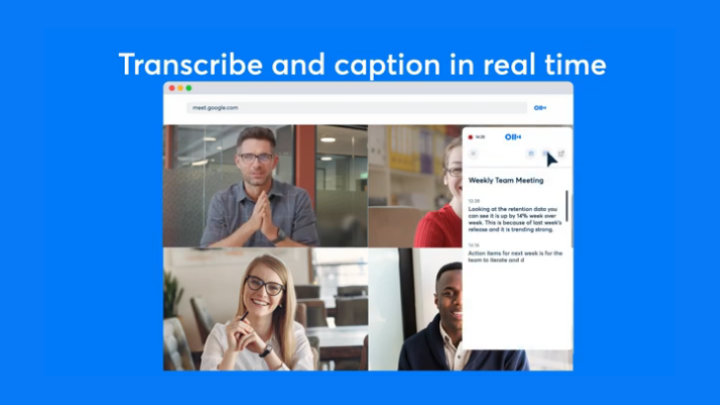

Otter.ai, an automated transcription service, now offers a Chrome extension that provides closed captions of online meetings through Google Meet. With the Otter.ai Chrome extension, users who open Google Meet in Chrome will be able to transcribe virtual video conferences in real-time. The Chrome extension works across all Otter plans, allowing other users to use it for free. Here's how to use the free Chrome extension: Visit this link and download the Otter.ai Chrome extension by clicking the Add to Chrome button. After the download, open Google Chrome and click the Extension icon (puzzle icon) from the toolbar. Click on the Otter.ai Chrome Extension icon to open it. Once the user stopped the Chrome extension, the recorded transcript is automatically saved in their Otter account. Read more in our articles including "Otter.ai Chrome extension transcribes online meetings in Google Meet for free" and "OnePlus Nord CE6 now available for pre-order in the Philippines".
Otter.ai, an automated transcription service, now offers a Chrome extension that provides closed captions of…
Jan 22, 2021
The OnePlus Nord CE6 is now available for pre-order in the Philippines through Digital Walker.…
Jun 13, 2026
Telegram has launched a dedicated app for Wear OS smartwatches, bringing full chat access, voice…
Jun 13, 2026
During the latest CES and Google’s I/O Developer Conference, it was announced that new features…
Jun 27, 2022
Google has announced 5 new features coming to Chrome on iOS that will help iPhone…
Jun 26, 2022If you own a Chromebook and an Android device, be it a smartphone or a…
Jun 26, 2014Otter.ai, an automated transcription service, now offers a Chrome extension that provides closed captions of online meetings through Google Meet. With the Otter.ai Chrome extension, users who open Google Meet in Chrome will be able to transcribe virtual video conferences in real-time.
The Chrome extension works across all Otter plans, allowing other users to use it for free. Here's how to use the free Chrome extension: Visit this link and download the Otter.ai Chrome extension by clicking the Add to Chrome button. After the download, open Google Chrome and click the Extension icon (puzzle icon) from the toolbar.
Our coverage of Chrome extension transcribing meetings includes: "Otter.ai Chrome extension transcribes online meetings in Google Meet for free"; "OnePlus Nord CE6 now available for pre-order in the Philippines"; "Telegram launches new Wear OS app with full chat support". Each article provides unique insights and information.