

Microsoft Copilot now lets Windows 11 users manage their Android 14 phones straight from a desktop. Users have to link their device via Phone Link, where Copilot can retrieve messages, set alarms, and get other information. To set this up, simply visit the Copilot website and look for the Phone toggle in the Plug-in section. Copilot will also ask the user for permissions to see your messages and contacts to enable the plugin’s functionality. For more information, check out Android's official developer's blog here. The update improves RCS messaging by adding support for replying to specific messages in conversations with Android users. Read more in our articles including "Copilot now lets Windows 11 users manage Android 14 phones" and "Smartphones Under P10,000 | Q2 2026".
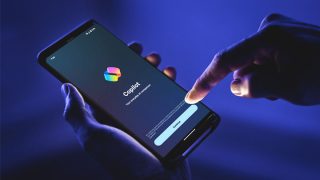
Microsoft Copilot now lets Windows 11 users manage their Android 14 phones straight from a…
Jul 4, 2024
It’s that time again when we round up the latest smartphone launches here in the…
Jun 26, 2026
Google has just announced a new version of Android 12 that is catered to larger…
Oct 28, 2021Maybe this is what Google wanted all along — for every small-time phone manufacturer not…
Dec 5, 2008
After being spotted in Lazada, the Infinix HOT 70 is now available in the Philippines.…
Jun 24, 2026
Apple has released the second developer beta of iOS 27. It brings several new features…
Jun 23, 2026Microsoft Copilot now lets Windows 11 users manage their Android 14 phones straight from a desktop. Users have to link their device via Phone Link, where Copilot can retrieve messages, set alarms, and get other information.
To set this up, simply visit the Copilot website and look for the Phone toggle in the Plug-in section. Copilot will also ask the user for permissions to see your messages and contacts to enable the plugin’s functionality. For more information, check out Android's official developer's blog here.
Our coverage of copilot pc for android 14 includes: "Copilot now lets Windows 11 users manage Android 14 phones"; "Smartphones Under P10,000 | Q2 2026"; "Google previews Android 12L for tablets, foldables, ChromeOS devices". Each article provides unique insights and information.