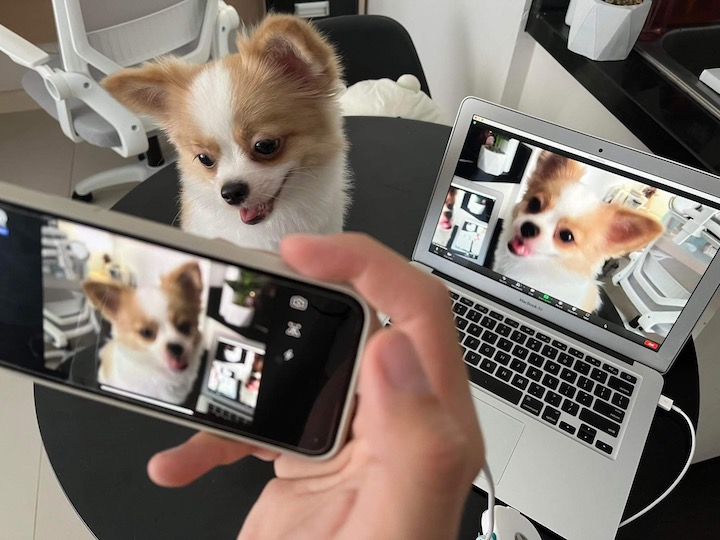

But did you know that you could put it to good use by converting it to a webcam? For this guide, we’ll be showing you how to use Iriun. We chose Iriun because it is one of the few webcam apps that is found on both iOS and Android, as well as on macOS and Windows. To use your phone as a webcam, open whichever video streaming or video call service you like and select Iriun Webcam on the list of cameras detected. You can use your phone as a webcam wirelessly! The best part is you can use your current smartphone or an older one lying around, so you don't have to spend for an upgrade. How to Enable the Baybayin Keyboard on iOS 27 Install the iOS 27 Developer Beta on your iPhone Open Settings Go to General Tap Keyboard Tap Keyboards Tap Add New Keyboard Scroll to Filipino (Tagalog) Select the Baybayin script layout Tap Done What Is Baybayin? After over two weeks of using the iPhone 3G, I can fairly say I have become familiar with this mobile device to share some insights on how it fares as a primary mobile phone. Read more in our articles including "How to turn your old Smartphone into a Webcam" and "iOS 27 Adds Native Baybayin Keyboard to iPhone: Here is How to Enable It".
Got an old smartphone lying around? Chances are that it might just be on a…
Mar 28, 2022
Apple quietly included a Baybayin keyboard layout in iOS 27, announced at WWDC 2026. This…
Jun 9, 2026While every iPhone fans are waiting for the supposed August/September release of the iPhone 3G…
Jul 27, 2008After over two weeks of using the iPhone 3G, I can fairly say I have…
Sep 13, 2008Update: Check out our iPhone 3G Review. Globe drops iPhone 3G Price Exclusive: iPhone 3G…
Aug 15, 2008Apparently, there’s still money to be made from old iPhones since demand for it from…
Jul 20, 2008But did you know that you could put it to good use by converting it to a webcam? For this guide, we’ll be showing you how to use Iriun.
We chose Iriun because it is one of the few webcam apps that is found on both iOS and Android, as well as on macOS and Windows. To use your phone as a webcam, open whichever video streaming or video call service you like and select Iriun Webcam on the list of cameras detected. You can use your phone as a webcam wirelessly!
Our coverage of how to use phone as webcam includes: "How to turn your old Smartphone into a Webcam"; "iOS 27 Adds Native Baybayin Keyboard to iPhone: Here is How to Enable It"; "Top iPhone 3G Alternatives". Each article provides unique insights and information.