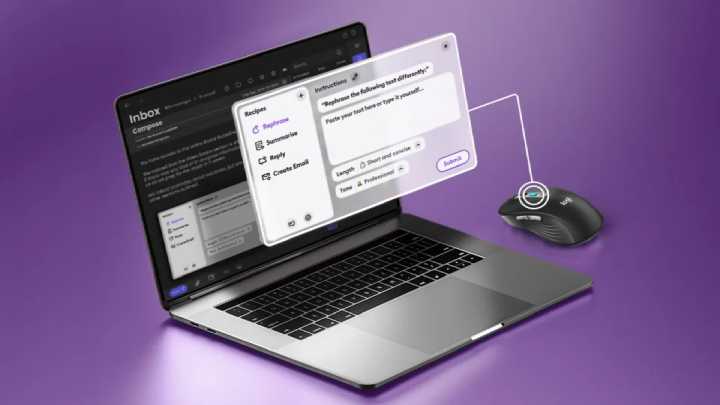

Just this week, Logitech announced a new feature on their blog, a dedicated ChatGPT shortcut supported by their peripherals. But despite AI already being an easy way to cut corners, Logitech has provided us with means to optimize this. And what better way than to have a dedicated shortcut to ChatGPT straight from our mouse or keyboard? With a Logitech keyboard or mouse supported by the Logi Options+ app, users use the new Logi AI Prompt Builder. Users can program their keyboards or mice buttons to access shortcuts for highlighted text. Logitech also introduced their signature AI Edition Mouse, available exclusively on Logitech.com in the U.S. As always, we’ll keep readers covered in the future if this mouse with a dedicated ChatGPT shortcut will be available in the Philippines. Today we’ll be taking a closer look at Logitech’s latest mid-range gaming mouse - the G500s - which recently made its official debut alongside its entry-level sibling, the G400s, as well as the high-end G700s. Read more in our articles including "Logitech announces ChatGPT shortcut for peripherals" and "Logitech G500s Gaming Mouse Review".
Just this week, Logitech announced a new feature on their blog, a dedicated ChatGPT shortcut…
Apr 20, 2024Today we’ll be taking a closer look at Logitech’s latest mid-range gaming mouse – the…
Jul 24, 2013Logitech’s latest wireless mouse is this funky-looking Touch Mouse M600 that sheds off the usual…
Jul 31, 2012
Alongside the Nothing Phone (4b), the company also introduced the Nothing Ear (3a). It gets…
Aug 1, 2026
Garmin has officially launched the CIRQA Smart Band in the Philippines, expanding its lineup of…
Jul 27, 2026
Infinix has launched the XBUDS H5 in the Philippines, expanding its lineup of affordable true…
Jul 27, 2026Just this week, Logitech announced a new feature on their blog, a dedicated ChatGPT shortcut supported by their peripherals. But despite AI already being an easy way to cut corners, Logitech has provided us with means to optimize this.
And what better way than to have a dedicated shortcut to ChatGPT straight from our mouse or keyboard? With a Logitech keyboard or mouse supported by the Logi Options+ app, users use the new Logi AI Prompt Builder. Users can program their keyboards or mice buttons to access shortcuts for highlighted text.
Our coverage of logitech ai shortcut includes: "Logitech announces ChatGPT shortcut for peripherals"; "Logitech G500s Gaming Mouse Review"; "Logitech Touch Mouse M600 Review". Each article provides unique insights and information.