


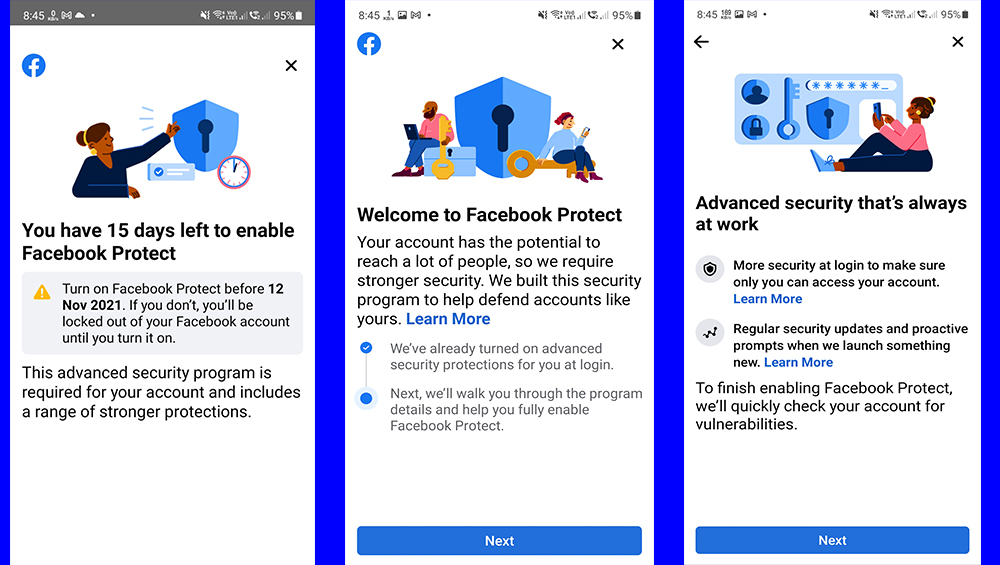
Facebook is now rolling out a feature for added security for its users in the Philippines called Facebook Protect. Facebook Protect provides additional security for users' accounts and pages, and by enrolling, accounts will have stronger security protections such as two-factor authentication, and user’s pages will be monitored for potential hacking threats. All Page admins of enrolled Pages will be required to go through Page Publishing Authorization to ensure the security of the Page, regardless of whether or not individual Page admins choose to enroll in this program. Users can use their Google accounts for two-factor authentication or their mobile number for added security. For users who don't get the prompt to activate Facebook protect, all you have to do is go to Settings & Privacy on your Facebook app, tap on Settings, tap on Password and Security, tap on Facebook Protect if it's off. All users have to do is follow the steps to turn on additional security measures such as two-factor authentication. This setup works especially well for families managing tight budgets, freelancers with irregular income, students and renters, work-from-home households, small online businesses, vacation or weekend homes. · 50 Mbps works for basic browsing, HD streaming, online classes, and video calls. Read more in our articles including "Globe Cuts Scam SMS by 85% Through Bank Partnerships" and "Instagram rolls out Bulk Delete feature".

Globe has made a significant achievement in fighting financial scams. They managed to reduce the…
Jan 1, 2024
Instagram has announced a new feature that allows users to bulk delete or achieve posts,…
Feb 9, 2022
TikTok has strengthened its app experience through another safety update, this time to protect the…
Nov 4, 2021
Facebook is now rolling out a feature for added security for its users in the…
Oct 28, 2021
The Philippines remains among the slowest countries in transitioning away from 3G networks, with most…
Jun 2, 2026
Inflation is now (May 2026) at 7.2%, electricity rates at Php14.33/kWhr, and gas prices through…
May 28, 2026Facebook is now rolling out a feature for added security for its users in the Philippines called Facebook Protect. Facebook Protect provides additional security for users' accounts and pages, and by enrolling, accounts will have stronger security protections such as two-factor authentication, and user’s pages will be monitored for potential hacking threats.
All Page admins of enrolled Pages will be required to go through Page Publishing Authorization to ensure the security of the Page, regardless of whether or not individual Page admins choose to enroll in this program. Users can use their Google accounts for two-factor authentication or their mobile number for added security. For users who don't get the prompt to activate Facebook protect, all you have to do is go to Settings & Privacy on your Facebook app, tap on Settings, tap on Password and Security, tap on Facebook Protect if it's off.
Our coverage of online security includes: "Globe Cuts Scam SMS by 85% Through Bank Partnerships"; "Instagram rolls out Bulk Delete feature"; "TikTok strengthens safety features to protect younger users". Each article provides unique insights and information.