

Microsoft has updated the Xbox app on Windows to allow manual importing of games and apps. This means games from other launchers or standalone installations can now appear alongside Xbox titles in a single interface, making the app more flexible as a unified game library. Previously, the Xbox PC app was largely limited to content from Microsoft’s own ecosystem. The change aligns the Xbox app more closely with other PC gaming launchers that support centralized libraries, allowing players to manage multiple titles from one place. How to manually add games to Xbox PC app: Open the Xbox app on your PC Go to your Library Click on “Add a game” or “Add a non-Xbox app” Browse and select the game or application file (.exe) Confirm to add it to your library The game will now appear alongside your Xbox titles GCash has expanded its in-app help tools and security features to address a growing number of user issues on its platform, including unauthorized transactions, scams, account takeovers, and “wrong send” errors. Moreover, the company also revealed that both iPhone 12 and iPhone 12 mini in Purple ship with the latest iOS 14.5, which features the ability to unlock iPhone with Apple Watch while wearing a face mask, an enhanced Apple Podcasts app with a redesigned show and episode pages, and a Search tab, as well as new emoji. Read more in our articles including "Xbox PC app now supports manual game importing" and "GCash Adds More In-App Help Tools and Security Features".
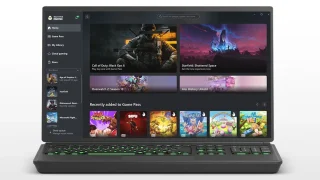
Microsoft has updated the Xbox app on Windows to allow manual importing of games and…
Mar 22, 2026
GCash has expanded its in-app help tools and security features to address a growing number…
May 22, 2026
Apple has loosened its grip on retro console emulators within the App Store. This move…
Apr 6, 2024
Apple has revealed that the iPhone 12 and 12 mini now come in the color…
Apr 21, 2021
Apple has a reputation for making premium and expensive products– from accessories down to smart…
Aug 9, 2020
Apple released the iPhone SE 2020 last week. It’s Apple’s most affordable iPhone in its…
Apr 24, 2020Microsoft has updated the Xbox app on Windows to allow manual importing of games and apps. This means games from other launchers or standalone installations can now appear alongside Xbox titles in a single interface, making the app more flexible as a unified game library.
Previously, the Xbox PC app was largely limited to content from Microsoft’s own ecosystem. The change aligns the Xbox app more closely with other PC gaming launchers that support centralized libraries, allowing players to manage multiple titles from one place. How to manually add games to Xbox PC app: Open the Xbox app on your PC Go to your Library Click on “Add a game” or “Add a non-Xbox app” Browse and select the game or application file (.exe) Confirm to add it to your library The game will now appear alongside your Xbox titles
Our coverage of Xbox app features includes: "Xbox PC app now supports manual game importing"; "GCash Adds More In-App Help Tools and Security Features"; "Apple App Store now permits game emulators globally". Each article provides unique insights and information.