

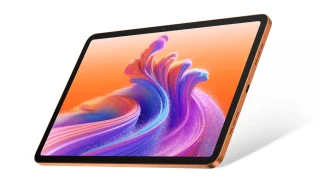
Ang tablet na ito ay mayroong 10.36-inch na 2K display, pinapatakbo ng isang katamtamang UNISOC T606 chipset. Nakakuha kami ng isang unit kaya maglalakbay tayo nang malalim upang makita ang kanyang mga nag-aalok para sa kasalukuyang pagsusuri.
Para sa sanggunian, ang aming yunit ay may konfigurasyon ng 8GB na RAM at 128GB na internal storage. Hanapin natin kung tutugma ba ang TechLife Pad sa pagbibigay ng madaling-enjoy na entertainment para sa mga gumagamit!
Pagdidisenyo at Konstruksyon

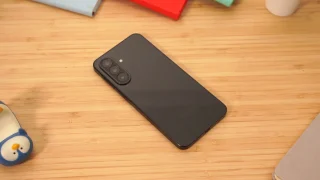
Ang aming review unit ay dumating sa Graphite Grey, na may makinis na aluminum na likurang panel na may TechLife branding sa ibabang kanang sulok. Ang metal na chassis ay pakiramdam ay matibay kapag hawak, na nagpapakita ng polished na surface nang hindi nakaslip.
Nakagustuhan ako sa unang pagkakataon ng tablet dahil sa kanyang minimalistikong disenyo, pero ang mga salamin na kulay rosas ay naging malinaw. Napansin ko na parehong ang display at likod na panel ay madaling makalimutan ng mga marka.
Inisip ko na baka mula sa lamig ng silid at panahon ang alikabok, pero ako'y naglalayag.


Magpatuloy, ang sensor ng kamera ay matatagpuan sa itaas na kaliwang bahagi ng likurang panel kasama ang LED flash sa ilalim. Sa harap naman, may display panel ang tablet kung saan ang kamera ay nasa kanang gilid kapag hawak ito sa portrait orientation.
Pinahahalagahan ko kung paano nila inilagay ng mga manufacturer ang mga kamera para sa mga tablet ngayon. Dahil hawak ang mga tablet sa landscape orientation habang nagtatawag o nanonood ng video, ito ay isang magandang detalye.

Para sa mga pindutan at port, ang power switch at volume rocker ay matatagpuan sa kanang itaas na bahagi. Samantala, ang kaliwang gilid ay walang anumang bagay dito.


Sa ibaba, may 3.5mm audio port, dalawang stereo speaker, isang Type-C port, at hybrid SIM slot. Sa itaas naman, may dalawang pang-ibang stereo speakers. Ang pagkakalagay ng mga speaker ay maganda para sa immersive na karanasan, pero sasamatin namin ang detalye sa susunod na segment.
Bukod sa tablet na madaling makalaglag ang mga bakas, sasabihin ko na masaya ako sa aspetong pang-disenyo nito. Medyo direkta ito at napakaganda ng paggawa para sa isang entry-level device.
Displey, Multimedia, at Biometrika
Ang tablet ay may malaking 10.36-inch na display na may 2K resolution at 60Hz refresh rate. Makukuha din ng mga gumagamit ang quad-stereo speakers para sa isang immersive audio experience.

Bilang personal na karanasan, masasabi kong medyo kulang ang pixel density kapag nagtatanong ng mga video sa device. Siguradong maaasahan ito, pero tila limitado pa rin. Pero hey, kahit ganoon, masaya naman ang pag-scroll gamit ang TechLife Pad.

Perkaya rin ng mambabasa na kapag nasa YouTube ang tablet, ito ay makakapag-view lamang hanggang 720p para sa mga video. Sa kabilang banda, ang display panel ay nag-aalok ng talagang maputing screen.
Para sa audio, mayroon nang sapat na puwang para sa pagpapabuti. Sa apat na speaker, ang aking inaasahang antas ng lakas ng tunog ay natupad. Gayunpaman, kailangan pa ng pagpapalambot ang kalinawan sa sound stage.
Bukod dito, sasabihin ko na ang TechLife ay nangangailangan ng kaunting karagdagang pagpapabuti sa lahat ng ibang bagay sa ilalim ng kategoryang ito.
Mga Kamera
Para sa mga kamera, ang TechLife Pad ay mayroong pangunahing 8-megapixel na sensor at isang 5-megapixel na selfie camera. Tama lang, mababa ang aking inaasahan para sa mga tablet na kamera, at ang mga ito ay nag-perform nang inaasahan nila.

Mga larawan ay medyo magaspang, ngunit sa katunayan, hindi naman talaga gagamitin ng mga tao ang kanilang mga tablet para sa mga litrato sa social media. Hindi ito inilaan upang makagawa ng mga litrong antas flagship. Sa huli, ito ay nasa budgeted na segment para sa mga tablet.
Hindi ma-load ang album. Pakisuri ang URL.
Gayunman, ang mga ito ay sapat na maganda. Mas gusto ko ang mga larawang ito kumpara sa mga kuha na ginawa gamit ang agresibong HDR o beauty mode. Kung titingnan natin na hindi talaga naglalayon ng mataas ang mga tablet para sa segment na ito, okay lang ito.
OS, Apps, and UI
The tablet runs Android 14 out of the box, using Google’s suite in place of the usual dedicated apps. To elaborate, it doesn’t have a dedicated photo gallery, instead using Google Photos.

Since this is plain vanilla software without skins, readers might think it’s pretty vanilla. I honestly wasn’t pleased, but it did grow on me over time. But other than that, I don’t have anything software-specific to nitpick from.
Users should also take note that the base Android 14 does not have ANY bloatware installed.

The user interface is what you would expect from standard Android devices. My general consensus under this segment is that the tablet does okay. It’s not terrible, but it’s certainly not great either.
Performance and Benchmarks
Powering the TechLife Pad is a UNISOC T606 chipset and an ARM Mali-G57 GPU. These are paired with a configuration of 8GB of RAM with 128GB of internal storage.

The tablet was able to handle light games like Teamfight Tactics with minimal frame drops. It didn’t really heat up though, which is great. But when playing heavier games like League of Legends: Wild Rift, there’s noticeable lag.
For those interested, we’ll be leaving our synthetic benchmark scores below.
| Benchmark Tool | Score |
|---|---|
| Antutu V10 | 270,706 |
| Antutu Storage | 59,801 |
| S. Read | 11,792 |
| Speed | 1027.7MB/s |
| S. Write | 9952 |
| Speed | 867.3MB/s |
| R. Access | 38,057 |
| R. Speed | 615.0MB/s |
| W. Speed | 419.0MB/s |
| 3D Mark: Wild Life | 737 |
| Geekbench 6 CPU Single | 375 |
| Geekbench 6 CPU Multi | 1325 |
| Geekbench 6 OpenCL | 444 |
| Geekbench 6 Vulkan | 450 |
These numbers are expected, since the device falls under the entry-level segment. Although I must say, it provided decent numbers for storage speeds.
Battery and Connectivity
The tablet packs a beefy 7,000mAh battery with 10W of wired charging support via USB Type-C. Depending on your habits, this should be enough for day-to-day usage.
We took the tablet for battery testing and had some interesting findings. First of all, the TechLife Pad can’t run PC Mark at all. It couldn’t be downloaded from the Play Store, and failed to run even with the APK download.

In our video loop test, the tablet managed to pump 7 hours and 47 minutes of video playback. The test was conducted by playing a full HD movie with 50% brightness, volume muted, and in airplane mode.
For the gaming test, the TechLife Pad put up 6 hours and 40 minutes of gameplay. The gaming test was conducted with brightness and volume set to 50% over a WiFi connection.
For charging, the tablet takes 1 hour and 36 minutes to charge from 0% to full power. This was done by using the provided adapter that came with the device.
Judging from the results, the TechLife Pad excels by providing end users with video playback. While it’s not the best numbers out there, it’s alright when users keep its price range in mind.
For connectivity, the TechLife Pad offers WiFi 5, Bluetooth 5.0, and LTE/VoLTE. There’s no issues with retaining connections over the device.
In addition, call quality is fairly decent. No lags from my end, nor the person I converse with. Of course, this comes with making sure you have a good enough connection to begin with.
Pricing and Conclusion
This tablet has a suggested retail price of PHP 8,999. Readers may also find the TechLife Pad with an initial promo price of PHP 8,499 in TikTok and Lazada.

At the time of writing, the promo is ongoing until June 30, 2024. If interested readers act now, they also get TechLife Wireless Earbuds worth PHP 999.
The TechLife Pad is positioned to be a great find for those who value entertainment without having to shell out much. After all, the device is equipped with a large display, decent chipset, and fair battery life.
What we liked:
Large display
Decent performance
Face unlock response time
What we didn’t like:
Smudge prone
Audio
Battery life
TechLife Pad specs:
10.36-inch 2K display
60Hz refresh rate
UNISOC T606 chipset
2x Cortex-A75 @ 1.6GHz
6x Cortex-A55 @ 1.6GHz
ARM Mali-G57 GPU
8GB LPDDR4X RAM
128GB internal storage
microSD card support (up to 1TB)
8MP main camera
5MP front camera
LTE, VoLTE
USB Type-C
Quad stereo speakers
WiFi 5
Bluetooth 5.0
Android 14
7,000mAh Li-ion battery
10W wired charging
7.44mm thin (dimensions)
453 grams (weight)
Graphite Blue, Graphite Grey (colors)


0 Comments
Leave a Reply