

HUAWEI MatePad 12 X (2026) Review



If you’re a movie buff that still uses USBs or portable hard drives to watch your media then you’d want to check this out. The Popcorn Hour A-410 is a media player that carries functions and features to further enhance your viewing and listening experience. Is it a good acquisition for serious media geeks? Find out.
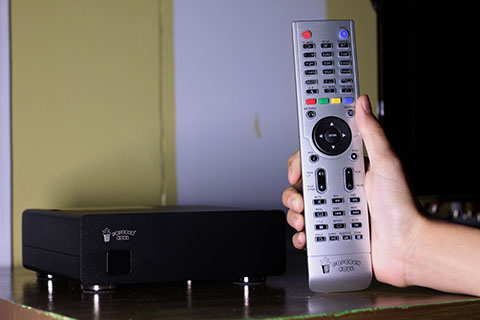
The Popcorn Hour A-410 with its included remote.
The Popcorn Hour A-410 is basically storage for all your media – videos, music, and photos. An HDD (not included) is loaded to its tray which is enclosed in a sturdy, aluminium case. There’s nothing much going on in terms of design except for an IR sensor for the remote along with two LED lights that show the device’s status.
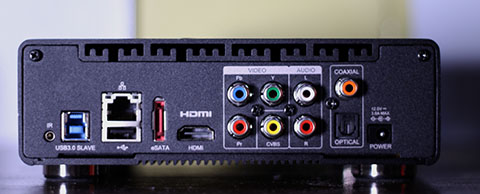
At the back we have all the necessary connectivity ports and slots including an HDMI, USB 3.0, and Ethernet ports.
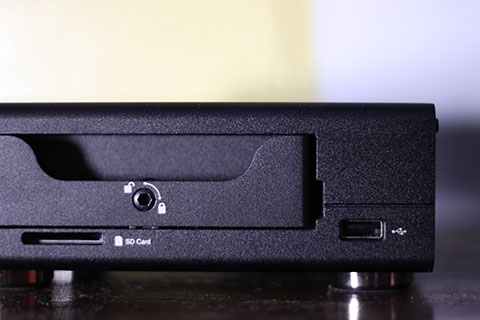
On the right side we have the lock for the disk bay as well as a built-in SD card reader and one USB 2.0 port.
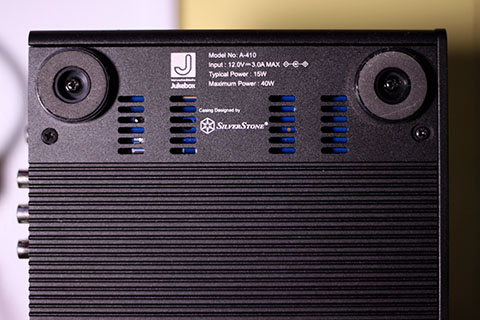
Turning it over reveals the cooling fins that help in expelling heat from inside its chassis.

A-410’s dashboard page.
After plugging the A-410 to power it up, we were led to its dashboard with large icons that are pretty straightforward. Navigating through its UI was responsive enough with very little to no lags – mainly due to its dual-core processor and 1GB RAM tandem.
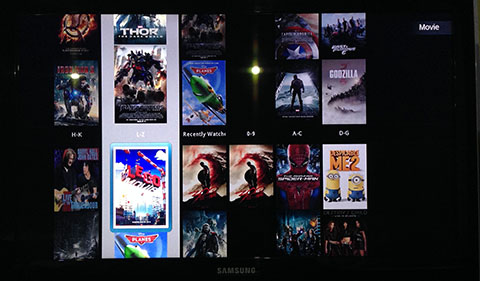
Your movies can be viewed as gallery where posters are lined up in order.
The included remote control works fine with all the essential buttons possible to operate with one hand, but due to either its buttons or Infrared sensor, pressing a command doesn’t push through 100% of the time. In addition, all the buttons light up which is good for watching in the dark.
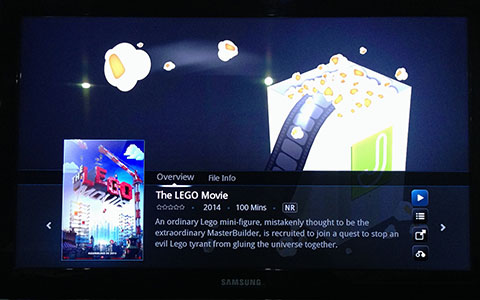
After choosing a movie, it will bring you to another page with the movie’s synopsis and other details before you can begin to watch.
We played several Full HD movies on the A-410 and picture quality was impressive. Its VXP image processor steps up the game with better contrast and well-saturated images, although some jaggies are still seen especially when blacks are right beside colorful areas. Another good news was that it didn’t show any form of delays in audio and video but if ever it happens, there’s a setting to manually sync the audio with the video.
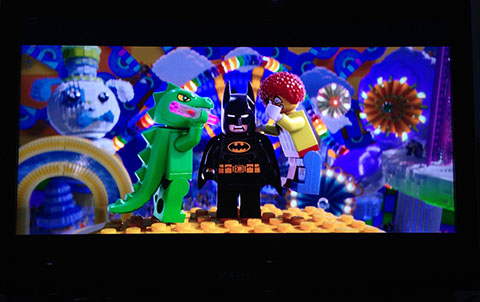
The A-410 shows good color saturation and contrast between light and dark areas.
With the use of its built-in DAC, the sound quality was delivered well on medium to high volumes. Although when we tried maxing the audio levels out we experienced slight distortions and noticeable pops in dialogues.
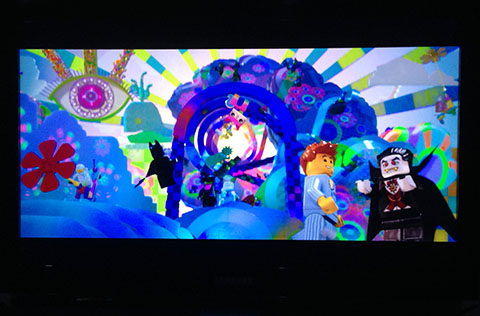
Overall, we had fun using the Popcorn Hour as our media buddy for a few days. It was convenient to use, has an array of connectivity options, and produces eye-candy images. Our gripe, only, is that it comes at Php13,500 which is pretty steep for many people. It throws in a free Wi-Fi dongle worth Php1,500 but it could still be considered as an investment for casual users.
If you’re an avid collector of multimedia files and have some budget to spare, the Popcorn Hour A-410 is a good buy.
Popcorn Hour A-410 specs:
800Mhz SMP8911 dual-core processor
VXP image processor
1GB RAM
ESS Sabre DAC
2x USB 2.0 host
1x USB 3.0 slave
1x eSATA
1x SD card reader
1x SATA
Gigabit Ethernet
Infrared
182 x 158 x 56mm
1.3kg
Power: 12V DC, 3.0A max
Video/audio output
HDMI, component, stereo audio, S/PDIF optical, coaxial
Suppoted file formats:
Video
M1V, M2V, M4V, M2P, MPG,VOB TS, TP,TRP,M2T, M2TS, MTS, AVI, ASF, WMV, MKV, 3DMKV, MOV, MP4, RMP4, 3D BD ISO
Audio
M4A, MP1, MP2, MP3, MPA, WAV, WMA, FLAC, OGG, TTA, AAC, DTS, DSD
Photo
JPEG, BMP, PNG, GIF
What we liked about it:
*Responsive UI
*Straightforward navigation
*Lots of connectivity options
*Impressive picture quality
*Decent sound quality
*Remote lights up
What we didn’t like:
*Steep pricing
*Doesn’t come with an HDD for its asking price
*Pressing the buttons sometimes don’t push through










Apple, Asus, Cherry Mobile, Huawei, LG, Nokia, Oppo, Samsung, Sony, Vivo, Xiaomi, Lenovo, Infinix Mobile, Pocophone, Honor, iPhone, OnePlus, Tecno, Realme, HTC, Gionee, Kata, IQ00, Redmi, Razer, CloudFone, Motorola, Panasonic, TCL, Wiko
Best Android smartphones between PHP 20,000 - 25,000
Smartphones under PHP 10,000 in the Philippines
Smartphones under PHP 12K Philippines
Best smartphones for kids under PHP 7,000
Smartphones under PHP 15,000 in the Philippines
Best Android smartphones between PHP 15,000 - 20,000
Smartphones under PHP 20,000 in the Philippines
Most affordable 5G phones in the Philippines under PHP 20K
5G smartphones in the Philippines under PHP 16K


John Q says:
🌱 Noobs🏆1
does it play 1080p?
Rainbow Rat says:
🥉 Rookie🏆1
Sana may raffle nito… Popcorn Hour, for me, is still the best media player in the market today.
ayokoniyan says:
🌱 Noobs🏆1
ngeek, di supported ang .flv
ha !? pati .3gp wala !?
e co-convert ko pa ang galing sa cherry mobile ko?
ayoko nga ! mahal pa
baka meron na nito sa cdr-king?
siguro mga wampayb lang yan sa cdr
hahahaha!!!! says:
🌱 Noobs🏆1
Halatang wala kang pambili dahil mga video type na gusto mo panooran ay 3gp and flv. Hahahaha! Seriously??? Sino pa ang nanonood ng videos in 3gp format? Hahahaha!
pfb says:
🌱 Noobs🏆1
the price is too much, I’d rather my HD movies stored on an ext. hard drive on my LG bluray home theater which comes with 5.1 speakers for almost the same price.
pfb says:
🌱 Noobs🏆1
*rather play
JoeTech says:
🌱 Noobs🏆1
Parang mas sulit na bumili na lang ng Minix Neo X8-H and use that to play your movies XBMC. At least 7K lang , quad core processor, octacore gpu and 2 gig of ram with free gyro remote pa (Neo M1). I was using Measy A1HD before, ok naman, pero nung nag minix na ako, sobrang sulit, ganda ng pic quality, big difference, worth it yung extra 5k investment compared to Measy. Can play upto 4k videos daw, never tried it though, di ata kakayanin ng TV. Enjoy pang gamitin because of XBMC.
Benjie Balarbar says:
🌱 Noobs🏆1
Hi, I’m a regular visitor of your site. Where can I buy this device at P13,500? appreciate feedback. Many thanks,
benjie