0:00Tablets have become the go-to for users
0:02who like working on the go, but don’t
0:05want to be hassled by bringing a laptop
0:07around. With that, it’s also become a
0:10very competitive segment similar to
0:12smartphones. And it’s no surprise that
0:15manufacturers are introducing new models
0:17each year. In this video, we’re looking
0:19at Xiaomi’s latest tablet lineup,
0:22specifically the Xiaomi Pad 8. It might
0:25look identical to its predecessor, the
0:27Xiaomi Pad 7, but features a bunch of
0:30changes under the hood. But the real
0:32question is this. Is the Xiaomi Pad 8
0:35the tablet to get this 2026? Let’s find
0:38out in this review.
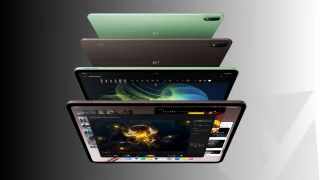
0:46As mentioned earlier, the design of the
0:48Xiaomi Pad 8 looks almost identical to
0:50the Xiaomi Pad 7 we reviewed last year.
0:53The layout is very much the same as
0:55before with the volume rocker on the
0:57right side and the magnetic charging
0:59port for the Xiaomi Pen when holding it
1:01in portrait mode. At the top, you’ll
1:03find the power button together with two
1:06speakers. While at the bottom, you’ll
1:07find the other pair of speakers as well
1:10as the USBC port. It looks the same,
1:13right? But then again, that’s not to say
1:15that’s a bad thing. The tablet still
1:17looks and feels premium with its all-
1:19metal build and minimalist styling. At
1:21the back, there’s just the large camera
1:24island on the upper left corner that
1:26houses the single main rear camera, but
1:28more on that later. Across it is a small
1:31Xiaomi logo, which adds a bit of touch
1:33to the minimalist design. Beside the
1:35small logo are three small dots which
1:37connect the tablet to the various
1:39accessories available from Xiaomi. These
1:41include a keyboard and even a keyboard
1:43with a trackpad, allowing to be used
1:45like a laptops. Among all of the cases,
1:47we found the one with the trackpad to be
1:50the best to use. It’s also the heaviest
1:53one, but it felt the most premium and
1:55comfortable to use. You could easily
1:57adjust the angle and work on stuff just
1:59like a laptop. The keyboard spacing
2:01takes a bit of getting used to, but
2:03other than that, it works great. Despite
2:05its identical design and dimensions, the
2:08Xiaomi Pad 8 is a bit thinner, measuring
2:10only 5.8 8 mm thick. It’s still
2:12relatively lightweight, too. Weighing
2:14485 g without any of the accessories.
2:17But then again, even with the
2:18accessories, it’s still very easy to
2:20bring around. The only issue with the
2:22Xiaomi Pad 8, though, is the lack of an
2:24official IP rating. With that, do be
2:26careful when using it outdoors or when
2:28there’s water and drinks around. Given
2:31that the design and dimensions of the
2:32Xiaomi Pad 8 didn’t change from before,
2:35it’s no surprise that the display also
2:37appears to be a carryover from its
2:39predecessor. It continues to feature an
2:4111.2 in IPS LCD panel with 144 Herz
2:44refresh rate, 800 nits peak brightness,
2:46and support for Dolby Vision. It’s a
2:48beautiful display, and we’re not
2:50surprised Xiaomi didn’t see the need to
2:52change it up. We do wish they updated it
2:54to feature an OLED for an even better
2:56viewing experience, but that would also
2:58mean a bump in price. Still, the display
3:01of the Pad 8 is one of the better IPS
3:03LCDs we’ve tried out. The colors are
3:06quite vivid and the blacks can be quite
3:07deep. Although it’s still not as deep as
3:10an OLED or as saturated as an OLED, so
3:13do keep that in mind. The viewing angles
3:14are decent, too, with very minimal color
3:16shifts. No doubt users will have a great
3:19viewing experience with this tablet when
3:21watching videos on YouTube or Netflix.
3:23However, it’s far from perfect display.
3:26For starters, users will notice the very
3:29thick borders all around, which takes up
3:31a big chunk of the display area. Another
3:34thing is the lack of an anti-glare
3:36coating. The display easily picks up
3:38reflections wherever you go. As you can
3:40see here with that, some might find it
3:43irritating, especially when using it in
3:45areas with a lot of light bouncing
3:46around. Thankfully, maxing out the
3:48screen does help with this issue, but it
3:50doesn’t fully address it. Since this is
3:52a tablet, of course, we had to try out
3:54how well it is for taking notes or
3:56doodling using the Xiaomi Pen. It’s
3:58sensitive to pressure, and users can
4:00sketch quite nicely using this tablet.
4:02Well, that’s assuming you have the
4:04skills to draw, which I clearly lack.
4:06But in the hands of someone who is
4:07skilled, they can sketch some really
4:09nice art. As for the speakers, it comes
4:12with quad stereo speakers, giving users
4:14a great listening experience. Not to
4:16mention, it now adopts Dolby Atmos,
4:18which further improves the audio quality
4:20when you have it turned on. The speakers
4:22themselves aren’t that loud despite
4:24having an option to bump the volume up
4:25to 200%. However, the speakers do have a
4:29great sound quality with a decent sound
4:31stage, especially when the tablet is in
4:33front of the user. It’s still lacking a
4:35bit of bass in our opinion, but the mids
4:37and highs are decent. Paired with the
4:38large display, there’s no doubt users
4:41will have a great time watching movies
4:43on this tablet. Remember the large
4:45camera island at the back? Well, don’t
4:47be fooled. The Xiaomi Pad 8 only
4:49features a single 13 megapixel shooter,
4:51while at the front there is an 8
4:53megapixel camera for selfies. If you’ve
4:56been watching our channel for a while,
4:57then I’m sure you already know our stand
5:00when it comes to using a tablet to take
5:02photos and videos. You’re still going to
5:04look stupid doing so, even in 2026. Just
5:09use your phone. But if you choose to
5:11ignore our suggestion, then using the
5:13Xiaomi Pad 8 to take photos and videos,
5:15it does so decently. The images are
5:18sharp and there’s a nice balance between
5:19the highlights and shadows. There’s nice
5:21contrast, too, but nothing too extreme
5:23that gives it that overly moody feel.
5:25Even at 2x zoom, the images are still
5:27usable, but beyond that, the quality
5:28drop is very, very obvious. The output
5:31is very much identical when it comes to
5:32video. The rear camera can record up to
5:354K at 30 fps, while the front is limited
5:36to 1080p at 30 fps. Interestingly, there
5:39also seems to be some form of
5:40stabilization, even though there is no
5:43option to turn it on in the settings.
5:44With that, the video didn’t come out as
5:46shaky as we expected, and we were able
5:48to capture some nice footage overall.
5:51While the Xiaomi Pad 8 might look
5:52identical to its predecessor on the
5:55outside, one of the biggest changes they
5:57made can be found under the hood. It now
5:59packs a Qualcomm Snapdragon 8S Gen 4
6:02chipset. Our review unit comes with 8 GB
6:04of RAM and 128 GB of storage, which is
6:07the base variant available. Storage is
6:09honestly a bit small at 128 GB, and
6:12there’s no micro SD card slot to expand
6:14storage further. With that, we recommend
6:16getting the Xiaomi Pad 8 with a higher
6:18storage capacity just so you don’t run
6:20out of storage. Even with just 8 GB of
6:22RAM, the Pad 8 ran very smoothly and can
6:25handle all the tasks we threw at it. Run
6:27multiple applications simultaneously,
6:29not a problem. Users can leave apps
6:31running in the background and can easily
6:32switch between them to pick up where
6:34they left off. There’s no need to worry
6:36about losing productivity time when
6:38using this tablet to get work or school
6:41work done. But of course, it’s not just
6:44all work. The Xiaomi Pad 8 is also great
6:46for playing games. It could easily
6:47handle graphic intensive titles like
6:49Genchin Impact with all the settings
6:50maxed out. There’s no frame rate drops
6:52or stuttering even when there’s a lot
6:54going on on the screen. Paired with the
6:56beautiful 144 Herz display, there’s no
6:58doubt users will enjoy exploring the
7:00world of Tabot and not just complete
7:02their dailies and move on. Other games
7:05ran smoothly as well, including CarX
7:07Drift 2, which ran on the max graphics
7:09and unlimited FPS. All in all, users can
7:12definitely enjoy work and play on this
7:14device, no problem. As for the
7:16benchmarks, they’ll be on screen right
7:18now, and as expected, they’re quite high
7:20numbers.
7:37The Xiaomi Pad 8 runs on Hyper OS3 which
7:40is based on Android 16. As expected from
7:42Hyper OS3, it’s great and easy to use
7:45and even in its tablet form. Not to
7:48mention, users will have the complete
7:49suite of AI features to help make work a
7:51lot easier. For productivity, there’s
7:53split screen and floating windows which
7:55makes it easy for users to get work done
7:57if needed. Given the capable chipset, it
7:59could even run Genchin and other apps at
8:01the same time in a split screen mode.
8:03Meanwhile, Gemini and Circle to Search
8:05can easily be accessed anytime should
8:07there be a need to do so. Other AI
8:08features from Hyper OS are available
8:11too, including AI eraser in the gallery
8:13and AI writing assistant in notes.
8:16There’s also AI art which automatically
8:18generates images in various styles for
8:20those who can’t draw just like me.
8:22Thankfully, there is no bloatware on the
8:24Xiaomi Pad 8 which is a heavenscent.
8:26Powering the Xiaomi Pad 8 is a 9,200
8:29milliamp hour battery, which is huge
8:32considering the size of this tablet.
8:34With that, we were expecting it to last
8:36a very long time given how big the
8:38battery is. Unfortunately though, that
8:40wasn’t the case. When we used it to play
8:41games, run the benchmarks, take photos
8:43and videos. We noticed that the battery
8:45dropped rather fast. That’s considering
8:47it was connected to Wi-Fi with the
8:49brightness and volume maxed out when we
8:51were playing games. However, the
8:53benchmark showed a similar story. Using
8:55PC Marks Work 3.0 battery test, the
8:57Xiaomi Pad 8 recorded only 12 hours and
9:0029 minutes of battery life, which is
9:02average at best. For reference, the test
9:04was run on 50% brightness, zero volume,
9:06and on airplane mode with the Wi-Fi
9:08turned on. Charging unfortunately isn’t
9:10that fast either given the large
9:13battery. It only features a 45 watt fast
9:16wired charging with no support for
9:18wireless charging. As for connectivity,
9:21it features Wi-Fi 7, Bluetooth 5.4, and
9:24infrared. No eim support here, so Wi-Fi
9:27only. Overall, the Xiaomi Pad 8 is a
9:29great choice for a tablet if you need
9:31one for work and play. It may have a lot
9:34of carryover features from its
9:35predecessor, but it also packs a new,
9:37more powerful chipset along with Hyper
9:39OS3. And then again, don’t change what
9:42isn’t broken, right? It’s far from
9:44perfect though, given the fast draining
9:46battery. But aside from that, it’s a
9:47great tablet for everyday use in all
9:49situations. Not to mention, there are a
9:51bunch of accessories users can choose
9:53from to suit their needs. Now, as for
9:56the price, well, at the time we recorded
9:58this video, Xiaomi has yet to reveal the
10:01price of the Xiaomi Pad 8, but we’ll be
10:03sure to pin it down in the comments once
10:06we have it, so you can check it out
10:08there. But so far, what do you guys
10:10think of the Xiaomi Pad 8? Is this the
10:12tablet you’re considering for 2026? Or
10:15would you choose the more capable Xiaomi
10:17Pad 8 Pro if you need the more
10:20firepower? Or would you choose something
10:22else entirely? Whatever the case, share
10:24your thoughts in the comments below. Of
10:26course, if you enjoyed this video,
10:27please do drop a like and subscribe to
10:29watch more. Don’t forget to follow us on
10:31our social media platforms. That’s
10:33Facebook, Instagram, X, and Tik Tok. And
10:35of course, visit ugate.com for the
10:36latest tech news and reviews. Once
10:38again, this has been Oay. This has been
10:40the Xiaomi Pad 8. And I’ll see you guys
10:43in the next
⚠️ This transcription is auto-generated from YouTube captions. Some text may not be 100% accurate.



0 Comments
Leave a Reply