

With the extended community quarantine, you’re still going to have to find a way to pay those bills. Thankfully, there are many ways to pay your PLDT bills online and from the safety of your own home.

For this guide, we will be first walking you through with how to enroll for paperless billing via their website pldthome.com/paperless-billing then proceeding with how to pay for it online.

To begin, you’re going to need a myHome account. Click on this link and enter your username and password. If you don’t have an existing myHome account, you’re going to want to create one by clicking on Create a myHome ID.

Enter your email address, first name, last name, and your preferred password. Once you’re finished, click on Register. After registering, an email will be sent to you for confirmation with a link directing you back to the PLDT home dashboard.

Next, click on “Enroll to Paperless Billing” and choose which email address you would like to receive your electronic bill. Click on submit and you should be enrolled! Starting your next billing cut-off, you will be receiving a password-protected copy of your statement straight to your email.

Now that you can easily manage your bills straight from your home, you can now proceed to pay online. You can pay via Bancnet, but you’re going to need to have an existing account with an enrolled ATM card.
If you don’t have a bank or refuse to link your card with Bancnet, you may also choose to pay for your PLDT bill through e-wallets such as GCash, Smart Money, Paymaya, and Coins.ph.
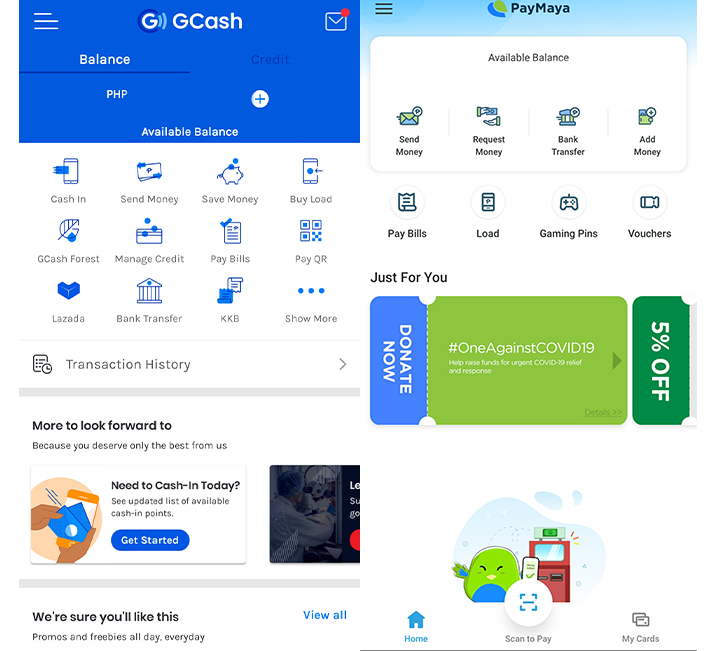

Although these apps are different, they generally have a similar user interface. So to pay using the e-wallets mentioned above, look for the “Pay Bills” option on the main menu. From there, search for PLDT from the list and input your account number and user details.
If you are registered to your bank’s dedicated mobile banking app, you can also use it to pay for your bills. Each app is quite different, so check with your bank’s services to find out how you can enroll your bills and pay them straight from the app.

Alternatively, if you are still getting paper bills, you can pay for your PLDT bill through their Pay Express service. All you have to do is scan the QR code provided at the bottom right of the paper with your smartphone, and you will be redirected to the payment screen where you can use either your debit or credit card to pay.
Keep in mind that PLDT has provided a 30-day extension due to the community quarantine, but these are still some handy things to keep in mind, especially if you want to stay home and avoid waiting in line.
And there you go! If you would like to pay for other bills such as your Meralco bill, check out the link here. Alternatively, you could look at this list to pay for other bills online.






your password is 0+account number only.
if your account number has started with zero (0) already don’t add zero, okay just put all the account numbers as your password.