
Auto Blocker يتيح مستويات جديدة من حماية الأجهزة، ويجمع بين الالتزام بالخصوصية والأمان مع التزام Samsung Galaxy الطويل بالتساهل وخيار المستخدم
Samsung Electronics Co., Ltd. اليوم قدمت Auto Blocker، وهي أداة أمان جديدة للمستخدمين من سلسلة Samsung مصممة لحماية أجهزتهم بالطريقة الأنسب لحياتهم.
تم إطلاق Auto Blocker مؤخرًا على نظام One UI 6 كجزء من مجموعة متقدمة من الابتكارات الأمنية والخصوصية لـ Samsung، وهو حزمة اختيارية من التدابير الأمنية الإضافية التي تمنح المستخدمين خيارات أكبر أثناء استكشاف التخصيصات المتاحة بفضل النظام المفتوح لـ Samsung.
إعطاء الخيار للمستخدمين
“في Samsung، نبذل جهودًا مستمرة للحفاظ على سلامة مستخدمينا من الهجمات الأمنية، ومع إدخال حظر الذكاء الاصطناعي، يمكن للمستخدمين الاستمرار في الاستفادة من مزايا نظامنا المفتوح، مع العلم بأن تجربة الهواتف الذكية الخاصة بهم آمنة”، قال الدكتور سيونغوون شين، نائب الرئيس التنفيذي والرئيس الفني لفريق الأمن، قسم التجربة المحمولة في Samsung الإلكترونيات. “نبحث دائمًا عن تمكين المستخدمين لاتخاذ قرارات تناسب احتياجاتهم – بدلاً من اتخاذ القرارات نيابة عنهم، وهذا لا ينطبق على حظر الذكاء الاصطناعي فقط.”
One of Auto Blocker’s features is the prevention of app installations from unauthorized sources, known as sideloading. There are many benefits to intentional sideloading, such as enhanced customization and control over a device’s functionality. Those who love to safely sideload will experience no change as the feature is off by default. For those not in the habit of sideloading or extensive customization, activating Auto Blocker can provide additional peace of mind by stalling the rise of social engineering attacks like voice phishing, where attackers could talk users into installing malicious software.
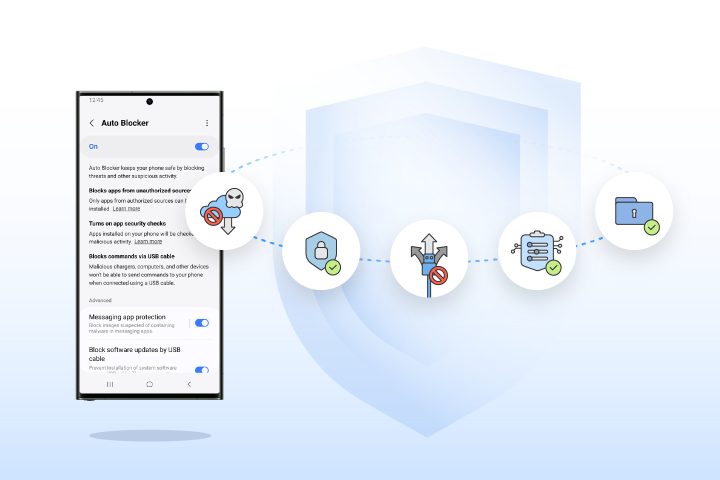
Auto Blocker has a range of additional controls, including turning on app security checks to help detect potential malware and prevent harmful commands and software installations by USB cable. This can help protect users in a situation where someone has physical access to their device, like when charging a phone at an airport.
With this feature also comes an update to Message Guard, which mitigates Zero Click attacks, or direct image messages hiding malicious code. Initially launched for messaging apps from Google and Samsung, it now can help protect users using popular third party apps. This way, users have greater choice over the apps they can safely use.
Pushing the Industry Forward with New Security Standards
Samsung sets the foundation for a safer, more secure mobile experience for Galaxy users, and Auto Blocker takes this one step further by combining industry-leading security standards with user choice to allow customers to control their device their way. As the latest feature to be added to Samsung’s suite of security and privacy innovations, Auto Blocker further optimizes the mobile experience for users across the Galaxy ecosystem.
Auto Blocker is available now on Samsung Galaxy devices compatible with One UI 6.


0 Comments
Leave a Reply