
In December, Facebook Messenger received a major upgrade with end-to-end encryption for chats. Now, Meta is adding even more features to its main messaging app including HD photos, creating shared albums, and file sharing up to 100MB files.
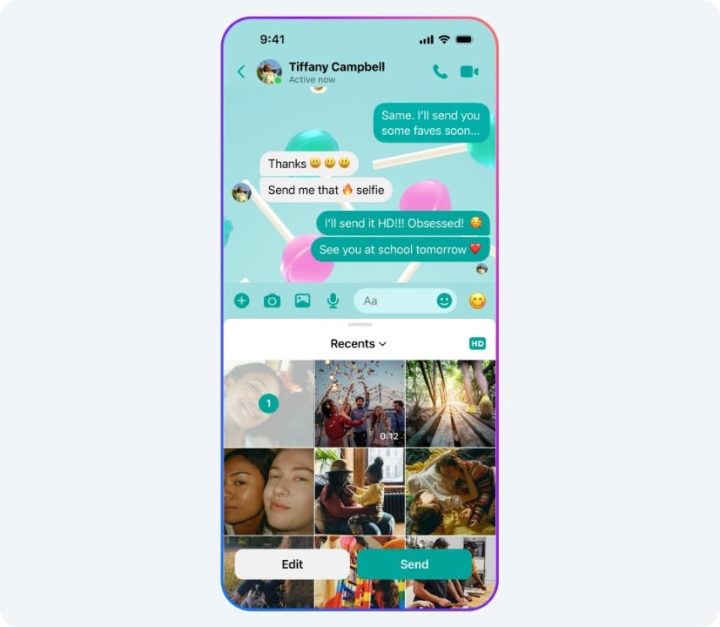
Send HD photos
Sending high-definition images is a breeze. Simply select an image and toggle the “HD” button before sending. The HD icon appears in the upper right corner of your gallery grid, so you shouldn’t easily miss it.
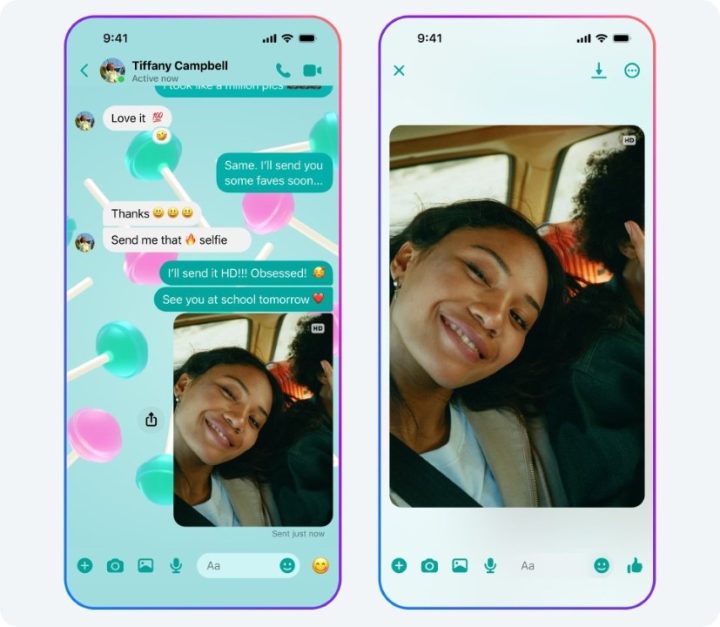
After you’ve sent a high-resolution image, an “HD” indicator will appear on it as well.
Shared albums
Organizing your photos in Messenger is now possible as users can now create shared albums. It is currently available for group chats, with everyone in it has the ability to view, add, and even delete content in a shared album.

To create one, select multiple media files or long-press an image in-chat then a “Create album” option appears. Of course, you can add more content to existing shared albums and rename them as preferred.
To see your shared albums, just tap on your group chat’s name and then scroll to “View media files and links”.
Add people with QR code
Next is QR codes. You can now add people with just their QR code or share yours.

Simply go to your Messenger Settings and tap the QR code icon on the top-left corner. From here, others can scan your code, or you can share a link.
File sharing up to 100MB
In a move that feels like it should have happened years ago, Meta has increased the file size limit for sharing on Messenger to a whopping 100MB.

Previously, Messenger’s measly file size limit forced users to jump through hoops to share anything substantial. Compressing files, resorting to third-party services, or just giving up entirely were all common experiences.
Thankfully, those days are over. With the new 100MB limit, sharing presentations, spreadsheets, and of course, HD photos becomes a breeze directly within the Messenger app.
Apparently, these new features will come gradually to devices. So, if your phone doesn’t have them yet, expect to get them in a week or so.





0 Comments
Leave a Reply