
Apple executive recently told in an interview that 8GB RAM on their latest MacBook Pro lineup is equivalent to 16GB on the PC. Thanks to the silicon’s ‘unified memory’ architecture, a MacBook with that little amount of RAM can still perform efficiently.
While that may be true—‘analogous’ to Windows PCs as what the Apple exec claims—the same can’t be said when compared to its own kin boasting 16GB unified memory.
New benchmarks from Max Tech show that the 8GB memory significantly limits the performance of Apple M3. Their method was putting heavy workloads on both 8GB and 16GB variants of the latest 14-inch MacBook Pro M3 while doing benchmarks at the same time.
This means that, on certain benchmarking processes, a bunch of Safari tabs are opened consisting of a YouTube page playing a video, and a website with lots of ads that are simultaneously running the background.
Apple M3 MacBook Pro 8GB vs 16GB
Cinebench and Speedometer
| 14-inch MacBook Pro | Cinebench 2024 Multi-Core | Speedometer |
|---|---|---|
| M3 (16GB) | 710 | 589 |
| M3 (8GB) | 640 | 496 |
Lightroom Classic
| 14-inch MacBook Pro | Lightroom Classic | Lightroom Classic with 5 Tabs (lower is better) | Lightroom Classic with 20 Tabs (lower is better) |
|---|---|---|---|
| M3 (16GB) | N/A | 1:06 | 1:06 |
| M3 (8GB) | 1:47 | 2:00 | 5:16 |
Final Cut Pro
| 14-inch MacBook Pro | Final Cut Pro – 4K ProRes RAW to ProRES (lower is better) | Final Cut Pro – 4K MC in 8K to ProRES (lower is better) | Photoshop (Photomerge 50MP x10) |
|---|---|---|---|
| M3 (16GB) | 1:25 | 5:01 | 1:20 |
| M3 (8GB) | 1:30 | 20:18 | 1:53 |
On Cinebench 2024, the 16GB delivered 11% higher multi-core performance. While on Speedometer, it brought 19% more performance than the 8GB.
In Lightroom Classic and Final Cut Pro exports, the 8GB significantly lagged behind on certain workloads. The 8GB variant couldn’t even run properly certain software such as Blender during exports and its ray tracing acceleration was missing and only accessible on the 16GB variant.
This shows that multitasking can have a negative impact on Apple M3’s performance using only 8GB of so-called ‘unified memory’. Without putting pressure on multitasking, the 8GB can efficiently perform as long as workloads don’t rely heavily on memory power.
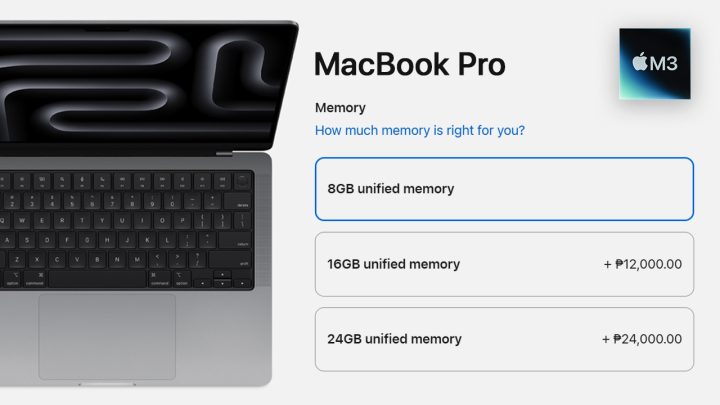
The base model MacBook Pro M3 starts at PHP 104,990 and is paired with 512GB SSD storage. To get its 16GB, the price goes higher with an additional PHP 12,000.





0 Comments
Leave a Reply