

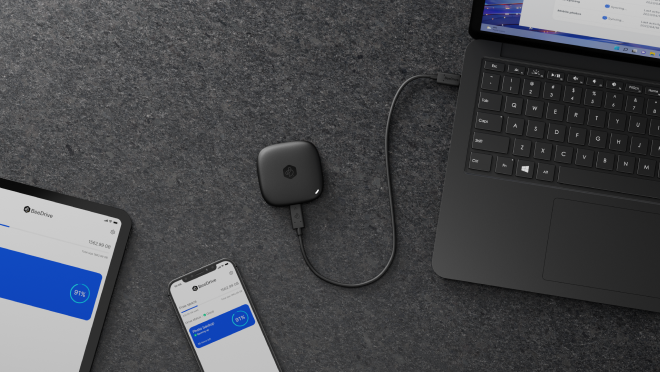
Si Synology nag-announce sa pag-uswag sa BeeDrive - usa ka portable data hub nga nag-backup sa mga personal nga mga archivo ug mga pipila gikan sa imong PC, handa, ug tablet. Ang mga user sa PC mao’y mahibal-an alang sa paggamit sa BeeDrive aron makapaloob sa ilang mga datos sa mga mahusay nga lokal nga pag-andam sa transfer, samtang makatipanan ang mahusay nga proteksyon sa mga datos ug ang kaugalinghan paglambo sa usa ka panahon sa pag-set-up nga 3 minuto.
"Ang isa ka mahimong usa ka dakong data nga gitakda kini niadtong kini niadtong usa ka panahon sa laing mga dispositivo sa kaugalingan. Ang mga kahain nga adunay usa ka dakong kamera ug laing mga usa ka bag-ong format sa mga foto o video, ingon nga nagpangadto sa imong telepono o storage sa cloud nga lugar nga mahimong sobra kaysa kini niadtong kini niadtong kini," bisan ni David Hu, usa ka mangduduki sa produkto sa Synology Inc.
"Internet upload speeds never caught up with the explosive growth in personal data, making it increasingly slower and more costly to store all our files in the cloud, especially if we just want to back up or archive old files elsewhere or exchange files between our personal devices," Hu stated, "This is why we want to offer a local, private alternative."
"With BeeDrive, we hope to bring Synology's expertise in backup technologies to a larger group of users — many of whom are perfectly computer-literate, but have neither the time or the networking knowledge to host a server that runs 24/7 just for backup," Hu added. "BeeDrive offers a no-hassle option even for the families and friends of current Synology users."
Local PC & mobile backup reduce backup time and long-term costs
Users can choose which folders to encrypt after connecting the device to a PC. In compared to scheduled hourly backups, BeeDrive's automated real-time backup of all changes made to those folders gives a greater recovery point objective (RPO). On BeeDrive, backup files are kept in the same format as they are on a PC. Users don't need to install any software or go through a time-consuming recovery process in order to access their files when BeeDrive is connected to another computer in the event of a computer problem.
In addition, BeeDrive wirelessly backs up photos and videos from iOS and Android devices, providing simultaneous security for tablets and mobile devices. To begin backing up data to BeeDrive and free up space on your phone, scan a QR code while your BeeDrive-enabled PC and mobile devices are connected to the same network.
BeeDrive can backup massive amounts of data to the cloud up to 11 times quicker than it can from a PC and up to 6 times faster than it can from a mobile device by getting over the bandwidth limitations imposed by internet or cloud service providers.*
BeeDrop and two-way sync boost productivity when exchanging files between devices
Field workers and other professions can wirelessly upload mobile-generated material from iOS and Android smartphones to BeeDrive using the BeeDrop function if they frequently capture images on their phone and need to access them on a PC when they return to the office. The necessity to upload to and download from the cloud is gone thanks to the ability to instantaneously access data on a PC.
When switching between work and home PCs, BeeDrive can help users sync files as soon as each one is connected in, ensuring that all information is constantly up to date on the PC you are working on while maintaining a backup on BeeDrive.
"Collecting files generated from all our personal devices is just the first step," said Hu. "In the future, we hope to leverage the abundant computing resources of a computer to help users extract more value from the data itself, such as through auto-categorization. It is always our goal to bring modern technologies to Synology users without sacrificing their data privacy and ownership."
Availability
BeeDrive is available in 1TB and 2TB capacity from mid-June for Windows, iOS, and Android through Synology partners and resellers worldwide. macOS support is planned. For more details, visit the site here.
*Data transfer speed may be affected by various factors such as file types and sizes, host devices, Wi-Fi speeds, cloud service providers, and other usage conditions. Tests are conducted at 100Mbps Internet upload speed when backing up to cloud services.





0 Comments
Leave a Reply