

Globe Telecom rolled out a new feature called Direct Carrier Billing that allows its subscribers to directly purchase from the Google Play Store and charge it to the customer’s postpaid account or prepaid load. If you still haven’t tried it out using prepaid, here’s how to do it.
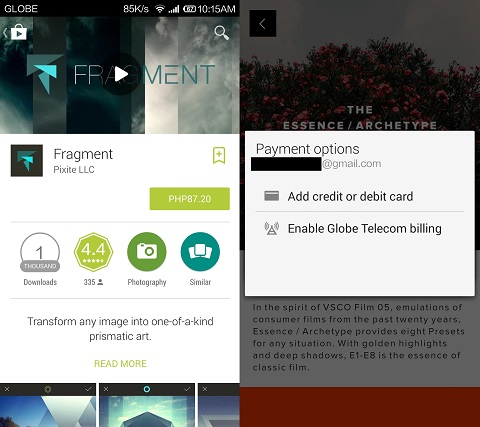
- Go to Google Play Store and find the app you want to purchase. Tap on the price then tap on Enable Globe Telecom billing.
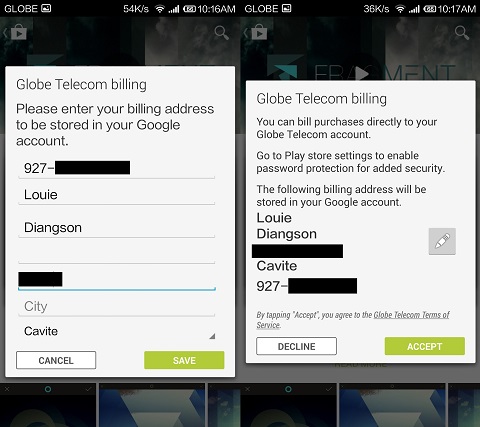
- It will then ask you to enter your billing info which includes your prepaid number, name and address (complete name and address not necessary). Once filled out just tap Save then Accept.
- After confirming your billing info Google Play will then ask for your Google password. Just type it in then tap on Confirm.
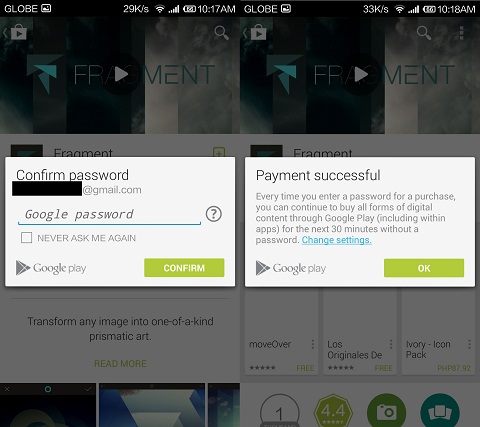
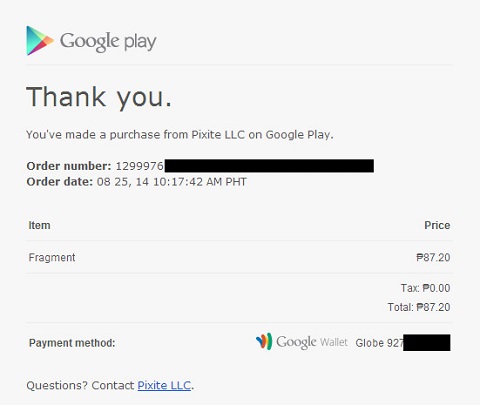
Congratulations! You have successfully purchased an app from the Google Play Store using your prepaid credits. You can also do this for in-app purchases. Google Play will then send you a text message and an e-mail that will serve as proof of purchase.
Important notes:
- Google Play will give you a 2-hour free trial period to decide if you want to keep your purchase or be refunded.
- Refund after the 2-hour free trial period will be processed within 7 days.
- No refund for in-app purchases.
We also monitored how much the whole transaction will cost us by doing a balance check before and after the purchase. The Fragment app by Pixite LLC costs Php87.20 but deducted Php97.66 from our prepaid load. That’s Php10.46 on top of the app’s asking price.


my phone hase 2 sims, globe and smart. when i try to enable the globe telecom, it wasn’t there. what’s there was smart telecom. when i try to enable that one, it said that they couldn’t send an sms verification so i have to try again later. is there a problem in my settings maybe?