
Fake news or articles spreading false information have seamlessly blended into our news feed and a lot of users online are sadly being persuaded by some of this misinformation.

However, for those who can discern the differences between real news and the ones meant to misinform, you can help filter out these posts so that fake ones no longer spread.
Below is a simple guide on how to report those fake news that you might encounter while browsing your Facebook feed.
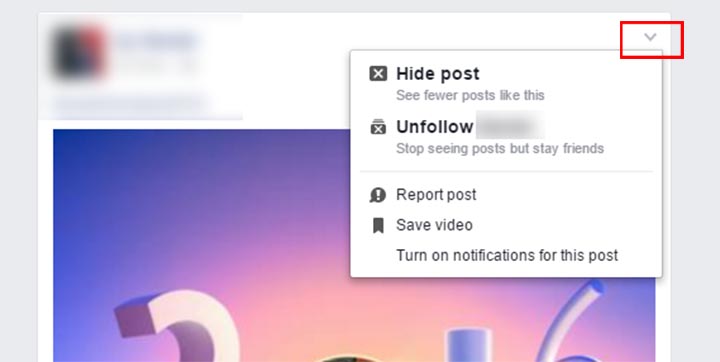
Step 1: Click the Option button on the post itself (drop down arrow on top right corner). This will show the available options for the entry.
Step 2: Choose to ‘Report post’. It will then ask you to give a reason why you want to report it.

Step 3: Click on ‘I think it shouldn’t be on Facebook’.

Step 4: You will see an option saying ‘it’s a false news story’ (second item). Hit that and Facebook will be notified.
After due process and verification, that specific post should already stop making its way to people’s news feed. You can also use this method to report other posts that you think are not supposed to be seen publicly on Facebook by clicking through to See more options.

If a post is racist, has someone buying and selling things like shotguns, marijuana, or adult items — these can also be brought up to Facebook’s attention. Again, actions will be taken after the post has gone through the company’s verification process.
Together, we can hopefully push for having a healthier news feed every time we browse.
{Image}







Hi there! Would you mind if I share your blog with my myspace group?
There’s a lot of people that I think would really appreciate your content.
Please let me know. Many thanks