

We’ve been checking out quite a number of Bluetooth-enabled audio devices lately, and here comes another. The Doss Asimom 3, a “talking” wireless portable Bluetooth speaker.

The Doss Asimom 3 is a can-like speaker that features Bluetooth and NFC (Near Field Communication) for wireless connectivity. It’s quite hefty due to its incredible build quality. It’s made out of metal with a combination of polycarbonate. The top features the usual controls like Play/Pause, Next & Previous and an answer key. The middle ring that lights up when powered is also the volume control enabled by touch, same as the others.
NFC one-touch pairing is present, so using this with an NFC-enabled device will only require a single tap.
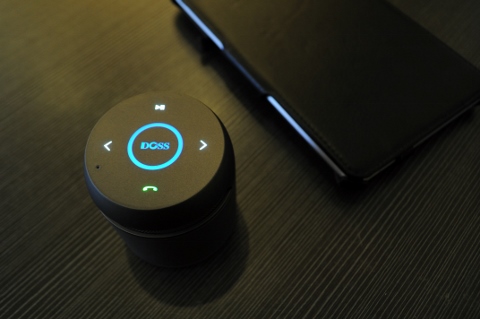
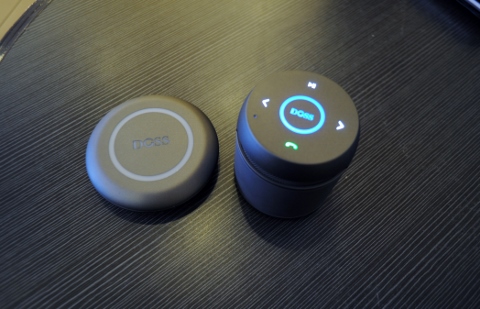
What is nice about the Asimom 3 is in its features, like wireless charging and voice-prompt. It comes with a base charging plate that also acts as a powerbank with a capacity of 1020mAh. Just place the speaker on top of the plate and voila. A micro-USB to USB (female port) is included out of the box but the micro-USB cable doesn’t seemed to be properly crafted because it just won’t fit in, or maybe it’s a unit specific issue. The voice-prompt is nifty and surprisingly entertaining. Instead of relying on light indicators, the Asimom 3 will speak out its current status.
The battery built in to the speaker itself is rated up to 8 hours of usage. As to save battery life or at times when Bluetooth doesn’t seem to cooperate, a 3.5mm cable is included out of the box for wired connection. Maximum distance of the speaker from its host is up to 10 meters, so keep it near for uninterrupted playback.
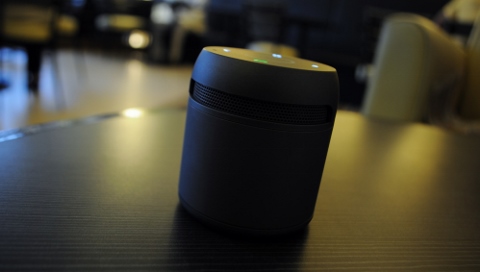
It offers 360-degrees of sound thanks to its cylindrical design. While this may sound fantastic, the audio quality of the portable speaker is something left to be desired. The volume is loud and the bass is really there but the overall output doesn’t feel as whole as compared to others.

If you want a portable speaker that is nicely built and did I mention “talking”, then this is just the right thing for you. The Doss Asimom 3 is available at Widget City. (See posting here)






Did anyone try this on a Windows 8 laptop or tablet. I have one but I get an error for some reason when I try to connect this speaker. “Try again and make sure that the bluetooth headset is discoverable”. Now, I’ve already connected this to my phone, a windows 7 laptop and my wife’s phone and it connects successfully except for Windows 8 machines that I have running. A Acer Iconia W500 tablet and a Lenovo Win8 Laptop. I think it’s something to do with the fact that this speaker doesn’t have a manual pairing mode unlike other bluetooth devices that you can press and hold the power button to enter manual pairing mode. If anyone has tried this speaker and made it work with Windows 8. Please help.
no****@gmail.com
It took me a while to get this working on windows 7 I would imagine the same issues with win8.
after failing I decided to update the Bluetooth driver for my laptop, that brought up more features include a Bluetooth wizard. The wizard also failed but i ran it again, prior to clicking next I right clicked the DOSS icon in the window and selected properties.
There are three check boxes: Audio Sync, Handfree telephony, and remote control. I selected them all. The went back into the control panel for bluetooth devices and clicked the doss. this time it worked.