infinix x yugatech

Facebook Messenger now lets Android users send SMS

Listen to article

In addition to playing a soccer mini-game in-app, Facebook Messenger now lets its users send text messages without needing to switch to a different app.

facebook-messenger-sms-1

“Today we are enabling people to use SMS in Messenger for Android to communicate with their family, friends and phone contacts. What this means is you will now have the choice to be able to send and receive your SMS/texts in Messenger and will not have go to different screens on your phone to communicate,” the company posted on their page.

To activate this feature, follow these three steps:

1. Open Messenger and tap on Settings (the person icon)
2. Select “SMS” from the list
3. Turn on “Default SMS app”
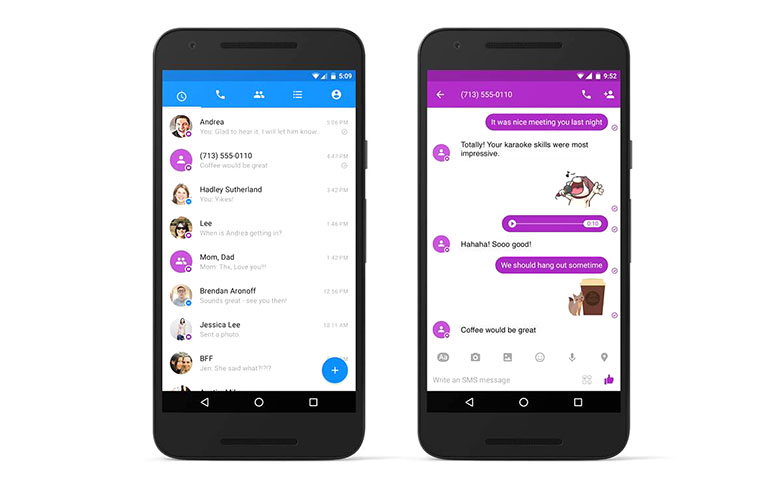
facebook-messenger-sms-2

After which, you’ll see a variation in the color of SMS conversations — blue is from Messenger while purple bubbles are text messages. Standard rates apply. Users can send text, images, videos, audio, and even stickers and emojis can be sent via SMS.

As of now, this feature is available to Android users and is only optional. You can always opt to have your separate Messaging app.

We tried doing it on our Android devices but we still don’t see the SMS option. We’re thinking that the update is per region just like normal software upgrades. Try it on your device and let us know if you see this feature.

{Source}


React to this article:
Written by
Kevin Bruce Francisco

Kevin Bruce Francisco is the Senior Editor and Video Producer for YugaTech. He's a Digital Filmmaking graduate who's always either daydreaming of traveling or actually going places on his bike. Follow him on Twitter for more tech updates @kevincofrancis.

View all posts by Kevin Bruce Francisco →

26 Comments

FR
France · 9 years ago

Can i ask magkano charges nila kapag nagsend ka sms.. Sa smart Network? Charges thanks..

Reply
MA
May · 9 years ago

Can’t send sms using the other network. Dual sim kasi yung phone ko. Wala bang option to to choose what network to use when sending SMS? Thanks!

Reply
DO
don · 10 years ago

Messenger updated. Tried also logout then login. But, I can’t see any “SMS” in the setting or anywhere inside messenger. Android user.

Reply
RO
Ronald · 10 years ago

Pde ba magsend yan (SMS) if hindi ka connected sa data or wifi?

Reply
RO
ross · 10 years ago

pwede naman yan na kasi magigigng messaging app mo, bali combine na with fb messenger, ang prob lang dko mabago notification sound, default fb msgr. sound kasi

RO
Ronald · 10 years ago

@Ross

anong file type ba ng message sound ng messenger(mp3, wav, mid, ogg)? try mo hanapin ung notification sa media\audio\notification\

Try mo rename ung orig notification into messenger-OLD notification
Then try mo i-rename ung favorite notification mo into original messenger format name notification then copy mo dun sa notification folder ng messenger.

RJ
rj · 10 years ago

Meron na. Sa system settings, try mo i-set yung default SMS app to (FB) Messenger. Tapos alising sa recent app list. Open the app, and voila!

Reply
RJ
rj · 10 years ago

Iniisip ko pala, pano yung mga dual SIM features nyan? Wala ata no?

RO
ross · 10 years ago

Un lang sana ubra sa dual sim

RO
ross · 10 years ago

Ok din sa dual sim sa LG G4 ko kaso switching type pagiging dual sim ng g4

MA
Marc Irving Suralvo · 10 years ago

Update the app

Reply
GI
Gian Pangan · 10 years ago

Try logging in and out then press allow when asked if you want to text anyone in your contacts list.

Reply
AD
ad · 10 years ago

It’s already available here, I had the notification last night and had been using it since then

Reply

Leave a Reply

Loading next article...