
Sigurado kami a, no kasla amin, adu a Filipinos ti adda iti langlanga iti Netflix. Ammo dagiti amin a ti Netflix ti balayna para kadagibus-busar a pelikula ken TV series, ngem adda pay dagiti sabali a makita laeng babaen dagiti mata. Nagpabingbingay kami ket napukawkan dagiti nasayaat a panangipakita iti Netflix nga mabalin a makasagana para kadagiti im-panunot a panagtignay. Dagitoy a maipapan a hacks ket agsinnaruno iti mobile ken desktop a version ti Netflix.
Ibaga ti Audio Descriptions

Agamag nga pagsarita ti keyboard
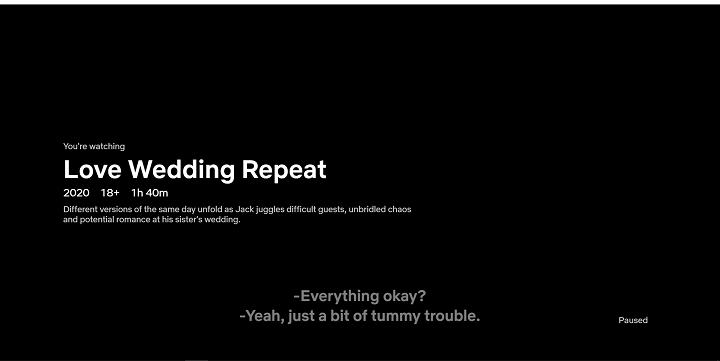
Naipatneng para kadagiti a mangusar iti Netflix babaen ti web browser wenno desktop a bersyon ti aplikasion, daytoy nga mga keyboard shortcut ket agtutulong kadagiti umili a masna a kontrolda iti panangngeddengda.
Daytoy dagiti basic a komando nga ar-aramidmo a maammoan:
Space/Enter - para iti paglalaro ken panagpausad ti digital a kontenido
F - para iti panangipakita dagiti pelikula ken episodio a bukod a laylayten
Esc - para iti panagserrek manipud iti full-screen
Kaliwat a panagkurang - para iti panagbalik balik ngem 10 a segundo
Sagittang kanan - para iti fast-forward aging a 10 a segundo
Arrow a baba - para iti pagtaeng ti volume
Panagbaba a sagot - para iti panagbaba ti volume
M - para iti pagmuteda ti volume
Isort dagiti pamay-an a nagsasao iti uray ania a panawen

Wen, maitedmo dagiti titulo babaen ti kategoria a maipangato iti uray ania a panagsurat. Ti amin a masapulna ket mangbiak kadagiti kategoria, pinduten ti bassit a kaxa nga addaan iti uppat a punto iti kangrunaan a dako, ken pilien ti "A-Z." Daytoy a katuturod ket agtultuloy laeng iti desktop version ti Netflix ken dagiti web browser.
Manonong ti programaan a saan a nasayaat

Saan a makasayon kadagiti bag-ay a update
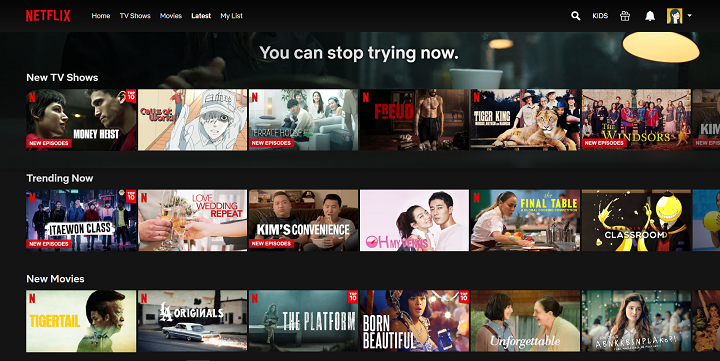
Ag-aramidka ti dagiti sumunod a panangipakita ken pelikula iti Netflix? Saan a rumbeng a agsukisok! Para kadagiti umili ti desktop, makasubliyo kadagiti baro a serye ti telebision ken pelikula nga inadda iti katalogo ti Netflix babaen ti "Latest" a panid. Daytoy ket mangipakita pay dagiti bag-ong kontento para iti kumadua ken sumunod a semana. Ngem, para kadagiti umili ti mobile app, makitanda dayta iti "Coming Soon" a seccion a mabirukan iti baba a sentro a parte.
Agpaspas kadagiti tagtagilako a saan a makita

Agpayso a trick a saan a maammo ti audience ket ti naipangruna a sistema ti Netflix iti panagkategorisa kadagiti kontento. Daytoy ket agdumaduma manipud dagiti genre a naipakita iti mobile ken desktop app, ken met laeng iti web browser version. Ditoy, makitayo dagiti nakaited a genre kas ti Film Noir, Satanic Stories, ken Stage Musicals. Para ma-access daytoy, sursurotanna https://netflix.com/browse/genre/XXXX kadagiti toolbar ti maysa a browser ken palawagan ti "XXXX" babaen dagti aktual nga kode. Maitedyo ti link para iti kumpleto a listaan dagiti Netflix codes.
Agpammanipio dagiti sabali a profile iti accountmo

Kung adda ka dagiti sabali a profile iti tunggal maysa nga account, makita ti sango a recent streaming activity ken ratingsda, seten ti viewing restrictions, lockan ti profileda, ken agbalin ti playback settings. Daytoy a feature, a na-access babaen ti mobile app, desktop app, ken web, ket mangpabassit iti Netflix para kadagiti ubbing ken adolecente. Para maeksplor dagiti amin nga step para daytoy, mabalinmo a basahen ti artikulo kami ditoy.
Sagpataen ti profilemo

Netflix recently updated its parental control feature. This includes setting a PIN to make a specific profile private from other users. This prevents kids from wandering into other profiles without content restriction. To set a PIN, go to your account setting, navigate to the "Profile & Parental Controls" section, enter the account's password, and enter your desired PIN. You can only set a PIN through a web or mobile browser.
Customize settings for subtitles

For those who would like to change the font and font size of their subtitles on all connected devices, you may do so by going to your Profile page, click "Account" and scroll down to "Profile and Parental Controls" section. Find the "Subtitle Appearance" to redirect on its main page and apply changes.
Petition a TV show or movie

Do you have any requests for Netflix? Now's the chance for you to be heard! Through this link, subscribers may submit up to three movies and TV series recommendations. The streaming service also keeps track of all requests from its members, so there's no need to submit the same titles again.
And that's a wrap for our list. Did we miss anything? Let us know in the comment section below!



0 Comments
Leave a Reply