yugatech x infinix

PLDT Home WiFi Prepaid LTE-A Cat6 Modem Hands-on

Listen to article

PLDT Home will soon launch a new prepaid WiFi modem that supports the LTE-A Cat6, the all-new PLDT Home WiFi Prepaid LTE-A Cat6 Modem powered by Smart LTE. Check out our hands-on below.

Let’s start with the package, it contains the huge modem, a pair of external antennas, power adapter, LAN cable, and a manual. The SIM card is already pre-installed.

The modem is a Green Packet DH-725 manufactured by Green Packet Berhad (“Green Packet”), which is an internationally recognized telecommunications, media, and technology company. It was founded in Silicon Valley, California, in 2000 and subsequently listed on the Malaysian Stock Exchange in 2005.

The modem is significantly bigger than the previous prepaid WiFi modem. It has eight LED indicators for power, WiFi 2.4GHz, WiFi 5.0GHz, connection status, SIM card status, and signal strength.

At the back are the antenna connectors, LAN ports, power connector, and reset button.

The SIM card slot is at the top and is sealed by a sticker to let you know that the SIM card is not tampered or replaced when you receive the unit.

There are vents all around to keep the modem cool. The bottom is also elevated for extra ventilation at the bottom.

To get your modem ready for connection, just screw the antennas at the back, then plug to the power outlet. The LEDs will light up, and after a minute or so, it’s ready for connection. If your device supports the WiFi 5.0GHz band, you will see two SSIDs, just connect to either one and enter the default password that you can see at the label at the back of the modem.

From here, you’re already connected to the internet, but we highly suggest changing the modem and WiFi password by accessing the modem’s dashboard using your PC/laptop’s browser.

Compared to the previous Home WiFi LTE Modem, PLDT says that the new Home WiFi LTE-A Modem is faster and offers a more stable data transmission thanks to the high-gain external antenna. It uses Carrier Aggregation and combines frequency channels to power LTE to deliver faster speeds.
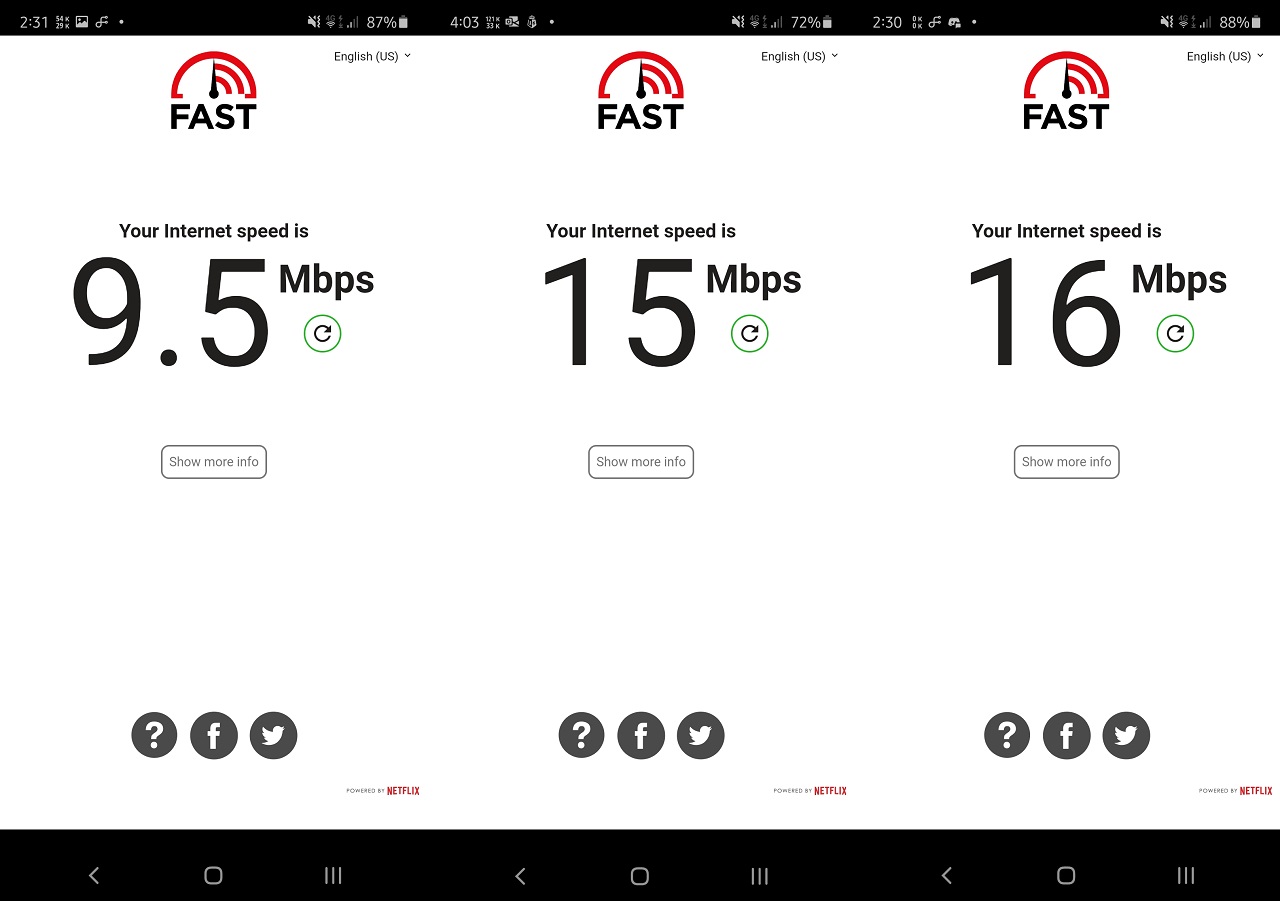
We tested the connection here in Bacoor, Cavite, and we’re getting a full signal with download speeds of 10 to 15 Mbps, which is not bad as it can still handle YouTube and Netflix streaming. Sometimes, we also get speeds of over 20Mbps. Upload speeds, on the other hand, are below 10Mbps. Do note that the quality of the connection depends on location, so your experience may be different from mine.

You can load the PLDT Home WiFi Prepaid LTE-A Cat6 Modem using the myPLDT Smart app or PayMaya by purchasing FamLoad packages: FamLoad 199 comes with 24 GB, FamLoad 599 with 80GB, FamLoad 999 with 130GB, and FamLoad 1499 with 200GB. You can also purchase load at PLDT, Smart and Sun Stores nationwide, sari-sari stores, convenience stores, and digital channels like Grab Pay.

The PLDT Home WiFi Prepaid LTE-A Cat6 Modem is priced at PHP 1,995 and comes with a free 10GB of data (valid for seven days) upon activation. It will be available in GMM areas only and can be ordered via the PLDT Home website starting the first week of August.


React to this article:
Written by
Louie Diangson

Contributing writer at YugaTech, covering the latest in technology news and reviews.

View all posts by Louie Diangson →

131 Comments

MA
Mark · 6 years ago

San kaya ma kka bili neto. Lage out of stock. Cavite area sana

Reply
LE
Leony · 6 years ago

Sir san po pwedeng mka avail ng cat6 modem tnx po

Reply
SI
sirkeds · 6 years ago

sir pa-update kung available na at san pwede mag purchase… God bless

Reply
JA
James · 6 years ago

Available online check site officialpldtreseller.com

Reply
JA
James · 6 years ago

Yung speeds nyo po same lang dito samin sa Valenzuela City. I’m just wondering gaano pa kaya kabilis yang new modem kung dito sa MM natest.

Reply
FE
Feliez loise · 6 years ago

Can i order the PLDT home wifi cat6 here?

Reply
RI
rico · 6 years ago

can i have one? cat6

Reply
JE
Jean · 6 years ago

I want to avail pldt home wifi cat 6 for my student

Reply
DA
Daisy Silva · 6 years ago

Where do I buy this PLDT Cat 6 …
I’m here in Muntinlupa City.send me a ASAP

Reply
AR
Aristeo · 6 years ago

Sir louie diangson panu po kaya aq mkaka order ng ganyang modem?

Reply
LY
Lyn · 6 years ago

How to order po ng pldt home wifi prepaid Cat 6

Reply
YE
yeng · 6 years ago

availble po ba ang cat6 na pldt wifi modem

Reply
KA
Kathy · 6 years ago

Bakit sa GMM areas lang available ang product? :(

Reply
CH
chuwi · 6 years ago

Bakit wala pang stocks sa market ngayon? When ba ang official release ng product na yan?

Reply
RE
Reggie · 6 years ago

Hi po. Nakabili n po ako ng bagong home wifi ng pldt. Nung august 3 sya nadeliver. Problem ko lang intermittent un connection nya. Medyo frustrating po. Hndi ko alam kung ngdodownload b ng firmware. Panu po un mlaman? Hirap kasi mgplace ng complain sa pldt. Tondo area po ako.

Reply
CO
Cos · 6 years ago

Grabe naman palagi walang stock! Horded by reseller! tapos may patong ng 1K hay…

Reply
LE
Leonora · 6 years ago

How to avail po pldt home WiFi cat 6.from isabela

Reply
AS
asus · 6 years ago

akala ko po handson? how to buy it from you?

Reply
JO
jo · 6 years ago

Bakit po ayaw nyo ibenta sa individual? Bakit lagi pong hinohoard? Tas bebenta nila grabeh patong presyo? Saan ang katarungan #pldt #tulfo #du30

Reply
WI
Winston Azue · 6 years ago

Planning to buy this one, but may ask, can i change the sim card to my Smart Bro Post paid sim?

Reply
JH
Jhey Are · 6 years ago

How to order po?

Reply
MA
Mary Grace Encinas · 6 years ago

Pwede na po magorder nito

Reply
CL
Clavel Balongkit · 6 years ago

Hi I would like to buy your updated pldt modem.

Reply
RI
Ritchel colaljo · 6 years ago

Saan puide omorder nito?

Reply
JA
Janjan Baguio · 6 years ago

Avail na po bah yan ngayon?..Pwede omorder

Reply
DI
diommelbarellano · 6 years ago

san ba pwede pakabit pldt smart magkano bayad monthly

Reply
MA
Marie Franz Torred · 6 years ago

How about negros po? Mkakabili po bah kmi?

Reply
RE
Reno Intong · 6 years ago

If there is no load for the sim card it means no access also can be done, am I right? Thank you!

Reply
CH
Chino Reyes · 6 years ago

Please look up the MPE Test report conducted for the router on the antenna gain part.

Reply
BL
Blakbandit · 6 years ago

Mapa cat 7 or cat 8 pa yan putang ina pldt prin rin yan wlang pinag bago sa madaling araw lng mejo malakas sa marketing lng matino kamusta nmn actual services nyo? Pakisagot

Reply
FR
Frank · 6 years ago

Have you tried using a smart sim in this particular modem? If it works, then this is a better choice than the well known Huawei B525-64a modem. Kindly please try using smart prepaid or postpaid sim. Thank you!

Reply
ME
Melissa Fabria · 6 years ago

Magkano po tong modem? San ito pwedeng ma bili?

Reply
CH
Chino reyes · 6 years ago

Hi Loue,

The PLDT new LTE router antenna is the same as the old one . Its just 2dbi which is nit a high gain antenna. A high gain antenna is from 10 to 17dbi onni diirectional or yagi. Hope this helps and not let the consumer provide false information.

Reply
LO
Louie Diangson · 6 years ago

Hi Chino, we’ll clarify with PLDT as we have different info on hand. Thanks!

RO
Roselle · 6 years ago

Malakas po ba ang signal ng pldt here at candelaria quezon province????

Reply
PI
Pinoyako · 6 years ago

just stick with the PLDT fibr 1299 with 10mbps, no worry in reaching its data allocation.

Reply
KE
Ken · 6 years ago

And also, ano-anong Bands ang supported?

Reply
KE
Ken · 6 years ago

How much is the gain for the external antenna? And can this be replace with another external antenna just like the Skywave parabolic?

Reply
LU
luzviminda antiporda · 6 years ago

HM po Pldt fibr cat 6

Reply
LO
Lour Perez · 6 years ago

Magkakaroon po ba sa Tacloban area and SAMAR nitong Cat6 modem?

Reply
MI
Mikko · 6 years ago

Wow

Reply
MI
Mikko · 6 years ago

How mh

Reply
JP
jp · 6 years ago

pwd po ba gamitin sa bgong PLDT prepaid wifi ung 18 dbi antenna na external antenna?

Reply
IA
IANVARIVS · 6 years ago

What’s the voltage/amp reqs po? Checking kung kaya itong patakbuhin ng step-up cables for powerbanks para may backup kami kung walang power. 12v2a kasi ang mga Fibr router kaya di pwede sa step up cable -_-

Reply
??
?? · 6 years ago

If your area is already wired for fiber internet, sure. But, this modem will serve as a good backup just in case.

Reply
DA
Danilo Jacla · 6 years ago

Boss pede na kaya eto mabili sa store khit before first week of August.. Badly po tlga just asking lang po..

Reply
KI
Kit Dwight Cape · 6 years ago

Wala po sa Mindanao? Tsk.

Reply
NE
Nep cruz · 6 years ago

Sana you’re able to compare the old and new modem in terms of speed

Reply
LO
Louie Diangson · 6 years ago

Ok nga sana. Kaso wala kaming old modem on hand. :(

CO
Concerned Citizen · 6 years ago

Hello, yung modem ba ng PLDT Fibr Cat6 na din and Wifi 6 na din..

Sino din po pala manufacturer ng modem nila thanks

Reply
SI
Siraolo · 6 years ago

As much as possible go for Fiber. This is meant for people without that infrastructure in place.

Reply
JO
Joseph Manalo · 6 years ago

san po sa bacoor cavite kayo nagtest?

Reply

Leave a Reply

Loading next article...