infinix x yugatech

Windows 8.1 のプレビュー

Listen to article

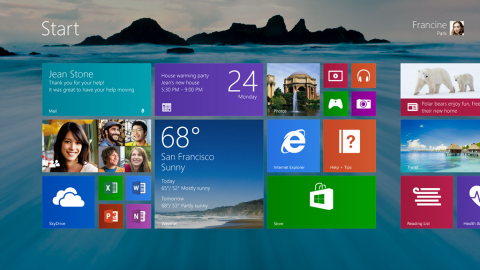
Microsoft は YouTube に動画をアップロードし、今年後半に無料アップデートとして Windows 8 の顧客向けに提供される Windows 8.1 のハイライトを紹介しています。
windows8.1

顧客のフィードバックとWindows 8 の使用方法から学び、Microsoft は次期Windows 8.1 アップデートで多数の新機能と強化を追加しました。以下は期待できる機能の一部です:

  • ロックスクリーンは、PC、Skydrive、または Windows Phone から取得した画像を表示するクラウド対応のフォトフレームになりました。
  • 新しいタイルサイズ。タイルサイズは、より効率的なスタート画面のために大きくしたり小さくしたりできます。
  • 改良された「すべてのアプリ」画面。スタート画面から上にスワイプすると、PC にインストールされているすべてのアプリの一覧が表示されます。
  • 新しいパーソナライズオプション。Windows テーマ用に、より幅広い色から選択できるようになりました。
  • Motion Accents - スワイプすると動くアニメーションスタート画面壁紙(Sony Xperia のアニメーション壁紙に似ています)。
  • デスクトップモードにスタートボタンが復活しました。
  • 新しい Windows 検索機能により、PC とウェブ上のすべてを一つの場所にまとめた、よりキュレーションされたアプリのような体験が可能になります。
  • Skydrive の統合が改善されました。
  • マルチタスク体験が向上し、画面上に最大 4 つのアプリを同時に表示できます。

上記の機能をよりよく理解するために、以下のビデオをご覧ください。

https://www.youtube.com/watch?v=VQb5caeSo00

Windows 8.1 を試したい方は、Microsoft が 6 月 26 日に OS のプレビュー版をリリースします。

React to this article:
Written by
Diangson Louie

This article was written by Louie Diangson, Managing Editor of YugaTech. You can follow him at @John_Louie.

View all posts by Diangson Louie →

16 Comments

CR
Cris · 13 years ago

Hi,
Any reviews on the all in one desktops in the market today with the huge touch screens? Looking for one actually for the home office. TIA!

Reply
JU
Justin · 13 years ago

A question from a (still) Windows 7 user: So if I installed Windows 8, and MS releases 8.1, will my OS get the update automatically, for free, via Windows Updates, perhaps? Or do I have to pay MS again for the 8.1 update?

Reply
JU
Justin · 13 years ago

Ah… nevermind. I just saw my answer on the 1st paragraph.

EM
emansky · 13 years ago

I personally love Windows 8. I have no problem with it.. and this just made it better :)

Reply
BO
BON · 13 years ago

nice move microsoft!

Reply
MI
Mica · 13 years ago

I really think WIndows 8 has potential. Looking forward to this update!

Reply
LO
lockon · 13 years ago

Is that the start button at 2:12?

Reply
QU
Quacker · 13 years ago

Interesting, they brought back the Start button on Desktop

Reply

Leave a Reply

Loading next article...