

もし、従来のハードディスクをどこにでも接続して使用しなければならないという制約なく、自宅やオフィス内のあらゆる場所でアクセスできるハードドライブをお望みであれば、NAS(ネットワークアタッチドストレージ)が最適です。NASを使用すると、お手持ちのスマートデバイスで自宅やオフィスのネットワークからいつでもハードドライブにアクセスできるようになります。
NAS の主な目的は、すべてのデバイスがアクセスできる集中型ストレージデバイスを提供し、お互いにファイルを共有できるようにすることです。これはオフィス文書や家族の動画・写真など何でも含まれます。NAS により、家庭内やオフィス内で誰もが簡単にファイルを共有できるようになります。
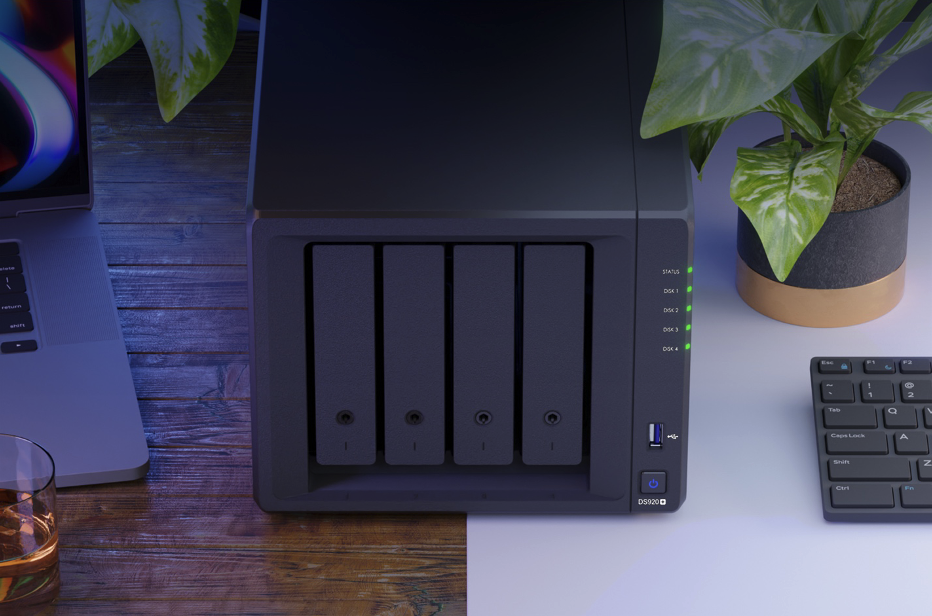
NAS セットアップ、DiskStation Manager 7.0 の使いやすさ
NAS ドライブを使えば頭が痛くなり、使いにくいものだとお考えなら、それは全くの誤りです!技術に詳しくない方でも、NAS を購入して自宅やオフィスで簡単にセットアップできます。
Synology NAS システムは非常に使いやすく、物理的なセットアップも極めて簡単です。電源コード、イーサネットケーブル、ドライブマウント用ネジがあればそれで十分です。ハードディスクをマウントにネジ止めして NAS 本体に挿入し、電源を入れてルーターに接続するだけで、ハードウェア面での準備は完了します。
ご自宅やオフィスで最高の NAS エクスペリエンスと最も使いやすい NAS エクスペリエンスをお求めなら、Synology DiskStation Manager 7.0 を選ぶことに間違いはありません。この新バージョンは、より洗練されモダンな外観を持つ全く新しいビジュアルデザインを搭載しています。DSM 7.0 は、Web ポータルに新しくクリーンでユーザーフレンドリーなデザインを導入しました。アイコンはより現代的になり、Web ポータルの全体的なビジュアルデザインも非常に理解しやすいものとなっています。これは以前のバージョンからの大きなアップグレードです。すべての機能がワンクリックでアクセスできる、非常にモダンなプログラムという印象を受けます。これにより、DiskStation Manager 7.0 は、技術に詳しくない方から詳しい方まで、両者に最適なスタートポイントとなります。必要な機能を探すために、アプリ内で細かくいじる必要はほとんどありません。
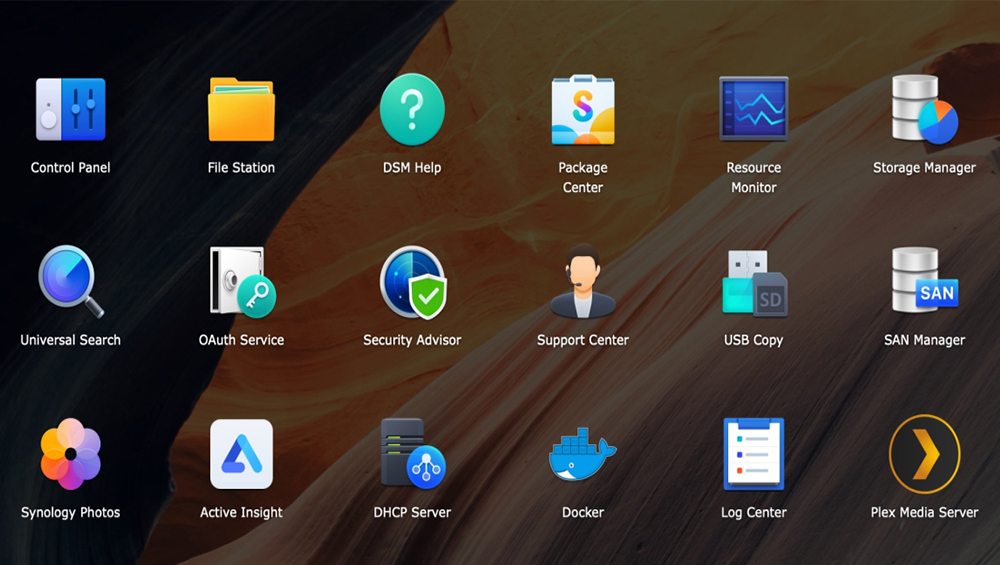
新しいストレージマネージャーは、NAS の管理を格段に容易にします。誰でも直感的に操作できる使いやすいインターフェースを採用しており、ユーザーはハードドライブの残容量を確認したり、ボリュームを作成したり、SSDキャッシュの状態をチェックしたりできます。また、故障が予兆のあるドライブがある場合は警告し、新しいハードドライブへの交換後にはバックアップを支援し、クローンへ切り替えるサポートも行います。

DiskStation Manager 7.0 をSynology NAS で使用すれば、これらすべてがあなたの手のひらの中にあります。(DSM 7.0 について詳しくはこちら: https://sy.to/zyj8d)
なぜネットワークストレージは自宅やオフィスで重要なのか?
1. ネットワーク内のどこからでも、遠隔地からもデータにアクセス可能
NASを使用すれば、同じWi-Fiに接続されている限り、ご家族やオフィスの方々がネットワーク内のどこからでもドライブにアクセスできます。これにより、写真、動画、作業文書など、あらゆるファイルをオフィスや家庭で簡単に共有できるようになります。特に在宅勤務期間中には、NASがこのプロセスを効率化し、誰もが互いに素早く共有できるようにします。
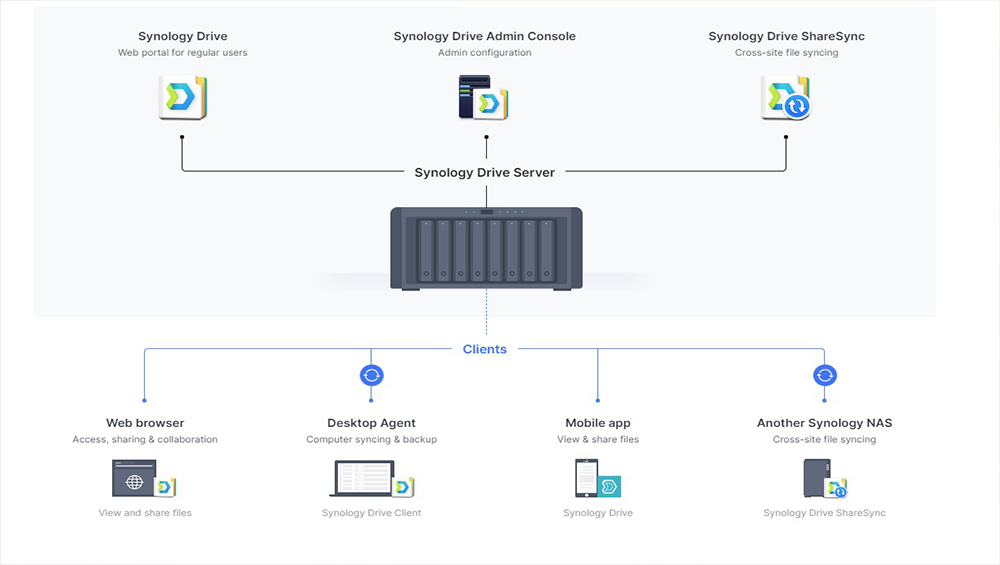
これにより、ファイルの共有に限定されず、動画や写真をほとんどのスマートデバイスにキャストすることも可能です。スマートデバイスで再生したい映画がある場合、NAS を使用すれば、そのファイルにアクセスできるため、デバイスを物理的なハードドライブに接続して再生する必要がなくなります。
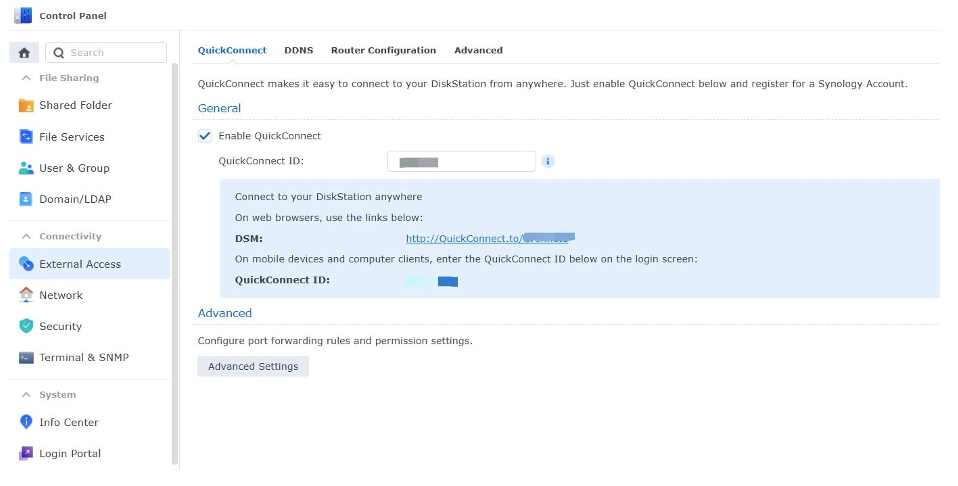
NAS の素晴らしい点の一つは、すべてのモデルがリモートアクセスに対応していることです。つまり、別のネットワークからでも、あるいは外出先からでもファイルにアクセスできます。これにより、世界中のどこからでも NAS 内の重要なファイルにアクセス可能です。DiskStation 7.0 では、QuickConnect を使用してシステムを設定するだけで、さらに簡単に利用できるようになります。つまり、自宅でファイルを忘れた場合でも、ブラウザを通じて Web ポータルにアクセスし、詳細を入力するだけで、PC を起動していなくても自宅やオフィスの NAS にアクセスできます。
2. ストレージ容量を増加させます
NAS の素晴らしい点は、他の外部または内部ハードドライブと同様に、自宅のストレージ容量を増やせることです。さらに優れた点は、オフィスと自宅のすべての人のストレージが増加することです。NAS を利用すれば、プライバシー機能が多数備わっているため、家庭やオフィスのために追加されたテラバイト級のメモリを共有でき、誰もが NAS 内に独自のスペースを持つことができます。

スマートフォンやラップトップのストレージでは不十分であることは誰もが知っています。また、多くの人が写真や動画を削除することに抵抗を感じており、それらをすべて思い出として保存したいと考えています。NAS はその課題を解決し、DiskStation Manager 7.0 は写真を整理することも可能です!広範なフィルターオプションにより、日付、カメラモデル、その他のパラメータによる検索機能を使って、写真などのファイルを検索できます。また、これらのデバイスに格納されている貴重な思い出のバックアップを検討している場合も、モバイルデバイスから NAS にアクセスすることが可能です。

3. データのバックアップ
あらゆる種類のデータの喪失は、オフィス機能を麻痺させることがあります。自宅では、長年蓄えてきた思い出がウイルスによって失われたり、外部ハードドライブを適切に取り出さなかったりすることで失われる可能性があります。データ喪失には多くの要因が関与します。Synology NAS ドライブを使用すれば、データを簡単にバックアップできると同時に、データ喪失を防ぐことができます。

Built-in backup アプリケーションに加え、Synology などの NAS ドライブ内の RAID システムは、データを複数のドライブに複製してデータ損失から保護します。1 つのハードディスクが故障した場合でも、もう一方のドライブにはファイルの完全なコピーが用意されているため、データを失うことはありません。
4. マルチメディアとオフィスファイルの共有が容易に
自宅にすべてのファイルを保存するハブを持つことは素晴らしいことです。まるで自宅で自分だけのNetflixを持っているようなものです!
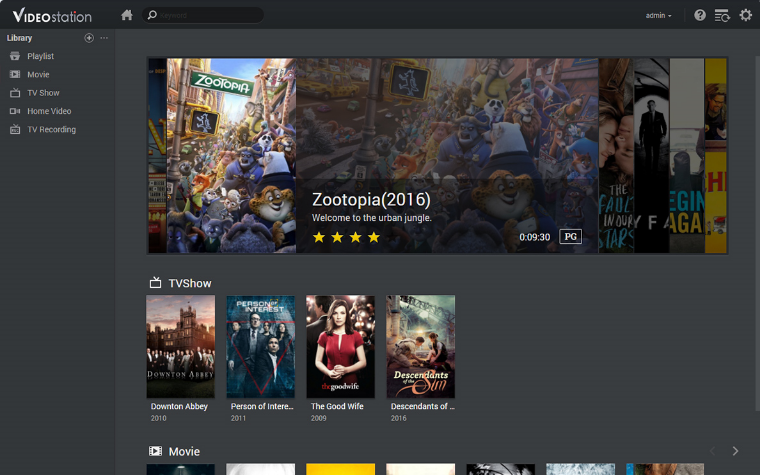
5. データの所有権は極めて重要である
NAS は、家庭および企業向けのオンプレミス型ストレージソリューションです。このデバイスに保存されるデータは、ユーザー自身が所有するため安全です。サードパーティのパブリッククラウドプロバイダーは、ユーザーが許可した場合にのみクラウドデータへのアクセス権限を得ることができますが、NAS にはそのような問題はありません。
どのNASを購入すべきですか?
DiskStation DS220j
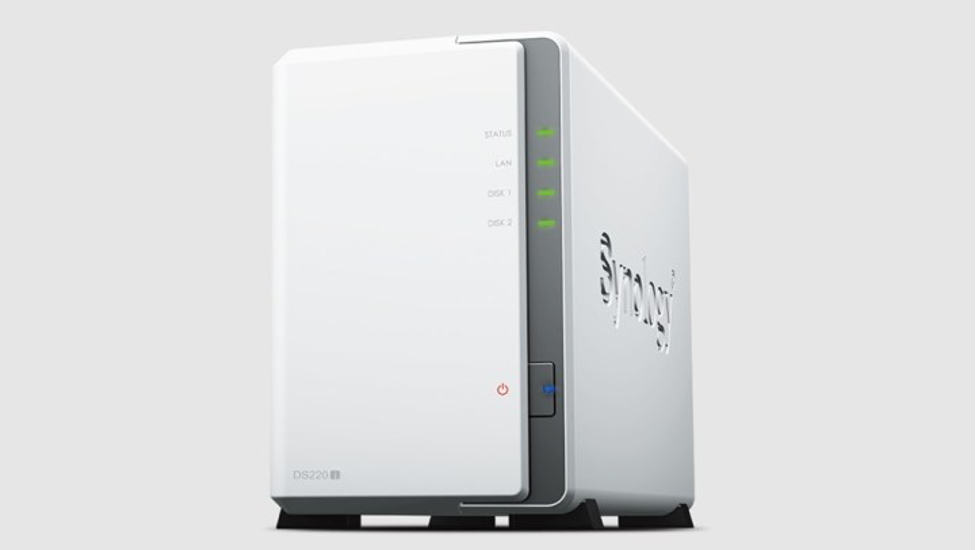
The DS220j is the entry-level NAS designed for home and personal use. This is perfect for storing your photos, videos, and documents. A very efficient 2 bay NAS system that can be the centralized backup solution for all your digital services and devices. Compatible with any OS, from Windows or Mac to Android and iOS. This NAS is designed to protect your digital assets like photos and videos from malicious online threats.
You can turn your DS220j into a streaming hub. Access your files and content from your computer and stream them directly to your TV or mobile devices. Compatible with Samsung TV, Apple TV, Google Chromecast, and DLNA devices, you surely will take your home entertainment to the next level.
DiskStation DS220+

If you need something more powerful, then the DS220+ is for you. Designed to streamline your data and multimedia management, it features smooth data sharing, video streaming, and photo indexing, as well as well-rounded data protection and recovery options.
It has a powerful Intel CPU that speeds up computing-intensive applications. Access your files faster with its 2-core processor. You can access your multimedia content anytime with the DS220+ using features such as Audio Station, designed to intelligently sort and organize your personal audio files and is able to stream to your devices. Video Station lets you easily manage and organize your home videos and movies and stream the content to your mobile devices as well. The DS220+ is 17% faster than its predecessor and features two RJ-45 1 gigabit ethernet ports for faster transfer of files within your network. RAID 1 setup protects against sudden drive failure and offers an easy setup for your NAS drive.
DiskStation DS920+
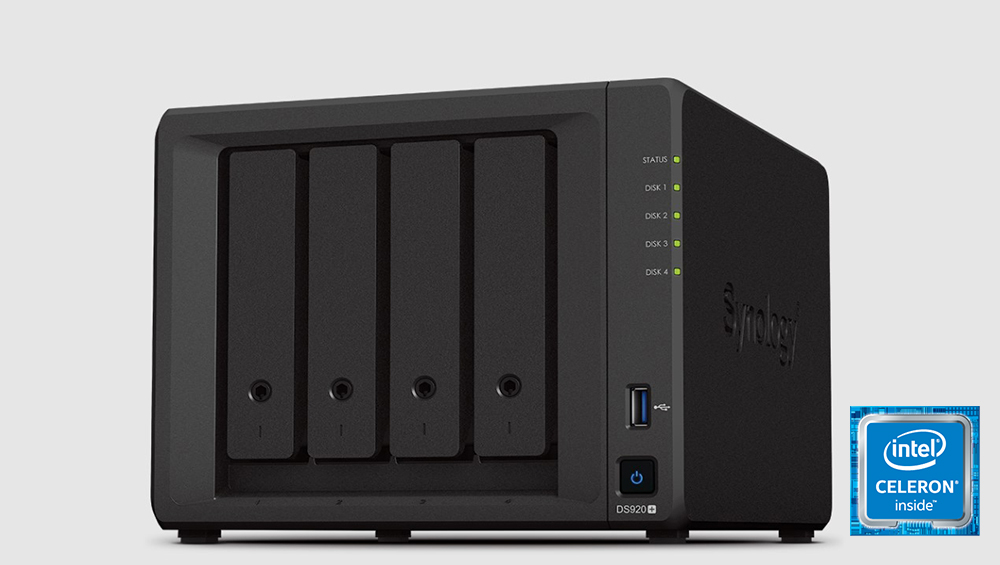
Files need to be shared in an office quickly for more productivity. This NAS can handle all your file sharing and storing needs for your office. If you need something fast and could store more hard drives for your office then the DS920+ is for you. The DS920+ offers 4 drive bays for your hard drives as well as 2 super-fast NVMe SSD slots. These NVMe slots add SSD cache for up to 20 times faster response without using the main front drive bays. The DS920+ is compatible with Synology Office. This is a collaboration package combining the convenience and usability of public clouds with the data privacy and security guaranteed by private clouds. You can share documents, spreadsheets, and more in a secure and protected environment.
There’s also the Virtual Machine Manager that allows you to test new software, isolate customers’ machines and increase the flexibility of your server. You can easily run different operating systems on your Synology NAS in just a few steps. The 4-core 2.0 GHz Intel CPU makes everything speedy on the DS920+ NAS that is surely a big boost to the productivity of your office. This is perfect for PC backups and for an office that needs to seamlessly share files with each other.
No matter the model you choose between the Synology NAS drives, you are getting a product that will definitely speed up productivity in your home or your workplace. The fact that you can also now store your precious photos and videos easily using the NAS while having the peace of mind that these files are secure and protected makes owning one worth it. Whether you buy one for your home for personal use or at work for productivity, having a Synology NAS is not just a want these days but a definite need.
To learn more, check out Synology Official Store on LAZADA and Shopee, or find local authorized stores here.







0 Comments
Leave a Reply