

如果您一直希望拥有一款硬盘,让您在家中或办公室的任何位置都能访问,而无需像传统硬盘那样到处插拔才能使用,那么NAS(网络附加存储)正是您的理想选择。NAS可将您的硬盘接入网络,让您通过家中或办公室的任何智能设备进行访问。
NAS 的主要目的是为您提供一个集中式存储设备,让所有设备都能访问该 NAS 以相互共享文件。这些文件可以是办公文档、家庭视频或照片等。NAS 使得在家庭或办公室内共享文件变得更加便捷。
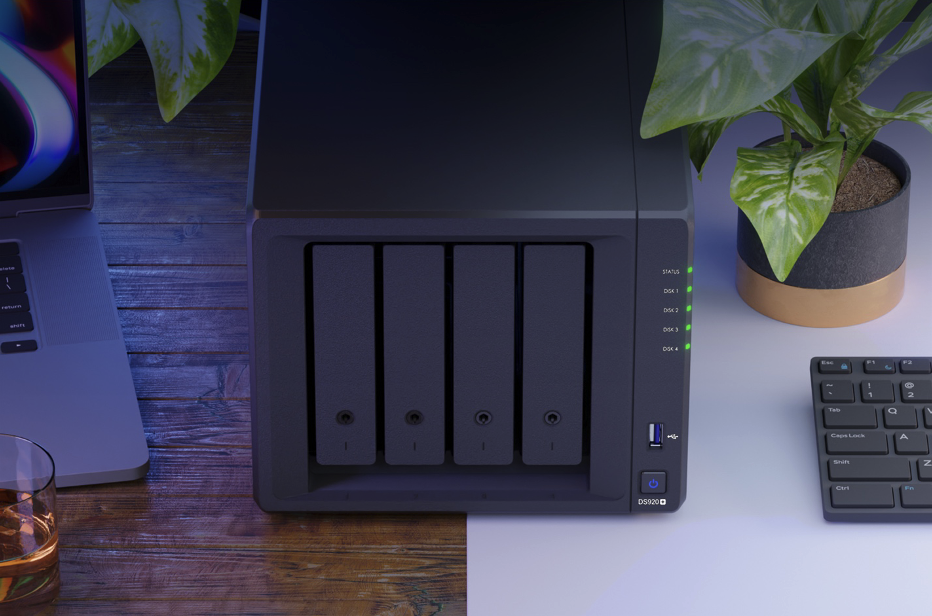
NAS 设置与 DiskStation Manager 7.0 的易用性
如果您认为拥有NAS驱动器会令人头疼且难以使用,那您就完全错了!即使是不太懂技术的用户也能轻松购买NAS并为其家庭或办公室进行设置。
Synology NAS 系统非常易于使用。在物理层面,其设置非常简单:只需一根电源线、一根以太网线、硬盘安装螺丝即可!您只需要将硬盘拧入支架并装入 NAS,接通电源,然后将其连接到路由器,硬件方面便已准备就绪。
如果您希望为您的家庭或办公室获得最佳的 NAS 体验以及最便捷的 NAS 体验,那么选择 Synology DiskStation Manager 7.0 绝不会错。此新版本采用了全新的视觉设计,外观更加时尚现代。DSM 7.0 在其 Web 门户中引入了全新简洁且用户友好的设计。图标更为现代化,整个 Web 门户的视觉效果也极易理解。相比以往版本,这是一次重大升级。它感觉像是一个非常现代的程序,所有功能只需点击一下即可访问。这使得 DiskStation Manager 7.0 成为技术爱好者和非技术用户的完美起点。在应用中查找所需内容时,无需进行繁琐的操作。
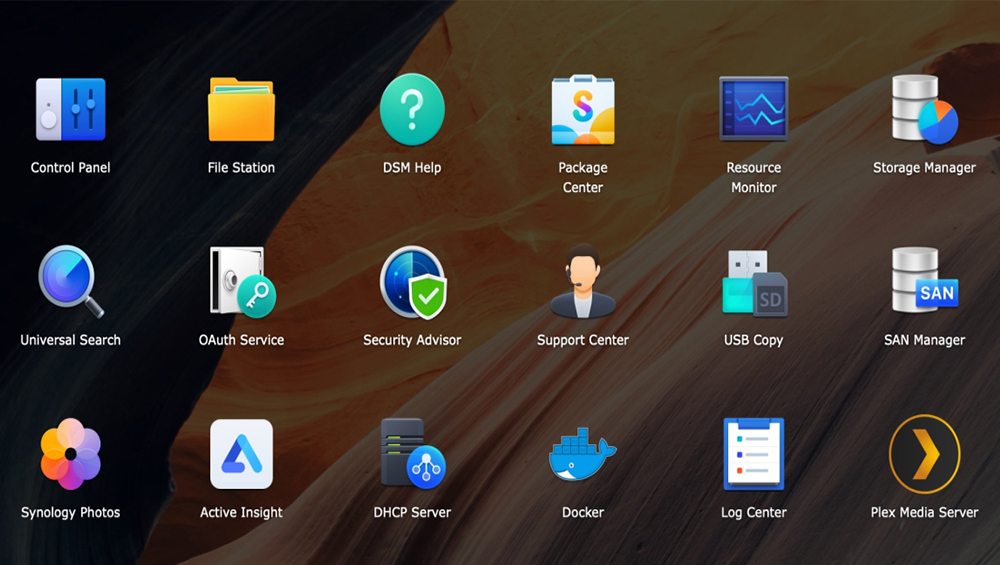
全新的存储管理器将使您管理 NAS 变得更加轻松。它采用直观易懂的界面,任何人都能轻松管理自己的 NAS。用户可以查看硬盘剩余存储空间、创建卷并检查 SSD 缓存。此外,若检测到故障硬盘,系统会发出警告,并在更换新硬盘后协助您进行备份并切换至克隆盘。

使用Synology NAS中的DiskStation Manager 7.0,您将获得这一切及更多功能。(了解更多关于DSM 7.0的信息:https://sy.to/zyj8d)
为什么网络存储对您的家庭或办公室很重要?
1. 随时随地访问您网络内的数据并实现远程访问
NAS 允许您和家人或办公室成员在连接到同一 Wi-Fi 的情况下,随时通过您的网络访问驱动器。这使得家庭和办公场所能够轻松共享文件,无论是照片、视频、工作文档还是其他任何内容;特别是在居家办公期间,NAS 简化了这一流程,让每个人都能更快速地相互共享。
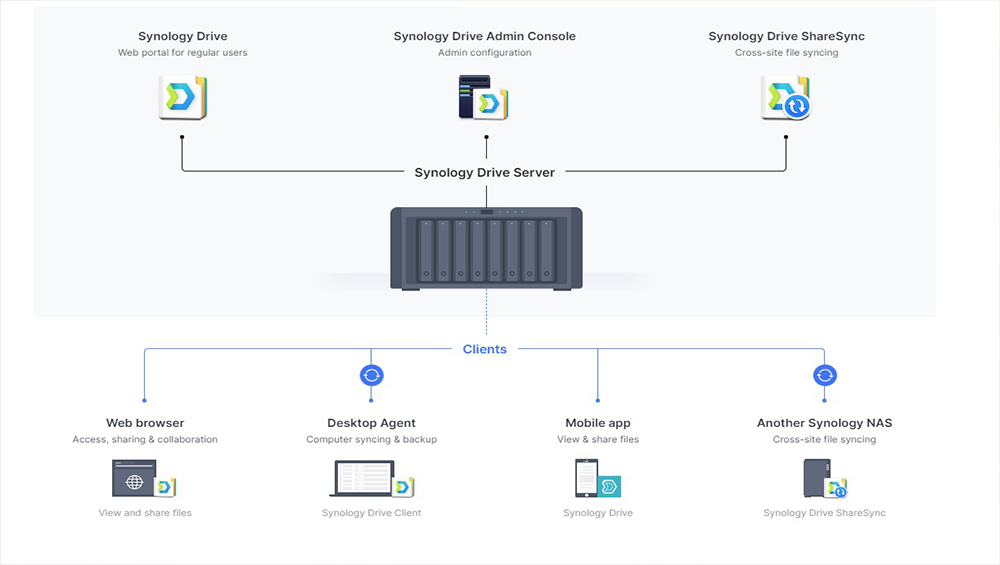
这不仅限于文件共享,您还可以将视频和照片投射到大多数智能设备上。如果您想在智能设备上播放电影,NAS 允许您直接访问该文件,而无需在设备上连接物理硬盘即可进行播放。
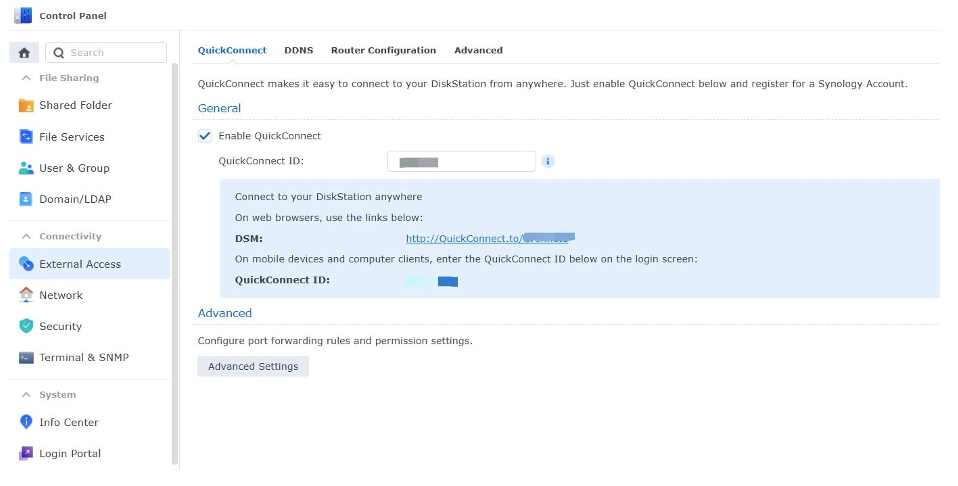
NAS 的一大优势在于所有型号均支持远程访问。这意味着您即使在另一个网络或身处异地,也能访问您的文件。这使得您可以随时随地从全球任何地方访问 NAS 中的重要文件。借助 DiskStation 7.0,设置变得更加简便,只需使用 QuickConnect 即可完成系统配置。因此,如果您在家忘记携带某份文件,只需通过浏览器访问网页门户并输入相关信息,即可立即访问家中或办公室的 NAS,而无需开启您的电脑。
2. 增加您的存储空间
NAS 的一大优势在于,它如同任何其他外部或内部硬盘一样,能够增加您家中的存储容量。其最佳之处在于,办公室和家中的每个人的存储空间都能得到提升。借助 NAS,您可以与家庭或办公室成员共享新增的数 TB 内存,同时得益于众多隐私功能,每个人都能在 NAS 内拥有自己的专属空间。

我们都知道,智能手机或笔记本电脑的存储空间往往不够用。许多人也不愿删除照片或视频,因为希望将所有内容作为回忆保存下来。NAS 可以解决这一问题,而 DiskStation Manager 7.0 还能帮助您整理照片!丰富的筛选选项让您能够通过日期、相机型号及其他参数搜索照片等文件。此外,您还可以通过移动设备访问 NAS,以便随时备份其中珍贵的回忆。

3. 数据备份
任何类型的数据丢失都可能使办公室陷入瘫痪。在家中,数据丢失可能导致您多年来积累的珍贵记忆因病毒入侵或未能正确取出外接硬盘而永久消失。在数据丢失方面,存在诸多影响因素。Synology NAS 驱动器可让您轻松备份数据,同时有效防止数据丢失的发生。

除了内置备份应用程序外,Synology 等 NAS 设备中的 RAID 系统会将您的数据复制到多个硬盘中,以防止数据丢失。如果一块硬盘发生故障或损坏,另一块硬盘将立即提供您文件的完整副本,确保您不会丢失任何数据。
4. 轻松共享多媒体和办公文件
在家中拥有一个存储所有文件的中心枢纽是一件很棒的事情。这就像在家里拥有自己的专属Netflix!
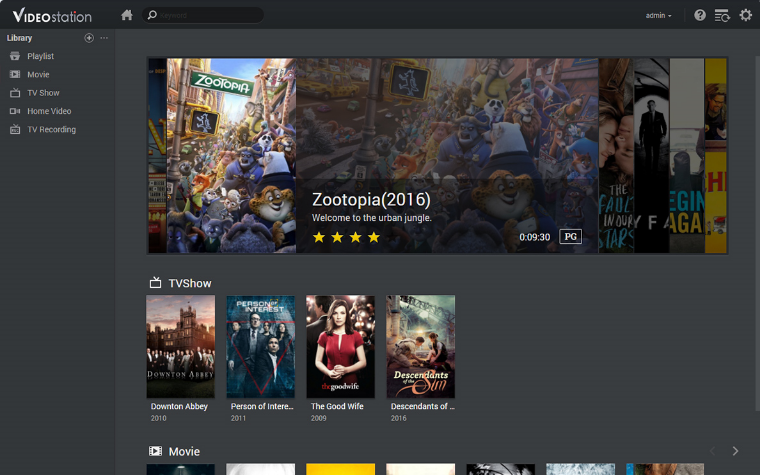
办公室也能从NAS中受益,项目间的文件共享将变得轻而易举。无需依赖受网速影响的云服务即可高效完成任务,协作因此变得更加轻松。NAS文件共享速度极快,只要NAS内部的硬盘存有您正在共享的文件,便无任何容量限制。对于需要共享< a class="wpil_keyword_link" href="/tag/gigabyte/" title="gigabyte" data-wpil-keyword-link="linked" data-wpil-monitor-id="416">GB级别文件的媒体公司而言,NAS也能在同事之间以极快的速度传输这些文件。
5. 数据所有权至关重要
NAS 是面向家庭和企业用户的本地存储解决方案。存储在该设备中的数据安全可靠,因为数据由您自行拥有。第三方公共云提供商在获得用户授权的情况下可能访问您的云端数据,而 NAS 则不存在此类问题。
您应该选择哪款NAS?
DiskStation DS220j
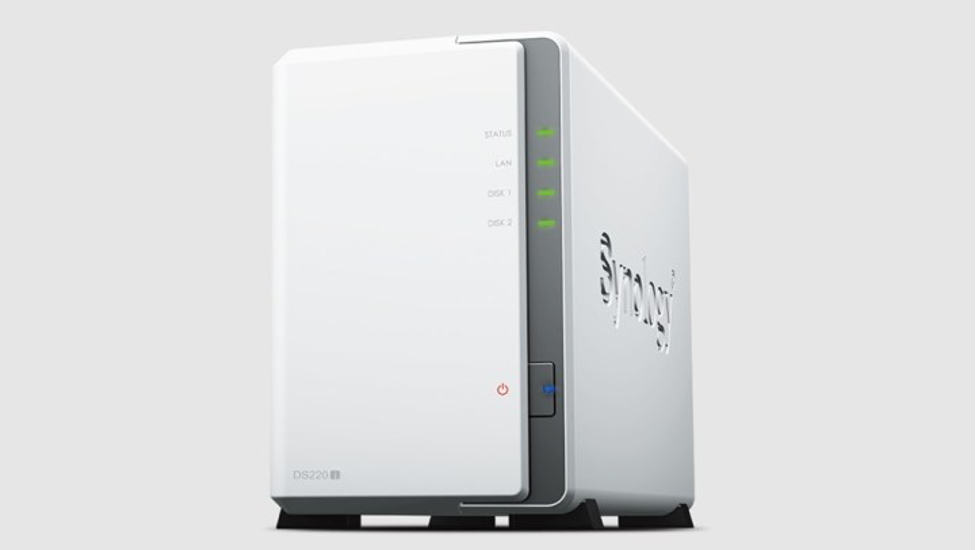
The DS220j is the entry-level NAS designed for home and personal use. This is perfect for storing your photos, videos, and documents. A very efficient 2 bay NAS system that can be the centralized backup solution for all your digital services and devices. Compatible with any OS, from Windows or Mac to Android and iOS. This NAS is designed to protect your digital assets like photos and videos from malicious online threats.
You can turn your DS220j into a streaming hub. Access your files and content from your computer and stream them directly to your TV or mobile devices. Compatible with Samsung TV, Apple TV, Google Chromecast, and DLNA devices, you surely will take your home entertainment to the next level.
DiskStation DS220+

If you need something more powerful, then the DS220+ is for you. Designed to streamline your data and multimedia management, it features smooth data sharing, video streaming, and photo indexing, as well as well-rounded data protection and recovery options.
It has a powerful Intel CPU that speeds up computing-intensive applications. Access your files faster with its 2-core processor. You can access your multimedia content anytime with the DS220+ using features such as Audio Station, designed to intelligently sort and organize your personal audio files and is able to stream to your devices. Video Station lets you easily manage and organize your home videos and movies and stream the content to your mobile devices as well. The DS220+ is 17% faster than its predecessor and features two RJ-45 1 gigabit ethernet ports for faster transfer of files within your network. RAID 1 setup protects against sudden drive failure and offers an easy setup for your NAS drive.
DiskStation DS920+
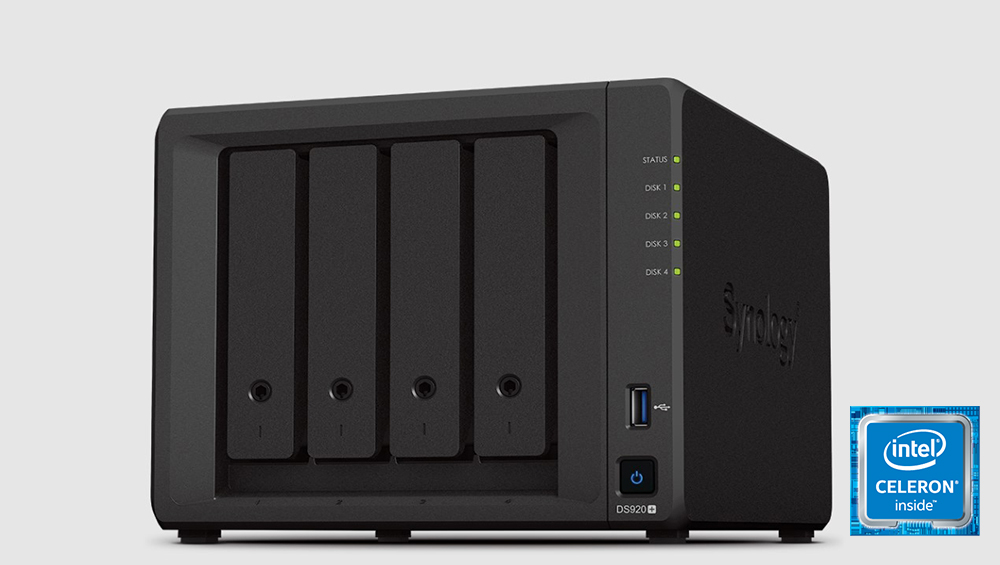
Files need to be shared in an office quickly for more productivity. This NAS can handle all your file sharing and storing needs for your office. If you need something fast and could store more hard drives for your office then the DS920+ is for you. The DS920+ offers 4 drive bays for your hard drives as well as 2 super-fast NVMe SSD slots. These NVMe slots add SSD cache for up to 20 times faster response without using the main front drive bays. The DS920+ is compatible with Synology Office. This is a collaboration package combining the convenience and usability of public clouds with the data privacy and security guaranteed by private clouds. You can share documents, spreadsheets, and more in a secure and protected environment.
There’s also the Virtual Machine Manager that allows you to test new software, isolate customers’ machines and increase the flexibility of your server. You can easily run different operating systems on your Synology NAS in just a few steps. The 4-core 2.0 GHz Intel CPU makes everything speedy on the DS920+ NAS that is surely a big boost to the productivity of your office. This is perfect for PC backups and for an office that needs to seamlessly share files with each other.
No matter the model you choose between the Synology NAS drives, you are getting a product that will definitely speed up productivity in your home or your workplace. The fact that you can also now store your precious photos and videos easily using the NAS while having the peace of mind that these files are secure and protected makes owning one worth it. Whether you buy one for your home for personal use or at work for productivity, having a Synology NAS is not just a want these days but a definite need.
To learn more, check out Synology Official Store on LAZADA and Shopee, or find local authorized stores here.







0 Comments
Leave a Reply