infinix x yugatech

Use DUALSHOCK 3 on your Xperia device

Listen to article

여러분 중에 이 사실을 모르는 분도 있겠지만, Sony DUALSHOCK 3 컨트롤러를 Android 4.2를 실행하는 일부 Xperia 기기에서 실제로 사용할 수 있습니다. 흥미롭나요? 휴식 시간 이후에 바로 그 방법을 보여드리겠습니다.

dualshock 3 xperia

먼저, 이 기능을 지원하는 Sony Xperia 기기 목록은 다음과 같습니다:

Sony Xperia SP (C5302/C5303/C5306)
Sony Xperia Z (C6602/C6603)
Sony Xperia ZL (C6502/C6503)
Sony Xperia Z1 (C6902/L39h/C6903/C6906/C6943)
Sony Xperia Z Ultra (C6806/C6833)
Sony Tablet S
Sony Xperia Tablet S
Sony Xperia Tablet Z (SO-03E/SGP311/SGP312/SGP321/SGP331)

이 모든 장치는 Android 4.2 이상에서 실행되는 경우 DUALSHOCK 3 컨트롤러를 지원합니다.

좋습니다, 이제 재미있는 부분이 시작됩니다. DUALSHOCK 3와 지원되는 Xperia 기기 외에 이 설정에 필요한 유일한 다른 것은 USB OTG(On-The-Go) 케이블입니다. 초기 설정 시 기기와 컨트롤러 사이에 물리적 연결을 설정하기 위해 한 번만 필요합니다. 그 이후에는 연결을 Bluetooth를 통해 무선으로 할 수 있습니다.
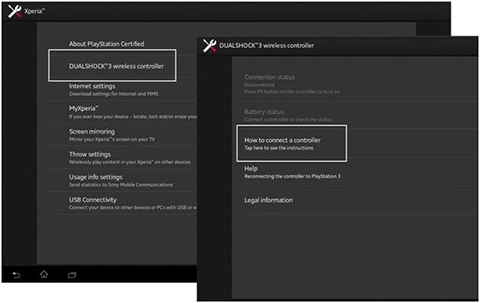
xperia dualshock 3

1. 지원되는 Xperia 기기에서 설정 > Xperia > DUALSHOCK 3 무선 컨트롤러(위 이미지 참조)로 이동합니다.
2. 메뉴에 들어가면 컨트롤러 연결 방법을 선택합니다. 다음 화면에서 USB OTG 케이블을 사용해 컨트롤러를 Xperia에 유선으로 연결하라는 안내가 표시됩니다.

dualshock 3 setup

3. 컨트롤러를 감지한 후, 무선으로 사용하려면 핸드셋/태블릿에서 연결을 끊으라는 메시지가 표시됩니다. 이 과정에서 기기의 Bluetooth가 활성화됩니다.
4. ‘완료’를 누르면 준비가 끝납니다!

다시 말하지만, 컨트롤러를 Xperia와 동기화하려고 할 때마다 USB OTG가 필요하지 않습니다. 초기 설정을 마치면 Xperia 기기에서 Bluetooth를 켜고, 컨트롤러의 PS 버튼을 길게 누르면 자동으로 페어링됩니다.

하지만 모든 앱이 Sony DUALSHOCK 3 컨트롤러와 호환되는 것은 아닙니다. 따라서 해당 앱이 지원되는지 여부를 확인하려면 Google Play Store에서 앱 상세 정보를 확인하는 것이 좋습니다.

출처 1, 2

Frequently Asked Questions

Which Sony Xperia devices support the DUALSHOCK 3 controller?
Supported devices include Xperia SP, Z, ZL, Z1, Z Ultra, Tablet S, Tablet S, and Tablet Z, running Android 4.2 or higher.
What additional accessory is needed for initial setup?
A USB OTG (On-The-Go) cable is required to establish a physical connection between the device and controller during initial setup.
How do you set up the DUALSHOCK 3 controller on an Xperia device?
Go to Settings > Xperia > DUALSHOCK 3 wireless controller, select How to connect, and hardwire the controller via USB OTG.
React to this article:
Written by
Ronnie Bulaong

This article was written by Ronnie Bulaong, a special features contributor and correspondent for YugaTech. Follow him on Twitter @turonbulaong.

View all posts by Ronnie Bulaong →

14 Comments

GO
GoodGame Empire · 13 years ago

GoodGame Empire Hack Is a great hack tool. GoodGame Empire
Hack Tool it`s very easy to use, you can generate whit this hack tool unlimited Rubbies,Coins and Wood.

Reply
BR
brylle anthony · 13 years ago

other Android phones can still use Dualshock 3 not justxexperia and as long as it is so rooted..using sixaxis app

Reply
WE
wew · 13 years ago

okay to gamitin lalo na pag ang gamit ay tablet :-)

Reply
KC
KCDMangune · 13 years ago

“provided that it’s running on Android 4.2 and up.”

You need to correct this sir. Xperia SP is still on 4.1.2 but then compatible with Dualschock 3 controller. I have SP and yes Dualshock 3 is working with it.

Reply
JO
Jolrael · 13 years ago

i’ve seen some video of pairing ung xperia smartphone with a ps3 controller and they say that you have to root your phone.. any clarifications on this?!

Reply
JU
june · 13 years ago

Nope, its already preinstalled the compatibility of ps3 dual shock contoller. Maybe for some older devices that it is not supported. Modding ur unit will really force u to root it just to have ur unit installed the program.

RA
raylgo · 13 years ago

Using other apps (SixAxis Controller comes to mind) to pair the PS3 controller to Android devices requires root access. This topic is about using the Ps3 Controller on Xperia devices without using other apps.

Leave a Reply

Loading next article...