infinix x yugatech

DLNA가 정확히 무엇인가요?

Listen to article

우리는 이미 그것에 대해 들어봤습니다. 스마트폰 박스에 로고를 본 적이 있을 텐데, 실제로 이 멋진 기능을 사용해 본 사람은 몇 안 됩니다. 그렇다면 DLNA는 정확히 무엇일까요?


DLNA 는 Digital Living Network Alliance의 약자입니다. 이는 소니가 거의 10년 전에 설립한 협업 조직으로, 단일 네트워크에 연결된 다양한 장치들 간의 상호 운용성을 가능하게 하는 일련의 가이드라인을 제공합니다. 영어로는 이 기술의 주요 목적이 동일한 네트워크에 있는 두 대의 DLNA 인증 장치 간에 콘텐츠 스트리밍을 가능하게 하는 것입니다.
DLNA

디바이스가 인증되었는지 어떻게 알 수 있나요? 가장 빠른 방법은 박스를 확인하는 것입니다. 디바이스가 인증된 경우 위 이미지와 같은 로고가 표시됩니다. 만약 박스를 더 이상 구할 수 없는 경우, Google 디바이스 사양을 확인하고 인증 여부를 확인할 수 있습니다. 모든 방법이 실패하면, 제품을 구매한 소매점에 문의해 보세요. 소매점도 모를 가능성이 크지만 시도해 볼 가치가 있습니다.

그렇다면 어떻게 작동할까요? Wikipedia.org에 따르면 DLNA는 미디어 관리, 검색 및 제어를 위해 UPnP(Universal Plug n Play) 프로토콜을 사용합니다. 이 프로토콜은 또한 장치를 서버, 렌더러, 컨트롤러의 세 가지 유형으로 구분합니다. 역할이 정의되면 장치들이 서로 원활하게 작동하기가 쉬워집니다.
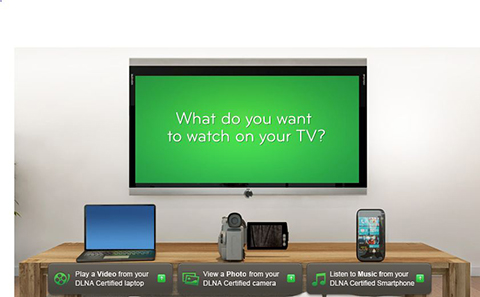
DLNA1

DLNA 인증 장치에는 세 가지 주요 분류만 있지만, 장치가 다른 장치와 상호 작용하는 방식을 정의하는 12개의 하위 카테고리가 있습니다. 그렇다고 해서 모든 서버, 렌더러 및 컨트롤러가 동일하게 작동하는 것은 아닙니다. 이러한 하위 카테고리를 더 잘 이해하려면 기사를 읽어 보세요.

Now here’s the fun part. We’ll show how to use your DLNA-certified smartphone to wirelessly stream media to your PC. The first thing you need to have is a network connection to bridge the two devices. The connection can either be wired or wireless, but since we’re using a smartphone it needs to be a wireless router.

Once the two devices are linked to the same network, you need to go to the Windows Media Player. We’re not sure if all WMP supports this feature, but for this demo we’ve used Windows Media Player 12. Click on Stream then put a check mark on Allow remote control of my Player.
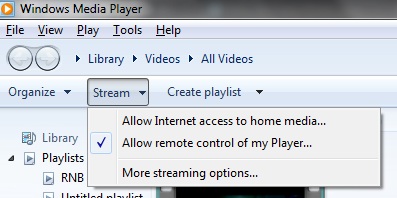
WMP

우리는 여기서 Galaxy Note를 예시로 사용하고 있지만, DLNA 인증을 받았거나 이를 지원하는 앱이 있는 다른 기기도 사용할 수 있습니다. 휴대폰에서 AllShare 앱을 열고 PC를 감지할 때까지 기다리세요. PC가 감지되면 스마트폰에 저장된 지원 파일 형식을 PC로 스트리밍할 수 있습니다. 기기가 PC를 감지하는 데 문제가 있다면 WMP12를 다시 열거나 PC를 재시작해 보세요.
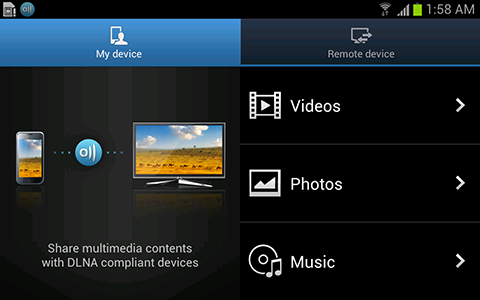
AllShare

보시다시피, DLNA 인증 스마트폰에서 PC로 스트리밍하는 것은 꽤 쉽습니다. 하지만 모든 파일 형식이 DLNA에서 지원되는 것은 아니며 따라서 스트리밍할 수 없습니다. 다음은 지원되는 파일 형식 목록입니다.

• 비디오 코덱: MPEG 1 (.mpg, .mpe 및 .mpeg), AVC MPEG4 part10 (.m2ts, .mts 및 .MP4), DivX Home Theater Profile3.0 (.divx 및 .avi), WMV (.asf 및 .wmv).
• 오디오 코덱: AAC (.mp4 및 .m4a), LPCM (.wav), MP3, WMA
• 이미지 코덱: JPEG (.jpg 및 .mpo) PNG

자, 여러분, 이제 스마트폰에서 DLNA를 이용해 디지털 콘텐츠를 PC로 스트리밍하는 것이 얼마나 쉬운지 알게 되셨습니다. 이미 몇 년 전 이 기능을 사용해 보신 분들도 계시겠지만, 모든 분이 여러분만큼 기술에 능숙하지는 않을 것이라 생각합니다. 아직 DLNA를 통해 콘텐츠 스트리밍을 시도해 보지 않으신 분들을 위해, 지금이라도 늦지 않았으니 한번 시도해 보세요.

설정 중에 문제가 발생했다면, 이 게시물에 댓글을 남겨 주세요. 도와드리겠습니다.

Frequently Asked Questions

What does DLNA stand for?
DLNA stands for Digital Living Network Alliance.
What is the main purpose of DLNA?
The main purpose is to enable content streaming between two DLNA-certified devices on the same network.
Which protocol does DLNA use for media management?
DLNA uses the UPnP protocol for media management.
React to this article:
Written by
Ronnie Bulaong

This article was written by Ronnie Bulaong, a special features contributor and correspondent for YugaTech. Follow him on Twitter @turonbulaong.

View all posts by Ronnie Bulaong →

30 Comments

WE
wes05 · 14 years ago

stupid. i’ve been using this for years. are you really a tech blog?

Reply
TO
Totem · 14 years ago

Sir, let me just quote a phrase from the article, “It’s a collaborative organization founded by Sony almost a DECADE ago..”

No one asked how long you have been using DLNA..
And I think you’re the one who’s stupid..

RI
Ric · 14 years ago

I tried using All Share and it’s asking me to create an account. Is this normal? My devices are connected via wifi so I dont think there is a need for creating an account with Samsung. Or am i missing something?

Reply
RO
Ronnie Bulaong · 14 years ago

What account are you being asked to create?

RI
Ric · 14 years ago

Samsung account is what’s on the top page. Do I really need to create one even if I just want to connect to WMP on my PC?

BTW, the app is called AllShare Play…if that makes a difference.

RO
Ronnie Bulaong · 14 years ago

Ahh… In that case, you do need to create a Samsung account. Because AllShare Play has other features (Web Storage, Group Cast, etc.) other than streaming contents over Wi-Fi unlike the simpler version of the app (AllShare).

I suggest to just create an account, anyway it’s free. Or if it’s possible, just download the regular AllShare app and install it on your device, which I assume to be an SGS3 or any of the new Galaxy Notes (2 or 10.1). Hope this helps.

RO
Ronnie Bulaong · 14 years ago

You can check the link below for more info about AllShare Play.

http://www.allshareplay.com/#

HI
HiERARCH · 14 years ago

Com’mon let’s accept the fact that we often read this DLNA thingy but not all of us is well educated with that stuff! This article and other how to’s and do’s is informative indeed.

Reply
ME
Mel · 14 years ago

Agree…

AR
ARL · 14 years ago

My Sony Internet TV, WDTV Live, Sony PS3, iPhone,iPad and my PC are all connected in one network.I usually stream movie files from my PC to directly to my TV but if codec is not available, my WDTV Live comes in handy, it can virtually support any type of codec, so does my PS3. to fully enjoy the movie on your LEDTV, better use HDMI ports to maximize all your devices. Just sharing.

Reply
JO
jong · 14 years ago

anO dw,.???

Reply
BO
boboy · 14 years ago

VLC player is doing this for years…

Reply
MA
Marcelo Techista · 14 years ago

Really? You can use VLC in your camcorder to stream to your compatible TV? As far as I know VLC for smartphone just came out within the last three years. The article is just trying to explain DLNA, so your comment on VLC is irrelevant

JE
jess · 14 years ago

Zzzzzzzzzzz…..

Reply
JA
James · 14 years ago

Finally, the use of AllShare! I thought this is for Samsung devices only.

Reply

Leave a Reply

Loading next article...