

HUAWEI MatePad 12 X (2026) Review



Starmobile announced on its facebook page the Up Vision, the more affordable version of the recently-released Knight Vision.
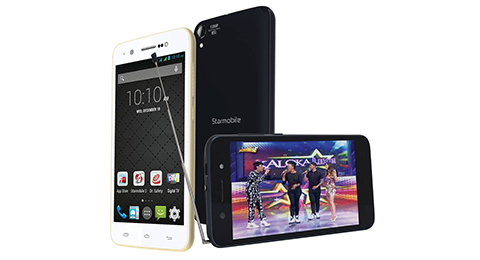
Like the Knight Vision, the Up Vision has an ISDB-T tuner built in, enabling you to watch free-to-air channels over digital terrestrial television signals. It also has a front camera flash for those selfie moments that need additional lighting.
Starmobile Up Vision specs:
4.7-inch HD IPS Display, 720 x 1280 Pixels, 312 ppi
1.3GHz Quad Core ARM Cortex-A7 CPU
Mali-400 MP2 GPU
1GB RAM
8GB 0nternal Storage
expandable Up to 32GB via MicroSD
13-megapixel BSI AF Sony rear camera with LED Flash, Blue Glass Filter
8-megapixel Samsung Front Camera with LED Flash
Dual-SIM, Dual Standby
3G HSPA+
Wi-Fi
Miracast, Chromecast Support
Bluetooth
GPS with A-GPS
FM Radio
Android 4.4 Kitkat
1,800mAh Li-ion Battery
137 x 68 x 8.1 mm, 137 g
The Starmobile Up Vision is now on sale for Php5,990.










Apple, Asus, Cherry Mobile, Huawei, LG, Nokia, Oppo, Samsung, Sony, Vivo, Xiaomi, Lenovo, Infinix Mobile, Pocophone, Honor, iPhone, OnePlus, Tecno, Realme, HTC, Gionee, Kata, IQ00, Redmi, Razer, CloudFone, Motorola, Panasonic, TCL, Wiko
Best Android smartphones between PHP 20,000 - 25,000
Smartphones under PHP 10,000 in the Philippines
Smartphones under PHP 12K Philippines
Best smartphones for kids under PHP 7,000
Smartphones under PHP 15,000 in the Philippines
Best Android smartphones between PHP 15,000 - 20,000
Smartphones under PHP 20,000 in the Philippines
Most affordable 5G phones in the Philippines under PHP 20K
5G smartphones in the Philippines under PHP 16K


Hello says:
🌱 Noobs🏆1
Hi Yuga, I like the new look of your website but the Share buttons on the left side is blocking our reading view. Is there a way you could leave it at the bottom? Just suggesting. Thanks.
Estamobayl says:
🥉 Bronze🏆1
Ok naba yun 1.8mah dito? Di kaya madaling malobat yan pag gamit ng tv?
Ronald says:
🌱 Noobs🏆1
I find the share option on the side very annoying.
jp says:
🥉 Rookie🏆1
Kailangan pa ba talagang ipangalandakan iyang Share options na yan sa pagmumukha naming mga readers? Inalis mo na nga sa gilid, sa taas naman nilagay na nagmistulang static portion ng web page. Tapos pag na click mo ma para i-share yung article nandoon pa din.
jake says:
🌱 Noobs🏆1
Sino gumawa ng share button? Napaka galing mo. very useful.