yugatech x infinix

Netflix rolls out Profile Transfer feature

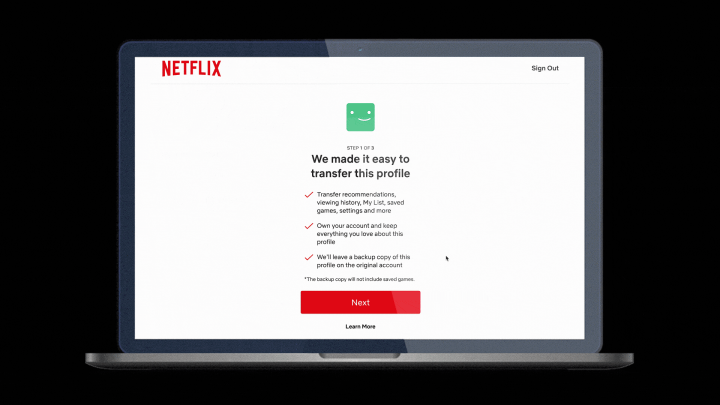
Netflix on Tuesday revealed a new feature that lets users export their “personalized recommendations, viewing history, My List, saved games, and other settings” to a new account.

Netflix Profile Transfer (3)

Netflix Profile Transfer via Settings | Image/ Netflix

“People move. Families grow. Relationships end. But throughout these life changes, your Netflix experience should stay the same,” Netflix’s press release read.

In essence, Netflix makes it less hurtful (and awkward) for people who share the same account to part ways.

Instead of quietly locking out a person out of an account, or awkwardly telling them that they are being removed, Profile Transfer simply lets users keep their data to very own account. So, they don’t have to really start a clean slate and just continue watching where they left off.

After months of testing in select countries, the said feature is now globally rolling out, and users will get notified via email as soon as Profile Transfer becomes available.

Netflix Profile Transfer (1)

Netflix Profile Transfer

  • To transfer a profile, go to the “Transfer Profile” option when you hover over your profile icon in the dropdown menu on the homepage — then simply follow the instructions.
  • You can always turn off Profile Transfer in your account settings at any time.

Previous reports revealed that Netflix lost nearly one million subscribers in Q2 2022 and rolling out such feature may be that strategic momentum to increase its subscriber base.

React to this article:
JM Chavaria
JM's highest stat is probably his curious ardor to anything tech—electronics and gaming in particular. He certainly heeds utmost regard to specsheet, visuals, and rule of thirds. If creativity and wit sometimes leave JM's system, watching films, anime and a good stroll for memes are his approved therapeutic claims.
    Leave a Reply

    Your email address will not be published. Required fields are marked *

    Community Leaderboard

    1 Abe Olandres
    Abe Olandres 🥉 Rookie
    33,225 3,286 comments
    🏆 3
    2 EasyE
    EasyE 💠 Supremacy
    21,060 1,763 comments
    🏆 3
    3 abuzalzal
    abuzalzal 💠 Supremacy
    17,440 1,176 comments
    🏆 3
    4 wew
    wew 💠 Supremacy
    15,360 1,410 comments
    🏆 3
    5 Justin
    Justin 💎 Platinum
    9,190 744 comments
    🏆 2
    6 Jay
    Jay 💎 Platinum
    8,450 830 comments
    🏆 1
    7 BrianB
    BrianB 🏅 Newbie
    5,980 595 comments
    🏆 2
    8 Aa
    Aa 🥈 Silver
    5,675 505 comments
    🏆 2
    9 Calvin
    Calvin 🥈 Silver
    5,180 497 comments
    🏆 1
    10 Benchmark33
    Benchmark33 🥈 Silver
    5,065 434 comments
    🏆 1
    yugatech x ASUS

    Latest Review

    Sleek HUAWEI MatePad 12 X tablet on a dark surface
    HUAWEI MatePad 12 X (2026) Review
    A person holding the new iPhone 17 Pro Max
    iPhone 17 Pro Max Review
    Gray Philips tablet with rear camera and flash on metallic finish
    PHILIPS 10-inch Tablet (T7305L) Review
    nubia Neo 3 GT vs. Infinix GT 30 Comparison Review
    Nothing Phone (3a) Lite smartphone on a white background
    Nothing Phone (3a) Lite Review

    Latest Guide

    What’s new with Samsung One UI 8
    Smartphones Under PHP 10,000 | Q3 2025
    Smartphones Under ₱6K (Php 6,000) | Q3 2025
    Xiaomi 15T Pro vs. Xiaomi 14T Pro: What’s different?
    List of Xiaomi devices for HyperOS 3 Update Timeline
    Netflix rolls out Profile Transfer feature » YugaTech | Philippines Tech News & Reviews
    Yugatech Logo 2023
    YugaTech is the largest and longest-running technology website in the Philippines. Orignally established in October 2002, the site was transformed in 2005 into a full-fledged technology news and reviews destination for Filipinos across the globe.

    Tech Guides

    YugaTech | Philippines Tech News & Reviews
    © 2025. All Rights Reserved.