

HUAWEI MatePad 12 X (2026) Review



Last night, Lenovo launched the newest members of its laptop product line – the IdeaPad S300 and the IdeaPadS400. These new ultraportable laptops aim to provide a balance between portability and performance at a low price point.

As an entry-level laptop, the IdeaPad S300 uses an Intel Pentium processor and sports a 13.3-inch display while its bigger sibling, the IdeaPad S400, is powered by a 3rd-generation Intel Core i3 processor in a 14-inch HD display (Windows Experience Index scored the Ideapad S400 at 5.1)
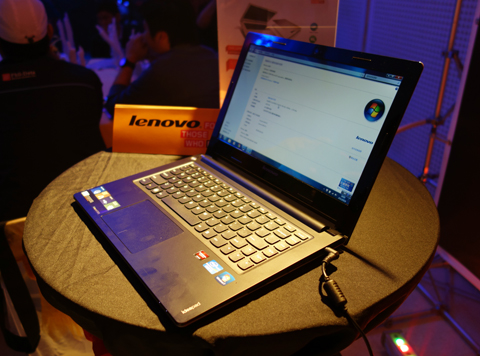
Lenovo IdeaPad S300
Both notebooks looked similar and are equipped with the following — 500GB HDDs, 4GB DDR3 RAM, HDMI ports, USB 3.0 ports, 3MP webcam, stereo speakers, intelligent touchpads and AccuType keyboards. All of these are housed in a chassis that is 21.9mm thin and weighs only 1.8kgs.
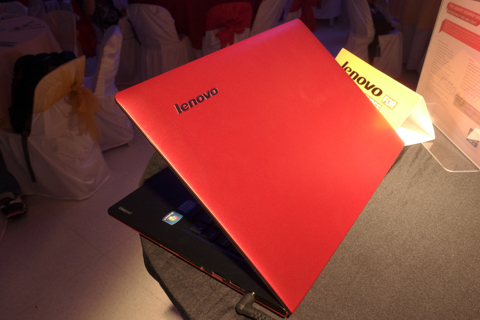
Lenovo IdeaPad S400
The S300 comes in cotton-candy pink and silver grey with a price tag of Php21,995 while the S400 comes in crimson red and silver grey and will sell for Php24,995.
Both units will be available in local stores by third week of September.










Apple, Asus, Cherry Mobile, Huawei, LG, Nokia, Oppo, Samsung, Sony, Vivo, Xiaomi, Lenovo, Infinix Mobile, Pocophone, Honor, iPhone, OnePlus, Tecno, Realme, HTC, Gionee, Kata, IQ00, Redmi, Razer, CloudFone, Motorola, Panasonic, TCL, Wiko
Best Android smartphones between PHP 20,000 - 25,000
Smartphones under PHP 10,000 in the Philippines
Smartphones under PHP 12K Philippines
Best smartphones for kids under PHP 7,000
Smartphones under PHP 15,000 in the Philippines
Best Android smartphones between PHP 15,000 - 20,000
Smartphones under PHP 20,000 in the Philippines
Most affordable 5G phones in the Philippines under PHP 20K
5G smartphones in the Philippines under PHP 16K


Randy says:
🌱 Noobs🏆1
Bakit Core i5 at may Radeon graphics yung nasa picture? Nakaka-confuse naman yan, for sure plastic body nito.
Too late nakabili na ako ng X401A ng ASUS, slimbook din siya.
Is that 21,995 with OS?
Mr. Serious says:
🌱 Noobs🏆1
This article is very poorly written.
Mr. Not So Serious says:
🌱 Noobs🏆1
This is not a technical writing site. It focuses on tech news.
Loki says:
🌱 Noobs🏆1
I agree..
@Author: Please summarize the specs clearly.
Mr. Serious says:
🌱 Noobs🏆1
I wasn’t pertaining to the technical aspect. (Did I ever mention that?) I was actually addressing the general article as a whole.
Delbert Ednave says:
🌱 Noobs🏆1
Intel and AMD joint.
daniel says:
🥉 Bronze🏆1
what should i choose?
Asus X401U-WX050 Slim (DOS, AMD E2-1800, 500GB HDD, USB3.0)
http://www.villman.com/Product-Detail/Asus_X401U-WX050_DOS – 16,992
or
an intel pentium laptop with no video card?
i need it for school… adobe flash, dreamweaver, mysql, visual studio, sql server etc.
should i choose the one with AMD Fusion?
confused here :(
Amado says:
🌱 Noobs🏆1
I’d go for the Lenovo. There is another model supposedly coming out, the S405 which has AMD A-series processors which should be a lot cheaper than the S400 with Intel.
dok says:
🌱 Noobs🏆1
EXCEPTIONALLY SLEEK, REMARKABLY AFFORDABLE.
Up to 3rd Generation Intel® Core™ i5 processor
Up to Windows® 7 Professional
14″ HD display
Starting at 3.97 lbs
Up to 5 hours’ battery life
Up to 500GB HDD and up to 32GB SSD storage
Up to 4GB memory
Less than 1″ profile with tactile metal finish
Available in silver grey or crimson red
Up to AMD Radeonâ„¢ 7450M graphics*
Lenovo Quick Start: Instantly surf the Web at the touch of a button
Stereo speakers and Dolby® Advanced Audio™ v2
Comfortable, user-friendly AccuType keyboard
Integrated 720p HD webcam
Intelligent Touchpad with easy multi-gesture control
Integrated Bluetooth® and 802.11b/g/n WiFi
USB 2.0, USB 3.0, 2-in-1 card-reader and HDMI out
OneKey® Rescue System makes data backup and recovery simple
Intel® Wireless Display (WiDi) technology
Lenovo Energy Management minimizes power use and protects battery life
*optional feature
Jojo says:
🌱 Noobs🏆1
To Daniel,
For school, choose something with longer battery life. You won’t be able to plug-in in a classroom or the library most of the time.
My bet is on the Lenovo unit. Lenovo has apps which can manage power better than standard Windows. I am not sure if Asus has this.
ghk says:
🌱 Noobs🏆1
@Jojo
Asus has a Power Management utility and it’s called “Power4Gear”. It’s definitely one of the best power management software I’ve ever seen because the utility itself lets you to control everything else you need in making a customized energy plan.