infinix x yugatech

Neo Shift N81 Review

Listen to article

OS and Performance

Now for its main feature, the N81 features dual-boot capabilities allowing it to run both Android and Windows. From Android to Windows, switching is done by pressing and holding the power button and selecting “Boot to Windows”. The switch takes around 50 seconds. Switching from Windows to Android, on the other hand, requires the use of a special program pre-installed on Windows. It’s easy to use and just requires a couple of clicks and takes around a little over a minute.

Android

Running the Android department is the old, yet still very functional, Android 4.4.4 Kitkat. The UI is kept stock and doesn’t have much pre-installed apps. Even Google apps are kept to a minimum – GMail, Chrome Browser, Google Search, and Google Play Music. Well, Neo doesn’t have a lot of choice as the Android System only has 4.36GB of allocated space with 2.93GB of usable out of the 32GB total. That being said, it’s better that you invest on a microSD card and move all your videos, photos, and music files there.

Windows

It’s good for Neo to ship the N81 with Windows 10 instead of Windows 8.1, saving buyers the hassle of upgrading to the latest version of Windows themselves. It also has MS Office’s Word Mobile, PowerPoint Mobile, and Excel Mobile pre-installed. As for the available storage, this is where the bulk of the internal storage is placed with 21.4GB allocated for it and 11.2GB as usable.
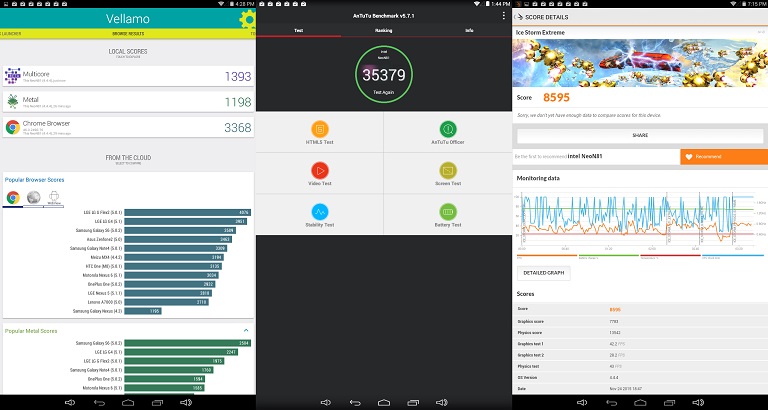
Powering the N81 is a 1.33GHz Intel Baytrail Z3735F Quad-core CPU, Intel HD Graphics and 2GB RAM. It has the same configuration as the Cherry Mobile MAIA Smart Tab but with a lower CPU frequency. Performance is good for a tablet of its class. There’s no random crashes and navigation is smooth. Android gaming is good and can breeze through productivity-based tasks like MS Office apps. Check out the Android benchmark scores below.

* AnTuTu – 35,379
* Quadrant Standard – 15,589
* Vellamo – 1,393 (Multicore), 1,198 (Metal), 3,368 (Chrome Browser)
* 3D Mark – 8,595 (Ice Storm Extreme)
* Gaming Temp – 23-C

Based on the numbers, the N81 scored slightly higher than the MAIA Smart Tab. Also notable here is the cool temperature when gaming.

Battery Life

Providing juice for the N81 is a 4,800mAh battery. Not exactly huge but will get you through the working day if you’re using it for light to medium tasks. Don’t expect it to last that long if you’re into gaming. When it comes to endurance, it scored 5 hours and 5 minutes on PC Mark and 8 hours and 20 minutes worth of playback on our routine battery test.

Conclusion

The Neo Shift N81 is the kind of dual-booting tablet that also wants to be a 2-in-1 convertible tablet. In concept, it is very likable, it has a decent screen real-estate, 3G connectivity, capable hardware spec, portable build, pre-loaded with Windows 10, and already has a keyboard dock included. And it doesn’t cost much at Php8,999. On the downside, it has a flimsy keyboard, weak speaker and very limited usable storage on Android. However, if you’re one of those who can live with those cons, you’ll very much enjoy the Shift N81.

Neo Shift N81-3G specs:
8.9-inch 1280 x 800 pixels touchscreen display, 170ppi
1.33GHz Intel Baytrail Z3735F quad-core CPU
Intel HD Graphics
2GB RAM
32GB internal storage
microSD card slot
2MP rear camera
0.3MP front camera
3G
WiFi
Bluetooth
USB OTG
micro HDMI
Windows 10 and Android 4.4. KitKat
4,800mAh battery
Keyboard dock
SRP: Php8,999

What we liked:
* Good tablet build
* Good performance
* Runs Windows 10 out of the box
* Comes with its own keyboard

What we didn’t like:
* Keyboard dock feels flimsy
* Very limited usable storage on Android

Frequently Asked Questions

What operating systems does the Neo Shift N81 support?
The Neo Shift N81 is a dual-boot tablet that can run Android and Windows.
Does the Neo Shift N81 come with a keyboard dock?
Yes, it comes with a keyboard dock that transforms it into a mini laptop.
What type of SIM card does the Neo Shift N81 accept?
It accepts a nano-SIM card for 3G connectivity.
React to this article:
Written by
Diangson Louie

This article was written by Louie Diangson, Managing Editor of YugaTech. You can follow him at @John_Louie.

View all posts by Diangson Louie →

79 Comments

MI
miles · 1 year ago

Good am. Do you still have this unit? Is it still working fine? Are you selling it? Thanks.

Reply
AL
aldrinbadsigan · 7 years ago

hello much a price this neo brach

Reply
AV
Aveil · 9 years ago

HI… Help naman po saan po ba pwede dalin ung Neo N81-3G ko para maalis yung passcode at para mapalitan na din yung battery. please reply on my email thnks

Reply
AV
Aveil · 9 years ago

Hi can you please help me where I can bring my Neo N81-3G to be fix to remove passcode and change the battery I reply on my email would be nice thanks…

Reply
PA
Patrick Oriz · 9 years ago

hi.. may i ask what are the possible solutions for my neo shift n81 which is not turning on but there is still battery life left

Reply
DA
Daphney Patena · 9 years ago

Hi! Can I ask what will I do when I want to screenshot ?

Reply
AN
Antz · 9 years ago

Wil, san ka nagpaservice ng neo m na inupgrade nla sa android 6.0?

Reply
BE
ber · 9 years ago

May mabibili bng keyboard ng neo shift n81 sn ako pede mkbili nyn…ng msg ako s neo d nmn sumasagot o replay wl ytng pkealam

Reply
RA
randy · 9 years ago

how can i store my apps in the sd card in android mode?

Reply
WI
Will · 9 years ago

Does yours have Android 6. 0pre-loaded on it? I had mine Fixed under warranty and returned my unit “Upgraded.” It’s a nice touch,, however, it runs a non-rooted Android 6.0 which has External Storage restrictions (they fixed it on 7.0). and for a device with only 4.0GB internal storage for android.. it’s utterly useless. unless they roll out any update that gives the device root or 7.0, we’re stuck with a useless Android on a Dual Boot

DH
dheiz · 9 years ago

Hi . my neo n81 stock in android I can not shift it back to window what will I do?

Reply
AJ
AJ · 9 years ago

Parehas tayo randy ng problem pero sa akin ayaw talaga magboot. Nasa warranty pa naman yung akin try ko ipatingin. Wala naman akong ginawa sa tab ko. Ayaw lang magbukas talaga. :/

Reply
MI
millicent · 10 years ago

pa help po .. ni reset co ang windows now dina gumagana ang windows .. tablet na lang ang gumagana pls help :(

Reply
RA
randy · 10 years ago

saklin din d na nag boboot.. nag eerror nalang palagi..pano b ma reformat to

PA
Paulo · 9 years ago

May fix na po ba dito?

WI
wins · 10 years ago

…is there any way to boot to windows directly via bios/uefi? i see it in the stores that you need to boot to android first…

Reply
VE
ver · 10 years ago

Musta po ung tablet manipis din po b katulad ng ibng tablet o makapal po…ung gilid

Reply
BJ
bjorn · 10 years ago

pwede mag ask about this tab? may alam ba kayo paano ang shortcut sa pag SCREENSHOT keys? nakalimotan ko kasi.. aside from using snipping tools po ha… thank you

Reply
LE
Lec · 10 years ago

neo n81……Can this be install the sofewares of Government agencies like bir, philhelth, sss softwares?

Reply
CH
chebum · 10 years ago

Who can run/play Pokemon go app here in neo shift n81 while in android boot?

Thank you all for your response. August 12, 2016 8:23 PM

Reply
BJ
bjorn · 10 years ago

what is the problems with my tab. why cant i change it to front cam?

Reply
AN
angel grace yude · 10 years ago

Pwde po ba iconnect ito sa lanline???? Troubleshoot sa modem ko??? Pwde?

Reply
AN
Anj · 10 years ago

Hello got this yesterday and i’m just wondering if it’s normal that the wifi keeps turning on and off? The only time the wifi connection stabilizes is when it’s situated right beside the modem. When i’m in my room the wifi connection is faulty. I have 2 other devices as well and I have no problem with their wifi connection when I’m in my room. Is it possible that I got a defective unit? Hope to hear from you. Thanks.

Reply
AJ
AJ · 10 years ago

Hi! May phone functionality ba siya? Pwede ba magtext at call?

DI
diane mae tumapang · 10 years ago

how does screenshot work for this product

Reply
VH
vhines · 10 years ago

How can I shift windows back to android? I’m new with this OS T.T

Reply
DI
diane mae tumapang · 10 years ago

yes click the icon on the bottom right side next to time and date

PO
POSEIDON · 11 years ago

Do I need to get a SIM card for this device to get full functions on its features?

Reply
DE
Deceptikolz · 11 years ago

I like where this is heading, but I’ll wait for more devices to choose from.

Reply
BE
Bert · 11 years ago

I have seen one sa Octagon with the same price above. Pinatry sakin ng staff doon. Very portable etong Neo kasi nga dual boot. As for the keyboard medyo flimsy nga at ang gaan. Un touchpad siguro makakasanayan na yan ng user kapag madalas na gagamitin.May 2 usb port and nagtry ako ng external hard drive since may dala ko that time at naread naman . Ang panalo dito kasi may sim slot kaso nano sim. Yun UI ng android at windows ok para sakin at ok to para sa mga students o mga taong on-the-go lagi.

Reply
LO
lol · 11 years ago

when you said that that the shift N81 is a ‘dime-a-dozen’ tablet, you basically said that its worthless, lol.

that aside, great review. would love to see more windows tablet reviews. neo is still a shitty brand to me.

Reply
LO
Louie Diangson · 11 years ago

Haha. You’re right. I meant uncommon. Apologies for the wrong phrase. Thanks for pointing out.

NI
ninja · 11 years ago

Do you have a video review for this one po? :)

Reply
NE
Ne-Yo · 11 years ago

hi what’s your routine battery test? i wish you could also do some pc gaming and record its performance and battery life

Reply
PI
pips · 11 years ago

one thing that sets this apart from other convertibles in the local scene is the 3G connectivity. It would have been nice to be included in the review. As in, how is the performance of the 3G connection? Is 3G available on both Android and Windows OS?

Thanks.

Reply
LO
Louie Diangson · 11 years ago

Hi Pips,

Thanks for your question. 3G works both on Android and Windows. Connection is good but still depends on your location.

PI
pips · 11 years ago

Good to know. Thanks for the reply.

PE
perry · 11 years ago

Does it read/access portable hard drive? if Yes, up to what size you try?

Reply
1C
1cho · 11 years ago

Have you tried playing Modern Warfare 2 or Command and Conquer 3 on this?

Reply
KU
Kurt Rainer · 10 years ago

Not sure about Modern Warfare, but this ran Command and Conquer Red Alert 3 pretty smoothly on low settings, there’s a good change it can handle CnC3 too.

Leave a Reply

Loading next article...