brother philippines

yugatech x ASUS

Latest Review

Sleek HUAWEI MatePad 12 X tablet on a dark surface
HUAWEI MatePad 12 X (2026) Review
A person holding the new iPhone 17 Pro Max
iPhone 17 Pro Max Review
Gray Philips tablet with rear camera and flash on metallic finish
PHILIPS 10-inch Tablet (T7305L) Review
nubia Neo 3 GT vs. Infinix GT 30 Comparison Review
Nothing Phone (3a) Lite smartphone on a white background
Nothing Phone (3a) Lite Review

Latest Guide

What’s new with Samsung One UI 8
Smartphones Under PHP 10,000 | Q3 2025
Smartphones Under ₱6K (Php 6,000) | Q3 2025
Xiaomi 15T Pro vs. Xiaomi 14T Pro: What’s different?
List of Xiaomi devices for HyperOS 3 Update Timeline
brother philippines Archives » YugaTech | Philippines Tech News & Reviews
Yugatech Logo 2023
YugaTech is the largest and longest-running technology website in the Philippines. Orignally established in October 2002, the site was transformed in 2005 into a full-fledged technology news and reviews destination for Filipinos across the globe.

Tech Guides

YugaTech | Philippines Tech News & Reviews
© 2025. All Rights Reserved.

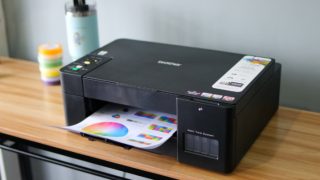
One good example of that printer is the Brother DCP-T420W. Design-wise, the Brother DCP-T420W looks like your typical printer. Setting up the Brother DCP-T420W requires several steps but pretty much easy to follow. The first thing we did is download the Brother iPrint & Scan app. Connect your mobile device to the Brother DCP-T420W's WiFi setup network, then return to the app. As for its printing capabilities, the Brother DCP-T420W is capable of print speeds of up to 16/9 ipm, while the Brother Ultra High Yield Ink bottles are capable of up to 7,500 black prints and up to 5,000 pages in color. What we really enjoyed with the Brother DCP-T420W is how easy it is to set up and use. We just download it from the phone, open the Brother iPrint & Scan app, then print. Read more in our articles including "Brother DCP-T420W Refill Tank Printer: Fun and Convenient Wireless Printing" and "Promo: Brother 2015 Calendar of Me Contest".

More About brother philippines

Frequently Asked Questions

What is brother philippines?

One good example of that printer is the Brother DCP-T420W. Design-wise, the Brother DCP-T420W looks like your typical printer.

What have you covered about brother philippines?

Setting up the Brother DCP-T420W requires several steps but pretty much easy to follow. The first thing we did is download the Brother iPrint & Scan app. Connect your mobile device to the Brother DCP-T420W's WiFi setup network, then return to the app.

Where can I find articles about brother philippines?

Our coverage of brother philippines includes: "Brother DCP-T420W Refill Tank Printer: Fun and Convenient Wireless Printing"; "Promo: Brother 2015 Calendar of Me Contest"; "Brother outs new laser printers, starts at Php6,990". Each article provides unique insights and information.