google chrome

yugatech x ASUS

Latest Review

Sleek HUAWEI MatePad 12 X tablet on a dark surface
HUAWEI MatePad 12 X (2026) Review
A person holding the new iPhone 17 Pro Max
iPhone 17 Pro Max Review
Gray Philips tablet with rear camera and flash on metallic finish
PHILIPS 10-inch Tablet (T7305L) Review
nubia Neo 3 GT vs. Infinix GT 30 Comparison Review
Nothing Phone (3a) Lite smartphone on a white background
Nothing Phone (3a) Lite Review

Latest Guide

What’s new with Samsung One UI 8
Smartphones Under PHP 10,000 | Q3 2025
Smartphones Under ₱6K (Php 6,000) | Q3 2025
Xiaomi 15T Pro vs. Xiaomi 14T Pro: What’s different?
List of Xiaomi devices for HyperOS 3 Update Timeline
Google Chrome: Latest News, Features, and Updates | YugaTech
Yugatech Logo 2023
YugaTech is the largest and longest-running technology website in the Philippines. Orignally established in October 2002, the site was transformed in 2005 into a full-fledged technology news and reviews destination for Filipinos across the globe.

Tech Guides

YugaTech | Philippines Tech News & Reviews
© 2025. All Rights Reserved.

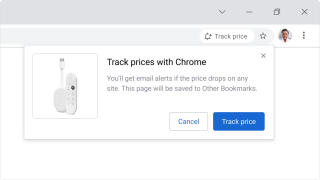
Google Chrome continues to evolve with regular updates aimed at improving performance, security, and user experience. From introducing generative AI features and a Material You redesign to rolling out practical tools like memory savers and price trackers, the browser remains a focal point of development. Here are the key updates and features based on recent announcements.

More About google chrome

Frequently Asked Questions

What are the new performance-saving modes in Google Chrome?

Google Chrome has introduced Memory Saver and Energy Saver modes. Memory Saver frees up memory from inactive tabs, while Energy Saver limits background activity and visual effects when your laptop battery reaches 20%. These modes are available on Chrome 110 for Windows, macOS, and ChromeOS.

Can Google Chrome summarize articles using AI?

Yes, Google is adding a generative AI feature that can summarize freely available public articles. By tapping a button, the browser will pull up key points from the article. This feature is initially available on the Google app for Android and iOS, with plans to bring it to the Chrome desktop browser.

Is Google Chrome still supported on Windows 7 and 8.1?

No, support for Google Chrome on Windows 7 and Windows 8.1 ended with the release of Chrome 110 (tentatively February 7, 2023). Older versions will continue to work, but no future updates or security patches will be released. Users need Windows 10 or later to receive updates.