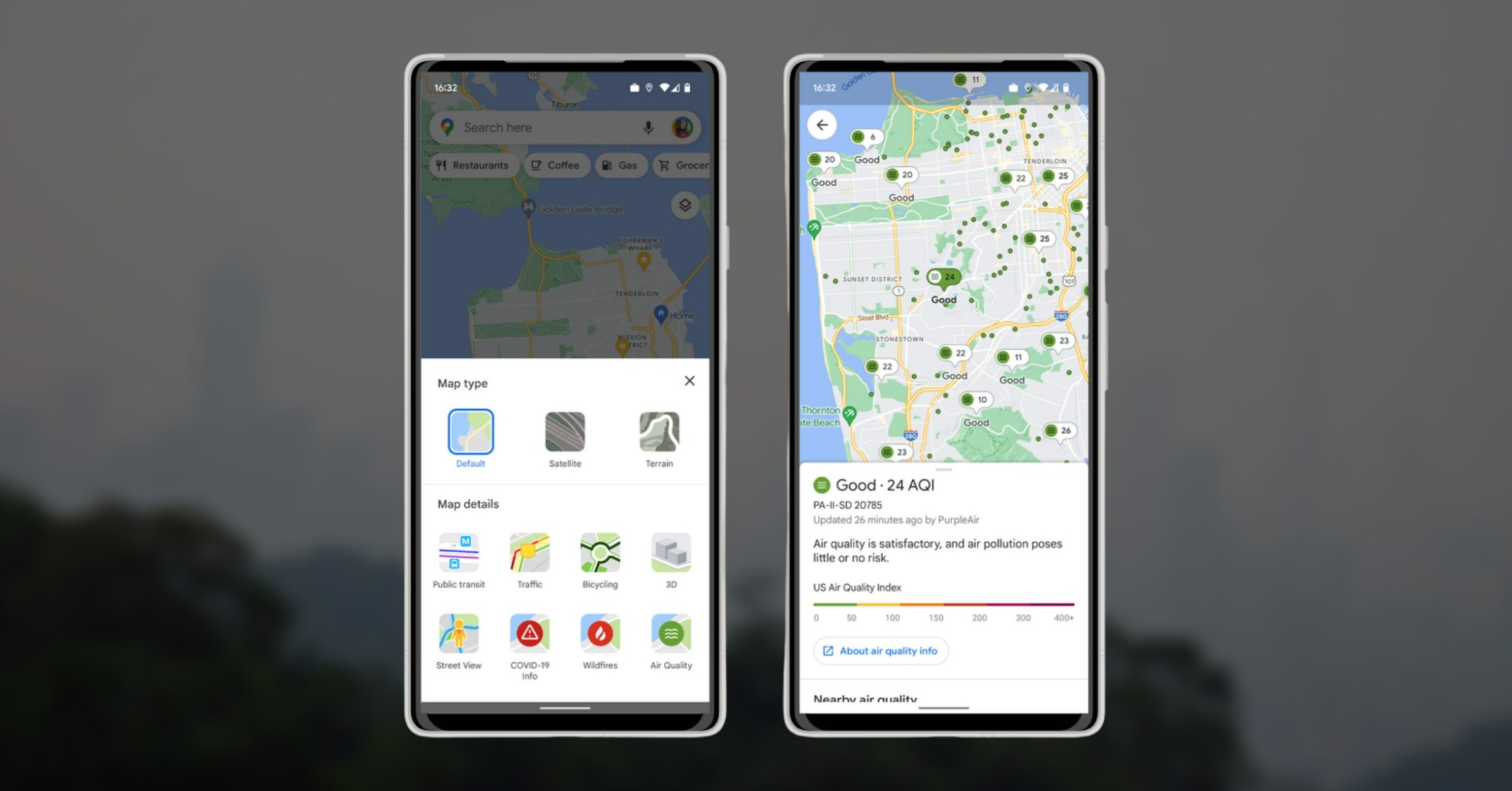

Google Maps just rolled out a new feature called ‘Air Quality’ which is included in the layers option. The new Air Quality feature enables users to check right away the air quality index in a given area (AQI) with real-time data based on government monitoring stations and other non-regulated or independent partners. To enable the AQI, open the Google Maps app and then tap the ‘layers icon’ then select the ‘air quality layer.’ After tapping, the Google Map will zoom out to show a bird’s eye view of the air quality in a larger area. Read more in our articles including "Google Maps rolls out Air Quality feature" and "Zoom launches ZoomMate AI Teammate".
Google Maps just rolled out a new feature called ‘Air Quality’ which is included in…
Jun 10, 2022
Zoom has introduced ZoomMate, a new AI-powered work platform designed to help teams turn conversations…
Jun 20, 2026
The Philippine Atmospheric, Geophysical and Astronomical Services Administration (PAGASA) has launched the PANaHON mobile app,…
Jun 16, 2026
EStrava has announced a set of new and updated hiking features aimed at helping users…
Jun 13, 2026
Netflix has unveiled a refreshed mobile experience and expanded gaming initiatives during its APAC Product…
Jun 11, 2026
Telegram has released a fully native Apple Watch app, bringing messaging and media features directly…
Jun 10, 2026Google Maps just rolled out a new feature called ‘Air Quality’ which is included in the layers option. The new Air Quality feature enables users to check right away the air quality index in a given area (AQI) with real-time data based on government monitoring stations and other non-regulated or independent partners.
To enable the AQI, open the Google Maps app and then tap the ‘layers icon’ then select the ‘air quality layer.’ After tapping, the Google Map will zoom out to show a bird’s eye view of the air quality in a larger area.
Our coverage of Google Maps Air Quality includes: "Google Maps rolls out Air Quality feature"; "Zoom launches ZoomMate AI Teammate"; "PAGASA launches PANaHON mobile app". Each article provides unique insights and information.