

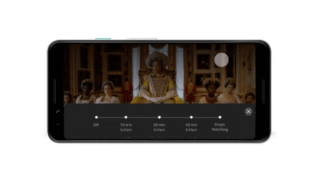
Netflix is launching global testing for its latest feature that allows Android users to set a timer for their viewing period. According to The Verge report, the tool gives the user options to set a timer on the following periods: 15 minutes, 30 minutes, 45 minutes, and even finish the whole show with the title ending at the specified minute mark when activated. After the show or film is finished, the Netflix app will stop automatically. The latest feature aims to save Android devices' battery, preventing the auto-play option of episodes and films on Netflix. “This test is the latest example—a new timer that gives members more control over their viewing experience by simply choosing their favorite show or movie and setting a timer without having to worry about pausing it before it’s over,” shared by a Netflix spokesperson on a report of Gizmodo. [video width="800" height="388" mp4="https://www.yugatech.com/wp-content/uploads/2021/01/Netflix-Timer.mp4" loop="true" autoplay="true"][/video] Here's how to enjoy the new timer feature: Choose and play content on the Netflix app. Select the target 15, 30, 45 minutes, or “Finish Show.” Netflix shared that the feature will explore bringing the new feature to other devices, including TV sets and desktops. Read more in our articles including "Netflix to start global testing of timer feature on Android devices" and "Netflix to launch in SG, HK, South Korea and Taiwan".
Netflix is launching global testing for its latest feature that allows Android users to set…
Jan 30, 2021A couple of days ago, Netflix made the announcement that it will soon launch in…
Sep 11, 2015
So let’s say you’re stuck at home because of the ongoing pandemic and thinking of…
Mar 19, 2020Netflix has just revealed a new logo with a different look that will be used on all…
Jun 21, 2016
Netflix now supports Spatial Audio on all devices to deliver a better cinematic experience through…
Jul 8, 2022
Netflix may soon expand its service to include livestreaming. Deadline reports that Netflix is in…
May 16, 2022Netflix is launching global testing for its latest feature that allows Android users to set a timer for their viewing period. According to The Verge report, the tool gives the user options to set a timer on the following periods: 15 minutes, 30 minutes, 45 minutes, and even finish the whole show with the title ending at the specified minute mark when activated.
After the show or film is finished, the Netflix app will stop automatically. The latest feature aims to save Android devices' battery, preventing the auto-play option of episodes and films on Netflix. “This test is the latest example—a new timer that gives members more control over their viewing experience by simply choosing their favorite show or movie and setting a timer without having to worry about pausing it before it’s over,” shared by a Netflix spokesperson on a report of Gizmodo.
Our coverage of Netflix timer includes: "Netflix to start global testing of timer feature on Android devices"; "Netflix to launch in SG, HK, South Korea and Taiwan"; "Netflix shows about viruses, outbreaks, and pandemics". Each article provides unique insights and information.