


If you love Starbucks but hate falling in long lines—especially during a pandemic and within the holiday season, then you should check out the Order feature via the Starbucks Philippines app. Payment, stars, and e-stickers Your Starbucks Rewards card will be your main payment method for in-app orders and don’t worry if you don’t have enough load/money in it as you can now reload through the app with debit or credit cards. How to order ahead Upon opening the app, make sure that your location toggle is turned on and that you have enough money in your Starbucks Rewards card. Once you decided on your pickup preference, you may now proceed to checkout and pay via your Starbucks Rewards card. Starbucks Philippines has officially announced the availability of the Mobile Order and Pay feature on its mobile app. The feature allows customers to place and pay for their orders in advance and pick it up at any Starbucks store. After the new Starbucks Rewards program launch, mobile ordering is the brand’s latest digital innovation providing Starbucks Rewards members a contactless option for getting their preferred beverage. The app makes it easier for customers to find a store, order in advance, and make a payment using your Starbucks Rewards account. Read more in our articles including "How to Order and Pay via Starbucks App" and "Starbucks app launches Mobile Order and Pay feature".

If you love Starbucks but hate falling in long lines—especially during a pandemic and within…
Dec 17, 2021
Starbucks Philippines has officially announced the availability of the Mobile Order and Pay feature on…
Nov 17, 2020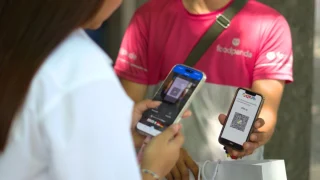
foodpanda Philippines has introduced QRPH payments for cash-on-delivery orders. The new feature, called QR-on-Delivery, allows…
May 16, 2026We’ve got over a hundred submissions from our recent poll on mobile 3G services. The…
Jul 3, 2008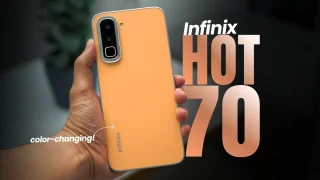
Coming in hot in the entry-level segment is the new Infinix HOT 70, and for…
Jun 25, 2026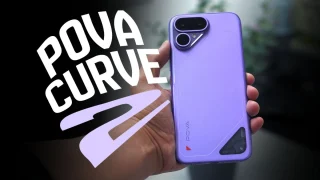
The TECNO POVA Curve 2 5G has arrived. It’s a slim, lightweight phone, and yet…
Jun 12, 2026If you love Starbucks but hate falling in long lines—especially during a pandemic and within the holiday season, then you should check out the Order feature via the Starbucks Philippines app. Payment, stars, and e-stickers Your Starbucks Rewards card will be your main payment method for in-app orders and don’t worry if you don’t have enough load/money in it as you can now reload through the app with debit or credit cards.
How to order ahead Upon opening the app, make sure that your location toggle is turned on and that you have enough money in your Starbucks Rewards card. Once you decided on your pickup preference, you may now proceed to checkout and pay via your Starbucks Rewards card. Starbucks Philippines has officially announced the availability of the Mobile Order and Pay feature on its mobile app.
Our coverage of Starbucks Mobile Order and Pay includes: "How to Order and Pay via Starbucks App"; "Starbucks app launches Mobile Order and Pay feature"; "foodpanda adds QRPH payments for cash-on-delivery orders". Each article provides unique insights and information.