infinix x yugatech

SD 卡上的六种标记及其含义

Listen to article

MMC(多媒体卡)有多种形状和尺寸,但如今最常用的是安全数字卡,简称SD 卡。这些卡上大多带有标签或标记,至少对于训练有素的用户而言,只需扫一眼即可概览 MMC 的功能特性。

在本篇文章中,我们将为您概述印在SD卡标签上的六种(6)常见标识,解释这些符号/数值的含义,并说明它们如何帮助您根据需求选择合适的SD卡。

1. 存储容量 – 这可能是您在 SD 卡上最常见的标识。它表示该卡能够容纳的存储空间大小。不过请注意,与所有存储设备一样,您实际可用的存储空间将小于卡上标示的容量。

2. 写保护标识 – 您通常会在SD卡上看到另一个标记,即写保护符号,常位于卡的左侧并配有向下的箭头标签。要使用SD卡,请确保微小的拨动开关位于该符号的上方,这表示它已解锁且未处于写保护状态。

sd card write protect

3. 读取速度(标称)——左上角的数字及其对应的单位(通常为每秒兆字节)表示该SD卡根据制造商内部测试所能达到的最大读取速度。

请注意,读取速度不同于写入速度。制造商通常不标注后者,因为 SD 卡的写入速度数值通常低于读取速度(即更慢)。另外需记住的是,卡商所标称的读取速度是在其内部测试中借助支持的主机设备实现的。因此,实际表现会因您所使用的设备而异。

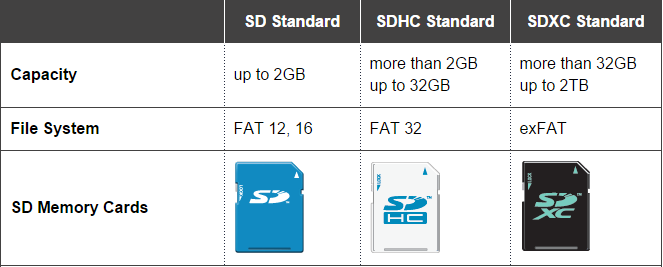
4. 格式 – 自近二十年前SD卡问世以来,它已不断演进以满足消费者对更大存储容量和更快存储配件的需求。随着每一项新技术的发展,SD协会都会推出新格式以标准化下一代SD卡。
sd format

目前共有三种 SD 格式——使用 FAT 12/16 文件系统且最高容量为 2GB 的 Secure Digital Standard Capacity(SDSC,简称 SD)、采用 FAT32 文件系统并支持高达 32GB 存储容量的 Secure Digital High Capacity(SDHC),以及采用 exFAT 格式、最高可达 2TB 的 Secure Digital Extreme Capacity(SDXC)。

5. 速度等级 – 接下来是速度等级标识,它提供了关于存储卡最低写入速度性能及其与主机设备兼容性的粗略参考。目前由SD协会定义了四种(4)速度等级:Class 2、Class 4、Class 6和Class 10。

Banner-SD-speed-class-01

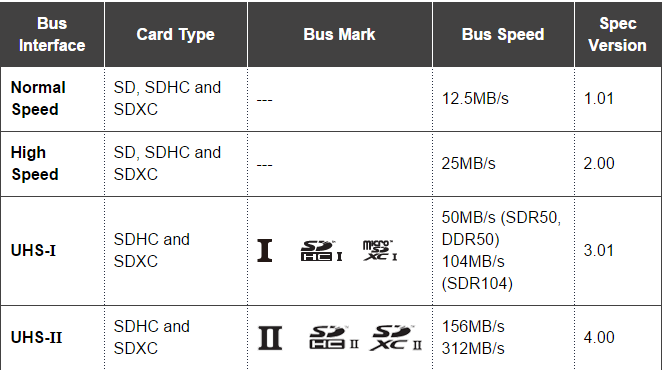
6. UHS 等级 – 我们列表中的 SD 卡标识以超高速(UHS)等级收尾。UHS 是 SD 协会于 2009 年推出的一个等级,旨在为 SDHC 和 SDXC 提供更高的传输速率,适用于高分辨率视频录制。
UHS

目前有两种UHS等级:UHS速度等级1(U1)和UHS速度等级3(U3)。与速度等级类似,只有当主机设备支持UHS速度等级时,UHS SD卡才能达到其最大速度。如果设备不支持UHS,则会回退到普通速度等级,这也解释了为何部分SDHC和SDXC卡上同时标有速度等级和UHS速度等级标识。


参考资料:1, 2 & 3

Frequently Asked Questions

What does the storage capacity marking on an SD card indicate?
The storage capacity indicates the storage space the card can hold, but actual usable space is less than the indicated capacity.
How do you use the write-protect lever on an SD card?
To use the SD card, ensure the tiny lever is at the top of the write-protect symbol, meaning it is unlocked and not write-protected.
What does the read speed marking on an SD card represent?
The read speed marking represents the maximum read speed the SD card can achieve based on the manufacturer's internal testing.
React to this article:
Written by
Ronnie Bulaong

This article was written by Ronnie Bulaong, a special features contributor and correspondent for YugaTech. Follow him on Twitter @turonbulaong.

View all posts by Ronnie Bulaong →

6 Comments

PA
Patrick · 10 years ago

Thank you so much, perfect layout

Reply
SD
sdcardduplication · 10 years ago

I cherished your blog. The potential is there for all. Marvelous recommendations for anyone and for superb SD CARDS SD Card Duplicators is right here to entertain you with originality of sounds and all.

Reply
V
v · 11 years ago

#3, write speed is kinda rare

Reply

Leave a Reply

Loading next article...