
Google 已开始推出其此前宣布的将 Google Keep 提醒迁移到 Google Tasks 的功能。目前,该更改已出现在部分账户上,而更广泛的发布计划定于 2025 年下半年。受此推广影响的用户将在 Keep 应用内看到一条提示,内容为“Reminders are now Google Tasks”。
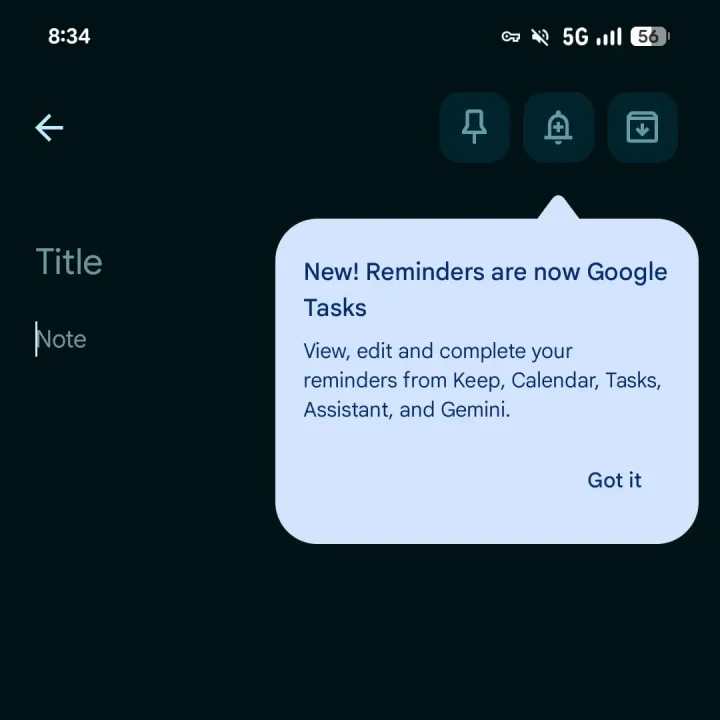
启用后,在 Keep 笔记中点击铃铛图标将创建一个直接保存到 Google Tasks 的提醒事项,并提供熟悉的快速选项,例如明天早上、明天晚上、下周或自定义日期和时间。这些提醒将在 Google Tasks 应用和 Google Calendar 中显示,标记为“来自 Keep”,点击徽章将打开相关的笔记以供快速参考。
然而,一个关键功能被移除:基于位置的提醒。Google Tasks 不支持家庭、工作或自定义基于地点的警报,因此 Keep 提醒中现有的位置数据现在被移动到任务描述中。Keep 也停止发送提醒通知;警报现在由日历或 Tasks 处理,因此用户需要安装这些应用才能继续接收提醒。
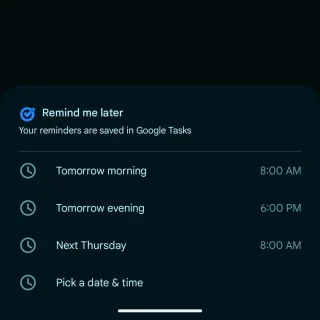
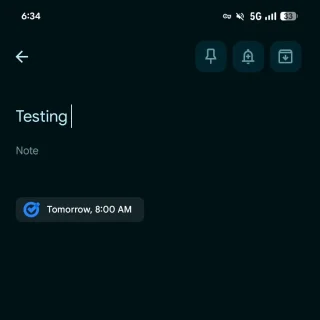
Google Keep 仍然在其导航抽屉中显示“提醒事项”页面,用户可以从 Keep、任务或日历管理日期和时间,尽管编辑提醒标题必须在任务或日历中进行。Google 还指出了迁移中的一些限制,例如 100,000 个任务的上限、对非常长的提醒标题进行截断、对极长重复间隔进行调整,以及非常遥远的日期被标准化为公元 2900 年。一年多以前的非重复提醒事项会被归类到“旧 Google Keep 提醒事项”列表中。
Frequently Asked Questions
What happens when I tap the bell icon in a Keep note after the migration?
Tapping the bell icon creates a reminder saved directly to Google Tasks, with options for tomorrow morning, tomorrow evening, next week, or custom.
Where do Keep reminders appear after migration?
Reminders show up in Google Tasks and Google Calendar, labeled as 'From Keep,' and tapping the badge opens the associated note.
What is the limitation regarding location-based reminders?
Location-based reminders are removed. Google Tasks does not support them; existing location data is moved into the task description.







0 Comments
Leave a Reply