
如果您曾是 Windows 的长期用户,那么您很可能遇到过屏幕右下角弹出的提示框,上面写着"Windows 不是正版”。
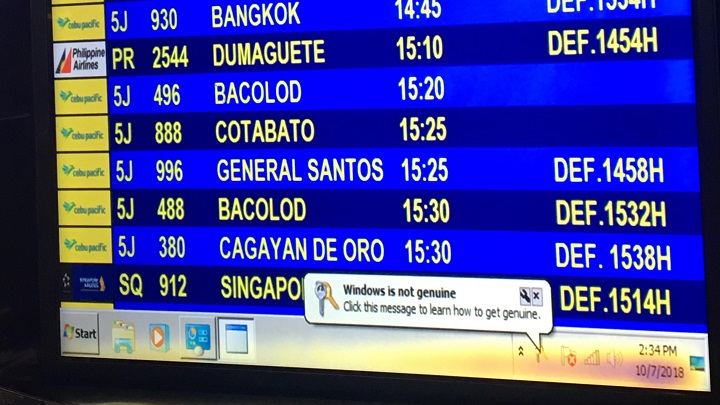
一张关于纳伊亚国际机场(NAIA)航班状态显示屏的照片近日在Reddit上引发热议。这可能是工作人员的失误,但图片显示,在航班信息下方,Windows任务栏实际上清晰可见,并完整显示了"Windows并非正版”的错误提示。
请不要误会,如果您的 Windows 副本是通过可疑的手段获得的,那么这确实是意料之中的事。然而,这种情况也可能发生在合法的 Windows 副本上。
如果您收到此错误消息且正在运行合法的 Windows 副本,那么本指南就是为您准备的。需要明确的是,本指南专门针对 Windows 7。此外,免责声明如下——尽管本文所述方法对部分用户有效,但我们并不保证这些方法一定成功,也不保证您计算机在此之后的完整性。
原因
如果您运行的是 Windows 的合法副本却遇到此错误,则可能由以下几种原因导致。首先,问题可能源于名为"SLMGR"的工具出错,该工具负责管理您的软件许可证。若非如此,可能是名为"Windows Activation Technologies"的工具出现问题,该工具用于验证您的操作系统。此组件 notably 包含在 Windows 7 Build 7600/7601 中。最后,问题也可能由注册表中的错误引起,包括权限不足或缺失条目。
解决方案 #1:命令提示符
- 点击“开始”菜单或按下 Windows 键。
- 在搜索框中输入"cmd"。
- 您将在结果中看到“命令提示符”。右键单击并选择“以管理员身份运行”。
- 输入"SLMGR -REARM",然后按 Enter 键。
- 如果一切顺利,您将看到一条提示,表明操作成功,并要求重新启动计算机。
如果此操作有效,重启后“Windows 不是正版”的错误提示应会消失。如果问题依旧,您可以尝试:
- 与上述步骤相同,但输入"SLMGR /REARR"。
解决方案#2:卸载更新
该错误可能是由 Windows 7 更新 KB971033 引起的,因此卸载它可能会解决问题。
- 点击“开始”菜单或按下 Windows 键。
- 打开控制面板。
- 点击“程序”,然后选择“查看已安装的更新”。
- 搜索"Windows 7 (KB971033)。”
- 右键单击并选择“卸载”。
- 重新启动计算机。
禁用自动更新
如果此解决方案有效,您可能需要关闭 Windows 自动更新功能,以确保该错误不会再次出现。
- 点击“开始”菜单或按下 Windows 键。
- 打开控制面板。
- 选择“系统和安全”,然后进入“设置自动更新开启或关闭”。
- 选择“从不检查更新”。
解决方案 #3:注册表编辑器
此解决方案专门针对错误代码 0x80070005,该问题可能由注册表权限不足或缺失条目引起。
微软提供了三种方法来修复此问题。如需详细操作说明,请访问微软支持中心的帖子此处。
重新激活?
如果此时上述解决方案均无效,您可能需要获取 Windows 的新副本,或通过在线或电话方式重新激活 Windows。
- 点击“开始”菜单或按 Windows 键。
- 输入"slui"。
- Windows 7 激活向导应会弹出。
- 按照屏幕上的指示操作。
结论
"Windows 不是正版”错误确实非常令人烦恼,尤其是当您实际上运行的是合法操作系统副本时。它会阻止您设置桌面背景,可能导致笔记本电脑电池消耗更快,并且总体上看起来也很碍眼。我们希望本指南能帮助您解决该错误。







The SLMGR -REARM worked ok. However, reactivation kept coming back. Not every day more like every two months.
However, i have now reached then end of this option because I have done the max number of rearms and now the OS has to be reinstalled.