yugatech x infinix

Apple iOS 7.0.4 now available for download

Listen to article

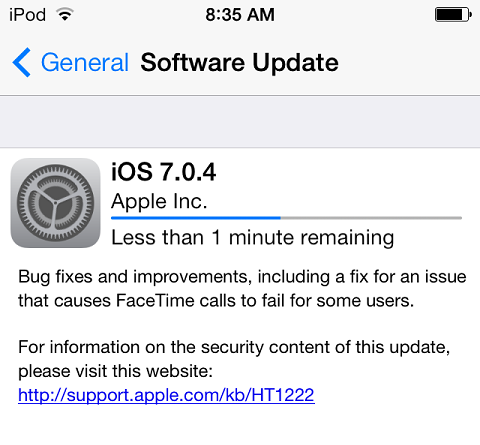
Apple has once again rolled out an incremental update for their mobile operating system which brings the build version to 7.0.4.

Unlike the previous update, iOS 7.0.4 is more focused on squishing security glitches and bugs that causes “FaceTime calls to fail for some users”.
ios

Other than what was mentioned above, the Cupertino tech giant didn’t give out that many details about the newly seeded firmware update. That said, let’s just hope that this new build does more good than harm.

To update, in your supported iOS devices, just go to Settings -> General and select Software Update.

React to this article:
Written by
Ronnie Bulaong

This article was written by Ronnie Bulaong, a special features contributor and correspondent for YugaTech. Follow him on Twitter @turonbulaong.

View all posts by Ronnie Bulaong →

28 Comments

JA
Jane rose · 11 years ago

Paano po ba mg update ng ios 7.1 wala kasi po sa software update ko


Reply
HI
history of education · 12 years ago

Let me straight away take hold of your current rss when i can’t to get ones contact monthly subscription link or perhaps e-newsletter support. Conduct you could have any? Kindly inform me to ensure I could join. Many thanks.


Reply
DI
Didi · 12 years ago

Ever since the update. I am having a hard time sending out text messages. I need to keep on resetting the network settings. Super hassle!!!!!


Reply
BR
BrickgameBoy · 12 years ago

I hope this new update 7.0.4 will now fix my iphone5 which is now…BRicked!.. i guess?

I am encountering Unknown Error 3 while doing restoration because my iphone5 will not open anymore and is in recovery mode….Forever.

I lost hope of apple because of this new iOS7


Reply
VE
Vekou X Aitenshi · 13 years ago

wala ba silang update na nakakapagpababa ng presyo?


Reply
GE
Genocide · 13 years ago

Walang ETA, ginagawa pa nila ang update na yan tol. Aheheeh.. Ganda ng comment mo, natawa talaga ako.

I just updated my iOS device to 7.0.4, I never encountered major issues from my prehistoric iPhone 4. Guess its luck since I don’t install to many applications on my device, except for music.


CO
cocopako · 13 years ago

*n


Reply
JK
JKhimmie · 13 years ago

Oo nga po, paano po ba kapag nag greyed out yung wifi pagkatapos mag update to ios 7? Nakakainis kasi inupdate ko pa 4s ko. :(


Reply
EU
Eunice · 13 years ago

Sir pano po yung greyed out wifi? Wala na talaga yun? :((


Reply
GE
Genocide · 13 years ago

Please try mo “Reset Network Settings”. Go to SETTINGS>GENERAL>RESET>RESET NETWORK SETTINGS, if d pa nag work yan. Last resort mo ug restore and iOS device mo.

Hope that helps, it worked for me.


CO
cocopako · 13 years ago

problem din yan ng iphone 5 ko dati sa ios 7.0.2, hindi talaga ma on ung wifi and bluetooth,mabilis ma drain battery,hindi maka send ng imessage tapos palagi nag boboot,, khit na anong gawin ko paraan useless, buti under warranty pa sa smart kaya naka kuha ako ng kapalit na bago, :) ngaun 7.0.2 pa din pero wala ng problem… ever na ako mag update,


CO
cocopako · 13 years ago

*n


TA
tambaysagreenhills · 13 years ago

problem na yan kahit sa 6.1 madam. Last resort is iheheat gun yung wifi chip sa loob mismo ng iphone. Ganyan pinagawa ko sa iphone ko sa GH, binenta ko rin agad kasi baka daw bumalik ulit yung sira.


BE
Ben10 · 13 years ago

Sana naman ma improve na ang battery life ng ios7 nakaka disappoint ang battery life sa ios7, sana di na ko nag update huhu.


Reply

Leave a Reply

Loading next article...