

HUAWEI MatePad 12 X (2026) Review



Saw this little USB device in action last week and was impressed by how easy and usable it is especially for iDevice users who tend to carry a lot of media files and transfer them between from and to their laptops/PCs.

The iFlashDrive practically stores and transfers media between the iPhone/iPod/iPad to your PC very easily.
Once you plug the i-FlashDrive into your iPhone or iPad, it will automatically prompt that you need to download the corresponding app from the iTunes App Store. Once installed, you can now access all of the files stored inside the device.
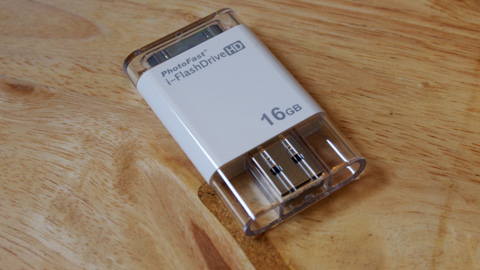
One end of the i-FlashDrive has the standard 30-pin connector while the other end has the USB 2.0 port. You can plug the USB into your laptop or PC and start copying media files into it (the device comes in 8GB, 16GB, 32GB and 64GB variants).
Unplug and and connect it to your iPhone/iPad, launch the iFlashDrive app and start playing all the media files straight away. The iFlashDrive acts as some sort of File Manager since you have options to create new Folders, create new Text file, record voice, paste content from Clipboard and import Photos from Photo Library.
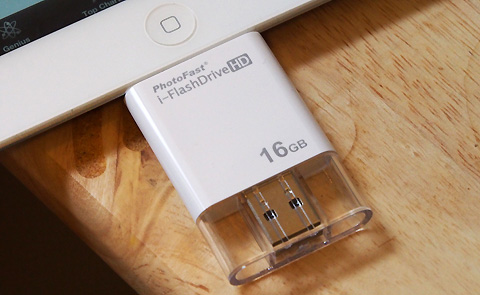
The case use is pretty simple, very easy to use and works all the time. If there’s one thing I’m a bit uneasy about it is that the transfer rate from my laptop to the USB is a little slow — it peaks at around 5MB/s which is decent but could be faster especially if we’re dealing with large media files here.

Since the unit still uses the old 30-pin connector, I am told that it will work with the 9-pin adapter.
I imagine that people who takes a lot of photos and videos using their iPhone or the ones who watches a lot of movies on their iPad will find this device interesting.

If you have a DropBox account, the app can also link it to the iFlashDrive so you can sync files between the USB and your DropBox folder.
The PhotoFast i-FlashDrive HD is expected to retail at the following prices:
8GB – PHp3,500
16GB – Php5,500
32GB – Php8,500
64GB – Php12,500
Should be available in stores by now but will update this post once we get the list of sellers.
Update: You can find them in all A.Shop branches (Eastwood, High Street, etc.) and GameStop in VirraMall and Trinoma.










Apple, Asus, Cherry Mobile, Huawei, LG, Nokia, Oppo, Samsung, Sony, Vivo, Xiaomi, Lenovo, Infinix Mobile, Pocophone, Honor, iPhone, OnePlus, Tecno, Realme, HTC, Gionee, Kata, IQ00, Redmi, Razer, CloudFone, Motorola, Panasonic, TCL, Wiko
Best Android smartphones between PHP 20,000 - 25,000
Smartphones under PHP 10,000 in the Philippines
Smartphones under PHP 12K Philippines
Best smartphones for kids under PHP 7,000
Smartphones under PHP 15,000 in the Philippines
Best Android smartphones between PHP 15,000 - 20,000
Smartphones under PHP 20,000 in the Philippines
Most affordable 5G phones in the Philippines under PHP 20K
5G smartphones in the Philippines under PHP 16K


jego207 says:
🌱 Noobs🏆1
Now, how am I supposed to plug a 1.5pound iPad into the USB socket in my PC [without using a USB extension wire]? Mmm…
Abe Olandres says:
🥉 Rookie🏆3
They don’t plug them in series. You need to eject the device from your PC once you transferred the files and then plug it into the iPad.
bopols says:
🌱 Noobs🏆1
OMG! so stupid question! HAHAHAHA! sige ipilit mo ilagay ang buong ipad sa USB socket ng pc mo. like OMG talaga! HAHAHAHAHA!
r41 says:
🌱 Noobs🏆1
Foul si bopols pero have to admit, ang benta ng tanong! Made my night LOL :))
sylv3rblade says:
🌱 Noobs🏆1
Makes me wonder if a Lightning Dock version will be available.
danoi says:
🥉 Rookie🏆1
Great peripheral. (But) Makes you think why Android tablets are better in this sense.
joelism says:
🌱 Noobs🏆1
I want…..
BJ Mandia says:
🌱 Noobs🏆1
@jego207..natawa ako sa comment mo.. :D
Guerde says:
🌱 Noobs🏆1
Can you use it for document(pages, docx, etc.) files? or just for media files?
Earl Choa says:
🌱 Noobs🏆1
I don’t know about pages, but i have tried it on docx and pdf and it works
Mr. Curious says:
🥉 Rookie🏆1
Because in the first place you don’t need this such device if only Apple would allow the “drag-and-drop” file transfer format into their devices. file transfer in apple devices is such a pain in the ass dT_Tb
Levi says:
🥉 Rookie🏆2
Right on.
Drey Roque says:
🌱 Noobs🏆1
Sir Yuga,
Any idea if you can plug a USB Flash Drive directly with this app? Just to view document files (pages, ppt, doc/x, pdf) on the fly.
This has been a problem with the iPad ever since it was introduced.
Thanks!
Drey Roque says:
🌱 Noobs🏆1
Sir Yuga,
The company also sells iPhone/iPad Card Reader. Any idea where to get one?
http://www.photofast.tw/products.asp?pid=2
Thanks!
Radere says:
🌱 Noobs🏆1
You can access the iDevice on your PC, just look for ifunbox PC app
ronsterrr says:
🌱 Noobs🏆1
This one from Kickstarter looks a lot better than this, but then again this is only for iphones. However the functionality it provides is a lot more:
http://www.kickstarter.com/projects/108290897/iexpander-an-expansion-device-for-your-iphone-4-an
I backed that project and should be getting mine in December. Bahala na kung saan ko ma share experience ko sa kanya since wala naman ako blog. hehehe.
ronsterrr says:
🌱 Noobs🏆1
at ito naman compatible for all idevices even android:
http://www.kickstarter.com/projects/125911486/cloudftp-wirelessly-share-any-usb-storage-with-ipa?ref=users
still from Kickstarter pero may sarili na silang website to take orders.
Calvin says:
🥈 Silver🏆1
meron ganitong solution before nung iPad 1 pa pero walang storage sa loob. parang apple camera kit with the 30pin adapter on one end but on the other end is a female USB stick. dun mo isasaksak yung USB mo to transfer files. i have one but don’t really feel like using it. i’d rather transfer files via WiFi using the Filer app.
Drey Roque says:
🌱 Noobs🏆1
Hello Calvin,
Do you need to JailBreak the iPad?
Do you have a photo of the set-up?
Kindly share please. =)
Thanks
Calvin says:
🥈 Silver🏆1
oops… on the other end is a female USB port pala.
jego207 says:
🌱 Noobs🏆1
@yuga — got it! Tnx boss
@bopols — buti naman at napasaya kita
marc says:
🌱 Noobs🏆1
question. do you need to transfer files pa from this device to you phone to view it? like you cant watch movies directly?
bottomsup624 says:
🌱 Noobs🏆1
Bought one 8gb variant yesterday at A-Shop in BHS… After getting home, tried finding the app in the appstore… But after reading the app reviews, i was disappointed… Warning: its ONLY compatible with iOS 5.1… duh???!!!… I have all my iDevices on iOS 6… Didn’t bother to open and test it… Will try to return or exchange it for a new item at A-Shop…
bottomsup624 says:
🌱 Noobs🏆1
my bad… the right app was i-FlashDrive HD and it says compatible with iOS 5.1 and later… I just hope it is… As per reviews, users of the original i-FlashDrive can’t use it in iOS 6 and the developers are ignoring their clamor for an update as they had bought the original version just months ago…
I just hope it works on iOS 6.1 and hope it gets updated thru the next versions of iOS… Or else, its P3,500.00 down the drain for me… But wait! I think it wouldn’t fit with my LifeProof case on… Have to find my Griffin Dock Extender first…
Jim says:
🌱 Noobs🏆1
Will wait for CD-R King to release this kind! LOL