

Huawei kamakita ang ilang Autumn Product Launch for APAC, nga mahitabo sa Oktubre 28, ug usa niini sa mga device sa lineup mao ang Huawei MateBook 14s. Apan unsaon kini pagkahimutang, ug unsaon kini pagkasulod sa nagtubo nga pamilyang MateBook para sa 2021, nga naglakip sa MateBook 14 2021, MateBook D 15 2021, MateBook D 14 2021, ug ang MateBook X Pro 2021? Pangitaon kini sa among review.
Disenyo ug Konstruksyon

Usa sa mga una nga butang nga nakakuha sa atong pagtagad mao ang MateBook 14s kung unsa ka bug-at ug nipis kini. Nagkita kini og 16.7mm sa gitas-on ug nagtimbang og 1.43kg, busa makapahigayon ka niini sa imong bag o dala-dala nimo nga walay sayop.


Ana sa wala nga kilid ang duha ka USB-C ports alang sa pag-charge ug DisplayPort (ang Core i7 + 16 GB + 1 TB + Space Gray nag-support og Thunderbolt 4 sa ikaduhang USB-C port sa wala), HDMI, ug ang 3.5mm headphone jack. Sa tuo anaa ang USB 3.2 Gen1 Type-A port.

Ana ang upat ka mikropono sa atubangan nga bahin, samtang anaa ang exhaust sa luyo.

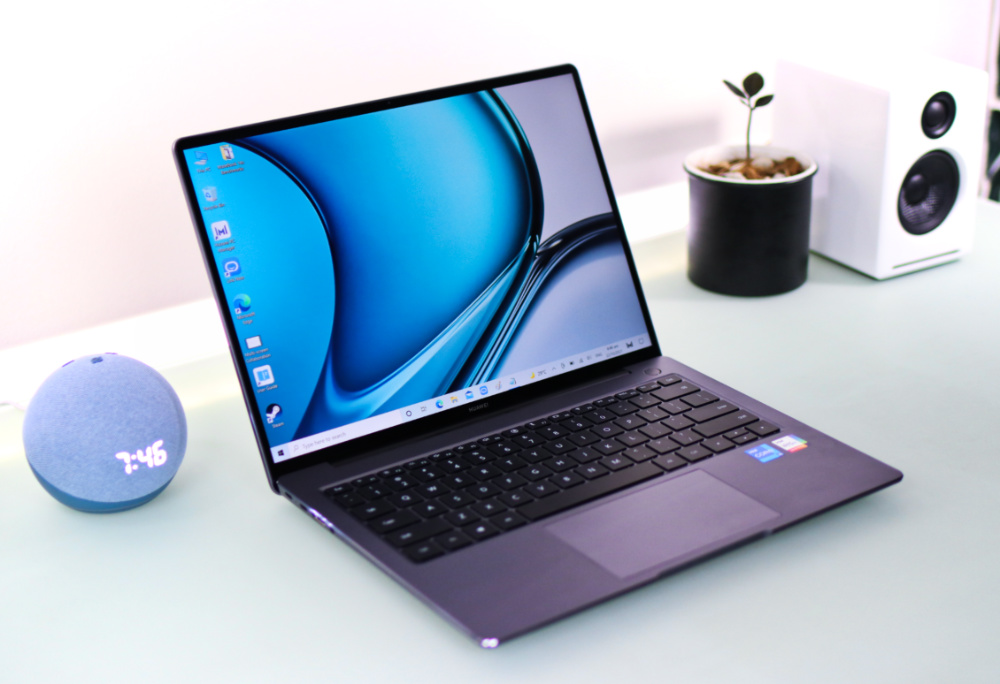
Igukod ang lead, ug makita nato ang 14.2-pulgada nga display nga adunay nipis nga bezels. Gipahimutang sa ibabaw nga bezel ang 720p webcam, busa walay na pop-up camera sa keyboard.

Sa keyboard nga dapit, naa nay fingerprint power button. Alang sa mga key, kini patag, maayo ang pagkakasunod-sunod, ug dili morag hinay. Aduna usab kini nga decent travel sa 1.5mm, busa matag stroke morag sige, ug gipadagan kini og backlighting nga adunay duha ka lebel sa kahayag. Dili kini kusog nga kahayag, apan anaa lang aron makita ang mga key sa kamingawan.

Ang trackpad hayag, adunay sapat nga gidak-on, ug may maayo nga left ug right clicks. Gihimong dugang, nag-support kini og multi-touch ug adunay Huawei Share nga built-in. Busa, kung aduna kay Huawei smartphone, i-tap ang NFC sa imong device sa trackpad, ug mosakop kini sa MateBook.

Displeyo ug Multimedia
Balik sa screen, ang MateBook 14s nagpakita og 14.2-pulgong nga screen nga adunay LTPS panel, 2520 x 1680 nga resolution o 213ppi, ug 400nits nga kahayag. Kini usab adunay maayo nga 90% nga screen-to-body ratio, 90Hz nga refresh rate, 178-degree nga viewing angle, 3:2 nga aspect ratio, ug suporta sa touch.

Kini nga mga numero nagpasabot nga kita nagtan-aw sa usa ka sharp ug vibrant nga screen nga may accurate nga colors sa 100% sRGB ug smooth nga animations ug transitions. Sa dugang pa, ang mas taas nga aspect ratio naghimo niini nga maayo alang sa pagbasa og mga artikulo o pagtrabaho sa spreadsheets kay adunay ka mas daghang content nga makasulod sa screen sa vertical nga direksyon. Sa uban pang pulong, ang screen sa MateBook 14s maayo para sa trabaho ug dula.
Ang MateBook 14s adunay upat ka speakers nga Huawei Histen Sound Effects alang sa suporta sa 3D surround sound kung bahin sa audio. Ang kalidad maayo kay kusog, klaro, ug tin-aw. Ang bass hinay, sama sa kadaghanan sa mga laptop, pero sapat kini para sa pagdumala og online nga mga pulong o pagtan-aw og mga video sa Netflix o YouTube.
OS ug mga Feature
Kung bahin sa operating system, ang MateBook 14s nagdagan sa Windows 10 Home. Gibuhat nato ang Windows PC Health Check aron makita kung eligible kini para sa Windows 11, ug hangtod karon, lahi-dili kini sa tanan nga aspeto, nga nagpasabot nga mahimo nimo pag-upgrade sa bag-ong OS walay bisan unsang problema sa compatibility.


Dili kini daghan nga pre-installed nga mga aplikasyon ug nag-depende sa default Windows nga mga app sama sa Microsoft Edge, Windows Defender, ug Office. Ang uban kay Huawei nga software nga kinahanglan alang sa collaborative ug productivity nga mga aplikasyon sama sa Huawei Link Now, nga morag usa ka dashboard para sa imong Huawei messaging ug real-time audio/video nga serbisyo.

Anaa usab ang Huawei PC Manager, nga usa ka hinungdanong kasangkapan tungod kay kini nagtabang nimo sa pagkonektar sa uban pang mga device sa Huawei ecosystem sama sa Huawei MateView (wireless), ug pag-aktibo sa Huawei Share alang sa Multi-Screen Collaboration uban ang Huawei smartphones ug tablets.


Pwede usab kini gamiton aron masusi ang notebook, i-update ang iyang software ug mga driver, ug dali nga ma-access ang suporta kung adunay problema.
Kahimtang ug mga Pagsulay
Ang nagapadagan sa modelong MateBook 14s nga among gipakita mao ang Intel Core i5-11300H processor uban sa Intel Iris Xe Graphics, 8GB sa RAM, ug 512GB SSD. Kaniadto, nagpasalamat kami sa performance kay tanan nagdagan og hayag ug makahimo og bug-at nga pag-browse sa Edge. Ang mga thermal usab maayo kay wala mi nakasulod og dili komportable nga init samtang nagtrabaho.

Check out the benchmark scores below:
• PCMark 10 Extended – 4,377
• 3DMark – 1,552 (Time Spy), 720 (Time Spy Extreme)
• Geekbench 5 – 1,298 (Single-Core), 4,796 (Multi-Core), 14,890 (OpenCL), 15,238 (Vulkan)
• Cinebench R20 – 2,244 (CPU - Multi-Core), 444 (CPU – Single-Core)
• Cinebench R23 – 5,801 (CPU - Multi-Core), 1,386 (CPU - Single-Core)
• CrystalDiskMark 7 – 3,384.42 MB/s (Seq. Read), 2,985.87 MB/s (Seq. Write)
It's worth noting that the MateBook 14s scored better than the MateBook D 15 2021 with an 11th-Gen Intel Core i5-1135G7, Intel Iris Xe Graphics, 16GB of RAM, and 512GB SSD that we reviewed in May.
Connectivity and Battery Life
The MateBook 14s has the basic connectivity features covered. In addition to the physical ports mentioned earlier, it has WiFi 6 for better and faster wireless internet and Bluetooth 5.1. We have a 60Wh capacity for the battery, which got us around 10 to 11 hours of use in Better performance mode. The laptop comes with a 90W charger that allows us to replenish the battery in a little over an hour.
Conclusion
The Huawei MateBook 14s is an excellent addition to the MateBook family and, in some aspects, better than the MateBook D 15, 2021, MateBook 14 2021, or the MateBook X Pro 2021. It has an attractive and premium design, an immersive screen with a 90Hz refresh rate and touch support, a webcam positioned at the top of the screen (which we prefer, by the way), good performance, and long battery life.
Huawei is yet to reveal the price of the MateBook 14s, though, so we're yet to determine how it fits in the family, but it's a worthy addition. It would satisfy regular users looking for a productivity laptop or those already invested in the Huawei ecosystem and looking for an excellent upgrade.
Huawei MateBook 14S specs:
14.2-inch 2.5K (2520 x 1680) FullView Display, Touchscreen, 213 PPI
90Hz refresh rate
Intel Core i7-11370H | i5-11300H Processor
Integrated Intel Iris Xe Graphics
8GB, 16GB LPDDR4X
512GB, 1TB NVMe PCIe SSD
Windows 10 Home (Free upgrade to Windows 11)
16GB DDR4
512GB NVMe PCIe SSD
WiFi 6
Bluetooth 5.1
2 x USB Type-C
2 x USB 3.2 Gen 1
1 x HDMI
3.5mm audio combo jack
Dual speakers
720 HD camera
Backlit keyboard
Fingerprint power button
60Wh battery
313.82 x 229.76 x 16.7mm
1.43kg
Spruce Green, Space Gray




Is thunderbolt support available only on the i7 model? The i5 model has no thunderbolt support?