

HUAWEI MatePad 12 X (2026) Review



PHP 350,000 is a lot of money.
You can do a lot with it. Use it to make more money like a responsible adult or spend it on a watch or even a second-hand car.. Alternatively, you could also buy what is arguably one of the most powerful gaming laptops on the market today – the 2025 ASUS ROG Strix Scar 18.

To give you an idea, the Strix Scar 18 packs an Intel Core Ultra 9 CPU, an RTX 5090 GPU, and 64GB of RAM. With that, it can run very much anything you throw at it, and I mean that in a literal sense.
But is the price worth all of the specs and features this laptop offers? Or should you build a PC instead? Better yet, should you just invest that money elsewhere? Well, let’s find out.
Before we go into the goods packed into the ROG Strix Scar 18, let’s talk about the design of the gaming laptop. Compared to the 2024 model, there’s one big change ASUS made to the design of the Strix Scar 18.

It now features the AniMe Vision LED Matrix originally found on the Zephyrus models. The LED Matrix isn’t as big as the one on the Zephryus, but it’s a nice addition to have. Users can fully customize the appearance of the dot matrix to their liking via the Armory Crate menu. I change it every so often just for the heck of it.
Aside from the AniMe LED matrix, the rest of the laptop remains unchanged from before. The lid is still made out of metal. There’s the huge RGB-back lit ROG logo on the right side of the lid, in case people don’t know what laptop you’re using.

I personally like the large ROG logo with the new AniMe LED Matrix design, but I’m sure some of you will prefer a more minimalistic styling. But hey, this is a top spec gaming laptop after all.
Like before, it retains the all-black design from the lid to the base with the premium feel you would expect from an ROG laptop. Though a bit more subtle, ASUS also redesigned the intake and exhaust vents of the Strix Scar 18.

At the base of the laptop, the vents on the sides are slimmer. Instead, all of the exhaust ports are located at the rear. As a result of this subtle design change, there’s even more RGB on base. The RGB lightbar now wraps around the entire laptop – including the rear – and it gives off a lot of aura points when turned on. It reminds me of the underglow on cars. If you want a more sleeper look, you can turn all of these off, but why though.

Similar to last year’s model, the interior lid and base are still made out of plastic. It’s a nice kind of plastic, and it feels nice to the touch. However, it doesn’t have the same premium feel as compared to a metal one. Still, it’s very much livable. What I didn’t like about it though, is that it isn’t very smudge-resistant. You can easily leave fingerprints and residue, and it’s also a bit hard to clean.

This being an 18-inch laptop, you get a full-size keyboard at your disposal. It also comes with dedicated keys for the volume control, mic mute/unmute button, performance mode, and armory crate. Of course, bright custom RGB lighting at your disposal as well.

They’re properly spaced out, and the keys look identical to the ones in the past. However, they do feel a bit different as compared to other ROG keyboards. They require a bit more effort to press, but the travel is longer.
It did take a few days before I got used to these keys, but they feel great. I was able to type rather fast and accurately, which includes writing this review. More importantly, my fingers didn’t get tired after all that typing.

Instead, what made typing not so comfortable was the new front end of the laptop where my arms and wrist are resting. They have a sharper profile, which meant some marks were left on my arms after typing for a while.
As for the trackpad, it’s a bit bigger than before. It still feels nice to the touch, and more importantly it’s accurate. I like the mechanical build with the physical clicks that you can hear when you use it. Despite the size increase, it features good palm rejection too. I didn’t even use a mouse most of the time I’m out and about.

But of course, we also have to talk about the size of the laptop. It’s not exactly the most portable laptop out there given how huge and heavy it is. It’s almost 400mm long, and when closed it is still 32mm thick. The weight? 3.3kg.
It’s so big it doesn’t even fit my usual bag, and I had to bring a different bag with me just to bring it around. Of course, I still bring it around.

Fortunately, the size does mean you have a lot of ports at your disposal for peripherals, SSDs, mouse, and even controllers. You get 3x USB 3.2 Gen 2 Type-A ports, 2x Thunderbolt 5 ports (USB Type-C), 1x 2.5G LAN port, 1x 3.5mm Audio Port, and 1x HDMI 2.1 port.

Sadly, no SD or even microSD card slots here, which I think is a missed opportunity. Considering how great this laptop is for editing photos and video, an SD card slot would have made life a lot easier to use. Not to mention, there’s still a lot of space available to add it in.

Now let’s move on to the part of the laptop, you’ll be looking at the most – the display. The display of the 2025 ROG Strix Scar 18 remains unchanged from last year. It still features an 18-inch 2.5K mini LED panel with a 240Hz refresh rate and 3ms response time, or as ASUS calls it – the ROG Nebula HDR display. It also features support for Dolby Vision, which you can turn on via the Dolby Atmos app.
As expected from this display, it features great vibrant colors, and with the 240Hz refresh rate the movements are super smooth. With the Dolby Atmos app, you can even adjust whether you’re watching something dark, bright, or vivid. But for this review, I set it mainly to vivid.

Given how big the screen is, it’s also great for watching videos in a group. I definitely enjoyed binge watching my favorite movies and anime on this laptop given how vivid the colors are and how deep the blacks can be.
But aside from having vivid colors, the colors are quite accurate too. You do need to turn on HDR since it isn’t turned on at the start, and the SDR colors are a bit oversaturated. I didn’t even calibrate it, and the output was similar to my monitor at home.

Of course, you’ll appreciate this display the most when you’re gaming. The vivid colors work well with the 240Hz refresh rate, giving you a very immersive visual experience when you’re playing games. With the power the laptop packs, it can run games at the highest settings too, but more on that later.
It’s not just the visuals that pull you in when you’re using the ROG Strix Scar 18. The speakers are equally amazing too. This laptop features a 4-speaker system and is complemented by Dolby Atmos.

Even without Dolby Atmos set to dynamic, you already have a great sound stage and clear mids. It does lack a bit of bass for my liking, but that’s to be expected from laptop speakers. What’s more important is the sound stage, as you can be immersed not just visually but also audibly.
Best of all, it’s loud too. There’s no distortions either with the speakers maxed out.

Now, we get to the good part – the performance. Our review unit of the 2025 ROG Strix Scar 18 is the top-spec variant. As mentioned earlier, it packs an Intel Core Ultra 9 275HX processor, 64GB of DDR5 RAM, 2TB of fast SSD storage, and an NVIDIA RTX5090 24GB GPU. If you need more storage, you can open up the back and add more. The same goes for the RAM.

As with any ROG device, you can also choose the performance mode you’re in. Of course, when plugged-in, I always set it to turbo to maximize performance of the Strix Scar 18. You can even tinker with the settings yourself in manual mode to max out the settings.
But of course, do this at your own discretion. The last thing you want is to brick a PHP 350,000 gaming laptop because you overclocked everything.

On paper alone, you already know ASUS fitted all of the top spec parts available during the launch of this laptop. With that, we’re not surprised it scored really high in all of the benchmarks we ran, which you can check out below.
What we were more interested in was the performance in real-life. It could easily handle running our productivity apps simultaneously. We mean Premiere, Photoshop, and Lightroom all together, and the Strix Scar 18 didn’t slow down. Of course, the fans started to spin up, but that’s to be expected.

And even with these apps running, you can still load your favorite games. Work and play all at once. With Premiere running in the background, Genshin, Ready or Not, and even Forza Horizon 5 still ran smoothly without any issues. Mind you these games were run with the graphic settings maxed out.
I even tried running two games at once, and the Strix Scar 18 could handle it all. The laptop did heat up a bit, and the fans became loud when I did. However, the important thing is that the framerates for either game were consistent.

For better reference, on Forza Horizon 5, I had a consistent frame rate of around 140+ with all graphic settings maxed out and NVIDIA DLSS turned on. (playing on custom maps with a lot of assets). It’s a similar story when I was playing Ready or Not that features a lot of mods.
So there’s no doubting the performance of the ROG Strix Scar 18. The fans can get really loud when in Turbo mode and running games. But if you’re just using it to get work done, you’ll barely hear it at all.

The 2025 Strix Scar 18 packs a 90Wh battery, which is similar in size to other ROG laptops of this generation. But as expected from a gaming laptop, the battery life isn’t exactly the best even when you’re not playing games.
You get the most battery life when you’re in silent mode and just working on productivity tasks. These include Google Sheets, Spotify, Discord, and RGB turned off, but still connected to Wi-Fi. From my experience, I did have around 4-5 hours of battery life with this setup.

But when you’re playing in performance mode, it uses a lot more juice. After just 30 minutes of playing Tekken 8 maxed out, I only had 60 percent battery life left.
With that, you’ll find yourself looking for a charger quite often – even if you plan to just work. You can just bring the smaller 100W USB-C charger with you. But if you plan on gaming and using turbo mode, you’ll need the big 380W charger which weighs a lot.

With everything it can do, the 2025 ROG Strix Scar 18 seems like the perfect gaming laptop. It’s a bit on the heavier side, but you can still bring it around to play games wherever you are. There’s just one big problem – the price.
The 2025 ROG Strix Scar 18 with the same specs as ours retails for PHP 348,990. That’s a lot of money to drop, especially on a gaming laptop. If you look around, you could even get the 2024 version of the Scar 18 for almost PHP 100,000 less. And by comparison, that is still a very powerful laptop today.

But if you’re a big player and want to aura farm wherever you go, you can’t go wrong with the 2025 ROG Strix Scar 18. You just have to pay to play. Would I get one if I had the budget? Definitely.
Still, what do you think of the 2025 ROG Strix Scar 18? Would you rather spend your PHP 350,000 here, or buy something else? Whatever the case, share your thoughts in the comments below.
What we liked:
* Amazing performance
* Beautiful display
* Great speakers
* Looks amazing
What we didn’t like:
* Very expensive
* No SD or microSD slot
*
Not exactly portable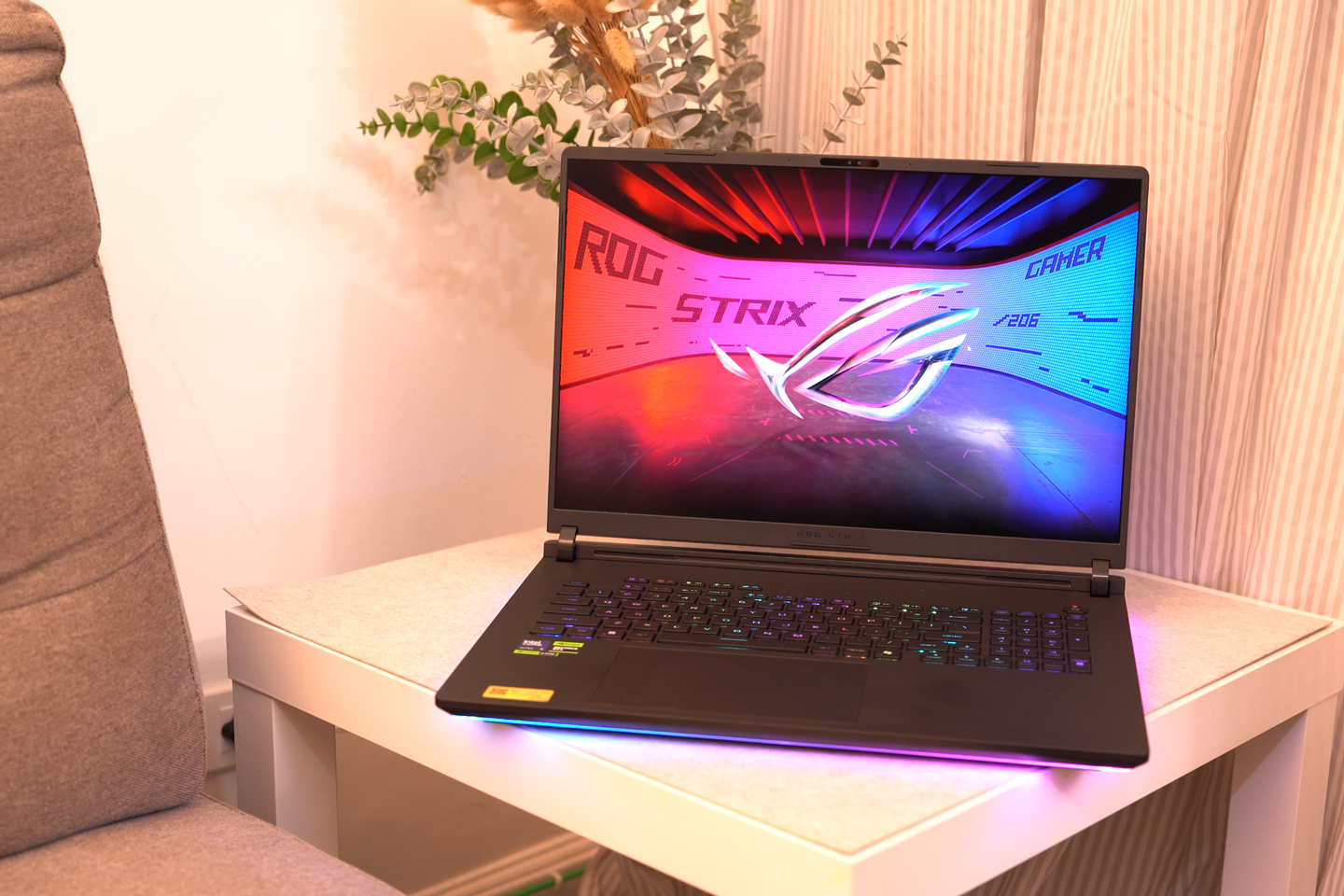










Apple, Asus, Cherry Mobile, Huawei, LG, Nokia, Oppo, Samsung, Sony, Vivo, Xiaomi, Lenovo, Infinix Mobile, Pocophone, Honor, iPhone, OnePlus, Tecno, Realme, HTC, Gionee, Kata, IQ00, Redmi, Razer, CloudFone, Motorola, Panasonic, TCL, Wiko
Best Android smartphones between PHP 20,000 - 25,000
Smartphones under PHP 10,000 in the Philippines
Smartphones under PHP 12K Philippines
Best smartphones for kids under PHP 7,000
Smartphones under PHP 15,000 in the Philippines
Best Android smartphones between PHP 15,000 - 20,000
Smartphones under PHP 20,000 in the Philippines
Most affordable 5G phones in the Philippines under PHP 20K
5G smartphones in the Philippines under PHP 16K


