infinix x yugatech

Apple ने iPhone 16 में कैमरा कंट्रोल बटन जोड़ा है।

Listen to article
Apple ने iPhone 16 सीरीज के लिए एक नया कैमरा कंट्रोल बटन जोड़ा है। यह बटन स्टेनलेस स्टील की रिंग से ढका हुआ है।

बटन कैमरा ऐप के लिए एक शॉर्टकट है और GESTURES के आधार पर विभिन्न कार्य करता है।

फोटो खींचने के लिए बटन को दबाएं और वीडियो रिकॉर्डिंग शुरू करने के लिए उसे दबाए रखें। चूंकि यह बटन टच-सेंसिटिव है, इसलिए उपयोगकर्ता अपनी उंगलियों को स्लाइड करके ज़ूम नियंत्रित कर सकते हैं। बटन पर दो बार दबाने से गहराई की सीमा (depth of field) जैसे अन्य नियंत्रण प्रकट होते हैं।

पिछले iPhone संस्करणों में कैमरे तक लॉक स्क्रीन आइकन के माध्यम से पहुंचा जाता था। उस समय, उपयोगकर्ताओं को फोटो खींचने के लिए वॉल्यूम डाउन बटन दबाना ही पर्याप्त था।

पिछले वर्ष के मॉडलों ने भी एक्शन बटन के साथ कैमरा ट्रिगर्स प्रदान किए थे। नए कैमरा कंट्रोल फीचर के साथ भी, यह विकल्प iPhone 16 सीरीज उपकरणों के लिए अभी भी उपलब्ध रहेगा।

Apple अधिक शॉर्टकट प्रदान कर रहा है जो उपयोगकर्ताओं के लिए इन कार्यों को मैप करने की इच्छा होने पर सहायक साबित हो सकते हैं। अंततः यह पसंद का मामला है। उदाहरण के लिए, उपयोगकर्ता निश्चित रूप से फोन के ऊपरी बाएं हिस्से में स्थित एक्शन बटन का उपयोग सेल्फी लेने के लिए कर सकते हैं।
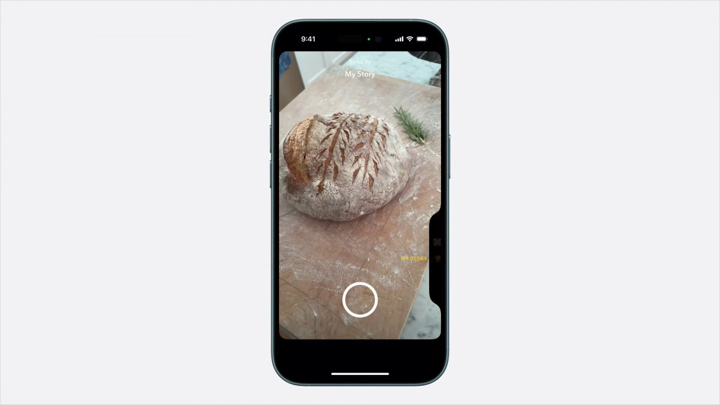
Apple तीसरे पक्ष के ऐप्पों को कैमरा कंट्रोल बटन द्वारा प्रदान किए जाने वाले विभिन्न गेस्टर्स का उपयोग करने की भी अनुमति दे रहा है। अनावरण के दौरान, Apple ने नोट किया कि Snapchat दोस्तों के साथ क्षण साझा करने जैसे अनुभवों के लिए पहले से ही इस सुविधा का उपयोग कर रहा है।

Apple के अनुसार, कैमरा कंट्रोल बटन इस वर्ष बाद में दो-अवस्था शटर के साथ अपडेट होने वाला है। यह विषय पर फोकस और एक्सपोज़र को लॉक कर सकता है, जिसे कैमरे के बटन को हल्का दबाकर सक्रिय किया जाता है।
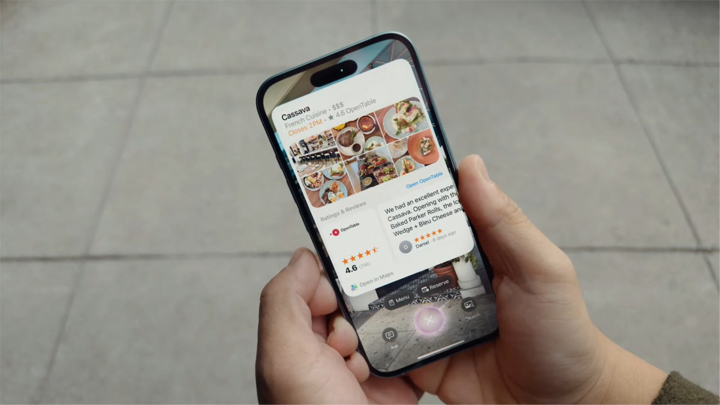

एक और उपयोगी सुविधा यह है कि बटन के माध्यम से Apple बुद्धिमत्ता के द्वारा उपयोगकर्ता दृश्यमान रूप से खोज कर सकते हैं। कंपनी ने बताया कि वे दृश्यमान खोज के लिए गेमिनी या ChatGPT जैसे तीसरे पक्ष के ऐप को एकीकृत करेंगे।यह भी उल्लेखनीय है कि iOS 18 उपयोगकर्ताओं को लॉक स्क्रीन आइकन बदलने की अनुमति देता है। इस बात का ध्यान रखें, क्योंकि जिन्हें रुचि हो वे डिफ़ॉल्ट के बजाय लॉक स्क्रीन पर कोई अन्य कैमरा ऐप लगा सकते हैं।

Frequently Asked Questions

What is the Camera Control button on iPhone 16?
It is a shortcut to the camera app with a stainless steel rim, using gestures for different functions.
How can users control zoom with the Camera Control button?
Users can control zoom by sliding their fingers across the touch-sensitive button.
Will third-party apps be able to use the Camera Control button?
Apple is allowing third-party apps to make use of the different gestures the button offers.
React to this article:
Written by
Duane Villanueva

Communication graduate, closet cynic, and kid at heart. Duane is a rare person to find, quite literally. He often takes to himself but has proven his mettle in tech media with his quick wits. Well, the portfolio of scriptwriting, web content, and public relations help too, we suppose. As a homebody, he often spends his time on the streaming platform Twitch or ‘farming’ gaming clips with friends. He is also an avid fan of round glasses and anything relative to blueberries.

View all posts by Duane Villanueva →

0 Comments

Leave a Reply

Loading next article...