
Apple added a new Camera Control button to the iPhone 16 Series. This button is covered by a stainless steel rim.

The button is a shortcut to the camera app and has different functions based on gestures.
Pressing takes a photo and holding starts a video recording. Since the button is touch-sensitive, users can control zoom by sliding their fingers across. Pressing the button twice brings up other controls like depth of field.
The camera used to be accessed through the lock screen icon in previous iPhone iterations. Back then, users just had to press volume down to capture photos.
Last year’s models also offered camera triggers with the Action Button. Even with the new Camera Control feature, this option will still be available to iPhone 16 Series devices.
Apple is offering more shortcuts that could prove to be helpful if users would like to map these for more actions. It’s a matter of preference, after all. For example, users could definitely use the Action Button to take selfies since it’s situated on the upper left side of the phone.
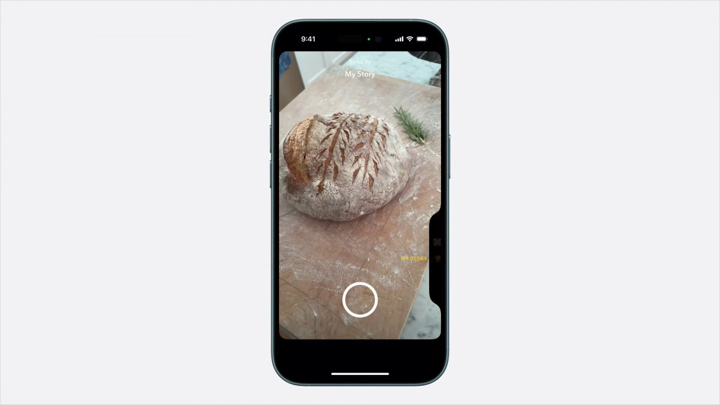
Apple is also allowing third-party apps to make use of the different gestures that the Camera Control button offers. During the reveal, Apple noted that Snapchat is already using the feature for experiences like sharing moments with friends.
As per Apple, the Camera Control button is due for an update later this year with a two-state shutter. This can lock focus and exposure on the subject, activated by lightly pressing the camera button.

Another neat feature is how the button allows users to search visually via Apple Intelligence. The company said that they’ll integrate third-party apps for visual search like Gemini or ChatGPT.
It’s also notable that iOS 18 allows users to replace lock screen icons. Keep this in mind, as those interested could place another camera app instead of the default on the lock screen.





0 Comments
Leave a Reply