

Users can now set ShopeePay as a preferred payment method for your purchases and subscriptions on the App Store and Apple services.

Apple ID’s access to ShopeePay is now enabled for Sourtheast Asian nations including the Philippines, Indonesia, Malaysia, Singapore, Thailand and Vietnam.
When a ShopeePay user connects it to their Apple ID, they can use that payment method to any of their Apple device with just the Touch ID or Face ID as authentication once it is set up. No codes or other passwords required.
Here’s how you can set up ShopeePay as a payment method.
- Step 1: On the iPhone, go to Settings and tap on Apple ID. Then select ‘Payment & Shipping’ (sign-in to your iCloud account may be required).
- Step 2: Tap on ‘Add Payment Method’.
- Step 3: Select ‘ShopeePay’ as your preferred payment method, then sign-in to your ShopeePay account as required.
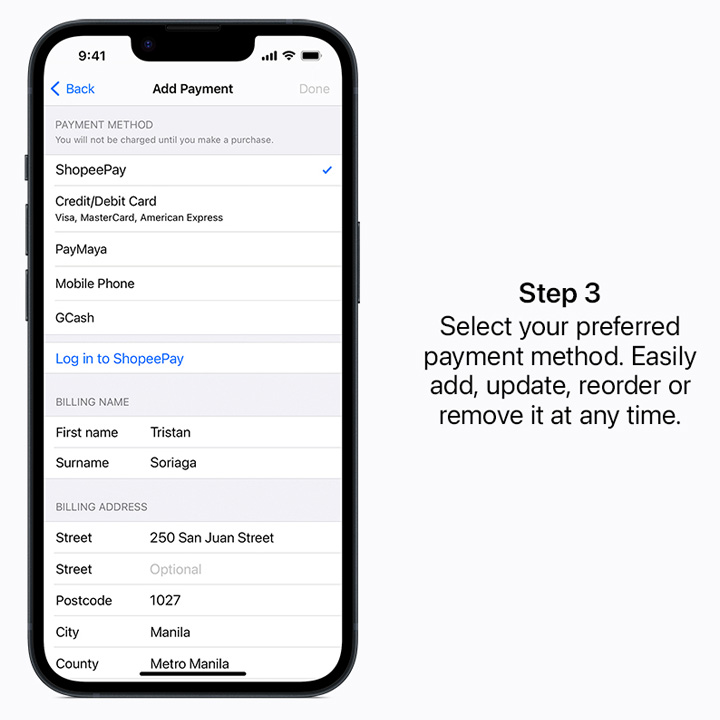
Of course, users may update, reorder, or remove ShopeePay as a preferred payment method anytime.
If you have an iPad, Mac or Windows PC, Apple also provided a guide on how you can add payment method to these platforms.
ShopeePay is the integrated mobile e-wallet of the Singapore-based e-commerce giant, Shopee.






0 Comments
Leave a Reply