

Lenovo Tech World, Beijing, China — Lenovo has introduces the Lenovo Cast – a wireless hub that lets you cast content from your smartphone or tablet to any display with an HDMI port.
The Lenovo Cast works similar to Google’s Chromecast – you plug it to any display with HDMI port and your smartphone or tablet will connect to the Cast wirelessly via WiFi. From there you can play any media file and it will wirelessly play on the display.

Lenovo Cast key features:
* Sends on and off line content, such as movies, videos and games, wirelessly from a smartphone or tablet with a transfer distance of up to 20 meters that can penetrate up to two walls
* Delivers superb wireless performance with Wi-Fi dual frequency thanks to true synchronized 2.4G and 5G working modes; high-performance antenna also significantly reduces interferences
* Easy set up and use; simply plug in Lenovo Cast into any large-screen display with an HDMI output, link device to corresponding TV signal and play any media off the device
* Sleek and compact size to fit into any pocket or bag at just 70mm in diameter and 15mm in height
* Designed to cast media from devices using Android 4.3 and above; also supports selected Miracast or DLNA-enabled Windows 8.1 or iOS devices.
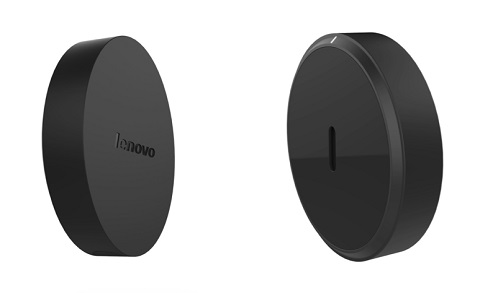
The Lenovo Cast comes with a USB and HDMI cable. It will be available beginning in August worldwide with a price tag of $49 USD.
Other devices introduced by Lenovo at Beijing, China:
- Lenovo Magic View — world’s first smartwatch with dual display
- Lenovo Smart Cast — world’s first laser projector smartphone
- Lenovo introduces Cortana and REACHit
- Lenovo ThinkPad 10 officially announced
- Lenovo Outs Three Affordable Laptops



0 Comments
Leave a Reply