Windows 95 の 20 年:私たちが愛した ⟨PH0X⟩ 95 の 20 のこと

Listen to article

Windows 95 は 1995 年 8 月 24 日にリリースされました。本日、その 20 周年を迎えます。

Windows 95の20周年を祝うため、このオペレーティングシステムで私たちが欠かし、そして愛している20のことをご紹介します。

  1. インストーラーとして3.5インチフロッピーディスクを使用。13枚の特別な 1.44MB フロッピーディスクをドライブに順番に挿入する必要があり、本当にコンピュータの前で次のディスクを促されるまでじっと見つめている必要があります。
  2. 動作には 4MB の RAM が必要。非常に軽量なメモリフットプリントです -- Windows 95 は 4MB の RAM で実行可能です。より多くのメモリを購入して追加の 2MB を得ることもできますが、 Windows を実行するには 4MB で十分です。
  3. インストールには約 50MB の空き容量が必要。 Windows 95 をインストールするためにすべての 50MB のスペースが必要になるため、ハードドライブを整理する準備をしてください。
  4. 起動前に MS-DOS バッチコマンドを実行。 Windows 95 をロードする前に、ウイルス対策、ディスクパーティション作成、ディスク RAM 作成を行うバッチ (.bat) ファイルを作成したことを覚えています。
  5. GUI が私たちの戦いの叫び声です。 Windows 95 は誰もがグーイ(粘着質な)またはグラフィカルユーザーインターフェースに慣れさせました。もはや PC の使用はオタクやゲーマーだけのものではありません。GUI により、子供から祖父母までが PC を容易に使用できるようになりました。 Windows 95 より前にインターネットを使用していたことを覚えています。メールには Pine、ウェブ閲覧には Lynx(テキストベースのブラウザ)しかありませんでした。
  6. ゴミ箱 が新しいアンディリートです。 Windows 95 を初めて見たのは寮の友人の 486 PC で、彼が私に見せた最初のトリックは削除されたファイルの復元でした。もはや Undelete は不要で、ゴミ箱に行って「復元」をクリックするだけです。
  7. 起動ロゴを変更。当時これをできる人は少なかった素敵な小技です -- 起動ロゴ用にアニメーション付きの旗のような動きを備えた独自画像を作成できます。
  8. Internet Explorer は付属しない。 Windows 95 がリリースされた際、Internet Explorer は同梱されていませんでした。IE ブラウザが必要な場合は、別売りの MS Plus! Pack(さらに 6 枚のフロッピーディスク)を取得する必要があります。
  9. ディスクデフラグメンター。ハードディスクをデフラグメントすると Windows の起動が速くなり、プログラムもより良く動作します。そのため、私たちはほぼ毎日実行していました。
  10. PowerToys。ハードコアユーザーで細部の設定を深く掘り下げたい場合は、Microsoft がリリースした TweakUI をダウンロードしてインストールする必要があります。
  11. ソリティアとマインスイーパ。 Windows における究極の時間つぶしゲームです。デスクトップにショートカットとして特別な場所を持っています。
  12. IRQ を学ぶ。COM ポートや LPT ポートに多くのデバイスを接続すると、プリンターがスキャナーやマウスと競合しないようにするために、割り込み要求(IRQ)についていくつかのことを学ぶ必要があるかもしれません。
  13. MS ペイントでアートを作成。最も強力な無料の画像編集ツールはペイントであり、あらゆる種類のことができます。
  14. 長いファイル名。MS DOS の 8文字制限にさようならを。 Windows 95 では最大 255 文字までのファイル名をサポートしています。
  15. プラグアンドプレイ。 Windows 95 が私たちの生活にもたらした最大の奇跡は プラグアンドプレイ です。Microsoft は、プリンター、マウス、CD-ROM、スキャナーなどの任意のデバイスを接続すれば、即座に検出してスムーズに動作するように設定できると主張しています。もはやドライバーや設定は不要です。常に完璧に機能したわけではありませんが、本当に素晴らしいものでした。
  16. ドラッグ&ドロップ。マウスを使えば、ファイルをどこでもドラッグ&ドロップして開く、コピーする、移動する、または削除できます。
  17. VGA モニターが登場。 Windows 95 より前は、モノクロやグリーンスクリーンで十分でした。 Windows 95 は私たちにより多くの色と高い解像度の世界を開きました。それは 480 x 640 ピクセルです。もちろん、768x1024 をサポートするモニターがあればクールだと思いました。
  18. スタートボタン。人気のあるスタートボタンは Windows のユーザーフレンドリーさの象徴となりました。
  19. 右クリック。マウスボタンの右クリックアクションがより意味を持ち、有用になりました。ファイルで何ができるか分からない場合は、右クリックしてください。
  20. 携帯電話でも動作します。 Windows 95 が Nokia N95 や N82 で動作しているのを見てきました。これは電話よりも OS のことをより語っています。
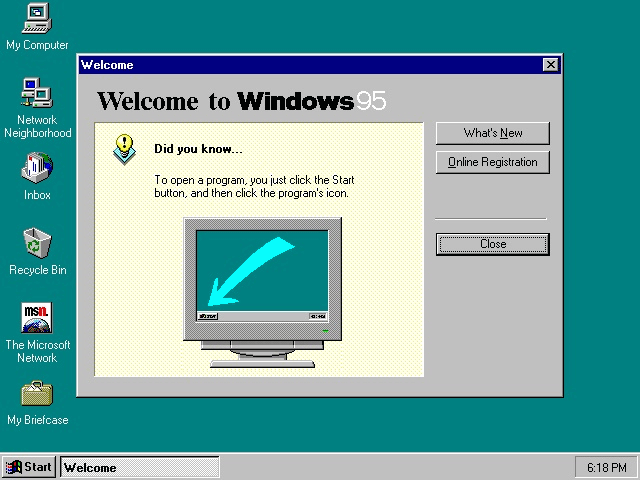
では、あなたはどうですか?Windows 95について最も記憶に残っているのは何ですか?また、それがあなたのPCの世界をどのように変えたのでしょうか?

Frequently Asked Questions

What storage media were used to install Windows 95?
The installation required a set of 13 special 1.44 MB 3.5" floppy disks that had to be inserted sequentially.
How much RAM was sufficient to run Windows 95?
Windows 95 could operate with only 4 MB of RAM, though adding more could provide an extra 2 MB of performance.
How much hard‑drive space did Windows 95 need for installation?
The operating system required approximately 50 MB of free space on the hard drive for a complete installation.
React to this article:
Written by
Abe Olandres

Abe Olandres

Editor-in-chief

Abe is the founder and Editor-in-Chief of YugaTech with over 20 years of experience in the technology industry. He is one of the pioneers of blogging in the country and is considered by many as the Father of Tech Blogging in the Philippines.

View all posts by Abe Olandres →

30 Comments

HO
hotruss · 11 years ago

CD installer came with the Weezer “Buddy Holly” music video. It was a crowd-pleaser whenever you would like to watch something.

Also came with Edie Brickell “Good Times”.

Reply
TR
trebor · 11 years ago

naalala ko to nung 1st year ko sa school,ask kme ng prof namen anu aw ang xpected na ma22han nmin sa computer subject,,sbi ko corell draw and autocad,hehe without knowing na 486 lang pla gmit nmin,,ayun ms word lang pala tinuro,naalala ko pa boot muna sa floppy ang windows 95,masaya nko nun hbang nkaharap sa mga white colored monitor and cpu,,tinitipa ko pa ang mga keys ng keyboard kc napakasoft compared sa typewriter,,inosente pako sa pc nun not until now i owned a computer shop with atleast 6 amd apu’s running stock windows 7 atlest 1mbps broadband speed here in pampanga…

Reply
FO
foobarph · 11 years ago

Tapos ang first programming experience ay yung gagawa ka ng BAT files. Astig!

Reply
PA
pandesal · 11 years ago

there was no lx-300 at that time…. it was the fx(s) and the OKI microline and the star(s) printers…. thanks

Reply
IM
imagi · 11 years ago

@Pandesal. The Epson LX-300 came out in 1994.

https://archive.org/details/printermanual-epson-lx-300-service-manual

FI
FiatLux · 11 years ago

I used to use Windows 98 when I was a very young kid.

And I’ve used to run Windows 3.1 on DOSBOX.
And the memories of floppy diskettes that I’ve remembered shouldn’t die….

Reply
RU
Ruben · 11 years ago

The first GUI used is not windows 95 it’s Windows 3.11 for workgroup. It’s based on a shell called Program Manager pretty much like the File Explorer of present day windows and no Start button yet. But it’s is GUI and mouse enabled already. Then windows 95 comes and start menu and desktop was born. But there is a trick to hide the start button of windows 95 and show only the Program Manager just like the old 3.11

Reply
1C
1cho · 11 years ago

I could recall the days when I used to play SimCity, Chips Challenge, Skifree, Monopoly, Lost Vikings and especially the 3D Maze screen saver.

Reply
1C
1cho · 11 years ago

Pati pala Red Alert! How could I forget? Hahaha

AB
Abe Olandres Editor-in-chief · 11 years ago

Yes, I remember playing Red Alert, Warcraft 1 and Diablo.

IM
imagi · 11 years ago

I remember Atomic Bomberman~ the game that started LAN games.

AN
Andre · 11 years ago

Earlier versions of MS-DOS already had a disk defragmenter, licensed from some other company. Also VGA monitors became a (virtual) necessity with the earlier Windows 3.1. By the time Windows 95 rolled out, many users were on Super VGA already, 256-color and even 15-bit, 16-bit or truecolor (24- or 32-bit).

My first reaction to Win95 was meh, though ‘meh’ didn’t exist at the time yet :P I preferred to stay with DOS and running bare metal stuff especially games.

Reply
IM
imagi · 11 years ago

Darn, I remember doing a long report in college using Wordpad. Hindi pa naka-install ang office in my computer. In those years, ang uso na word processor ay Wordstar. It was a big switch using the mouse. Also, unforgettable ang Epson Dot Matrix Printer (LX-300) when it first came out those years. It took me 2 hours to print a 50+ pages report back then.

Reply
DI
Digest · 11 years ago

I miss the sound of that printer printing endlessly back and forth.

'E
’em · 11 years ago

tama Wordstar!

Leave a Reply

Loading next article...