Windows 95 二十周年:我们喜爱的关于 Windows 95 的九件事

Listen to article

Windows 95 于 1995 年 8 月 24 日发布。今天,它迎来了其第 20 周年。

为庆祝 Windows 95 问世 20 周年,以下是我们怀念并钟爱的该操作系统的 20 个亮点。

  1. 使用 3.5" 软盘作为安装介质。这套包含 13 张特殊 1.44MB 软盘的套装需要依次插入驱动器,因此你必须坐在电脑前,盯着屏幕等待系统提示你插入下一张。
  2. 仅需 4MB RAM 即可运行。内存占用非常小——Windows 95 可在 4MB 的内存上运行。虽然你可以购买更多内存以获得额外的 2MB,但只需 4MB 就足以运行 Windows。
  3. 需要约 50MB 的安装空间。请准备好清理硬盘,因为安装 Windows 95 将需要全部 50MB 的空间。
  4. 启动前运行 MS-DOS 批处理命令。我记得曾创建批处理 (.bat) 文件,在加载 Windows 95 之前运行杀毒程序、进行磁盘分区以及创建磁盘 RAM。
  5. 图形界面是我们的战斗口号。Windows 95 让大众首次接触到了黏糊糊的或图形用户界面(GUI)。使用个人电脑不再只是极客或书呆子的专利。图形界面让从孩子到祖父母的人都能轻松使用 PC。我记得在 Windows 95 之前上网,我们只能用 Pine 来收发电子邮件,用 Lynx 浏览网页(Lynx 是一款基于文本的浏览器)。
  6. 回收站是新的“文件恢复”功能。我第一次见到 Windows 95 是在室友的一台 486 PC 上,他向我展示的第一个技巧就是恢复已删除的文件。不再需要 Undelete 程序,只需进入回收站并点击“还原”即可。
  7. 更改启动标志。这是一个当时鲜为人知的小技巧——你可以创建自己的特殊图像作为启动标志,包括带有动画效果的旗帜式摆动。
  8. 没有 Internet Explorer。Windows 95 发布时并未附带 Internet Explorer。如果你想要 IE 浏览器,则需要单独购买 MS Plus! Pack,它包含在另外 6 张软盘中。
  9. 磁盘碎片整理程序。如果你对硬盘进行碎片整理,Windows 的启动速度会更快,程序运行也会更流畅。因此,我们几乎每天都这样做。
  10. PowerToys。如果你是硬核用户并希望深入调整精细设置,则需要下载并安装由 Microsoft 发布的 TweakUI。
  11. 纸牌和扫雷。这是 Windows 上终极的消磨时间游戏。它们在桌面上拥有特殊的快捷方式位置。
  12. 学习 IRQ(中断请求)。如果你在 COM 端口或 LPT 端口连接了大量设备,那么你可能需要了解一些关于中断请求 (IRQ) 的知识,以防止打印机与扫描仪和鼠标发生冲突。
  13. 使用 MS Paint 创作艺术。最强大、免费的图像编辑工具是“画图”,它可以完成各种任务。
  14. 支持更长文件名。告别 MS DOS 的 8 字符限制。Windows 95 现在支持长达 255 个字符的文件名。
  15. 即插即用。Windows 95 为我们的生活带来的最大奇迹就是 即插即用。微软宣称,你可以插入任何设备——打印机、鼠标、CD-ROM、扫描仪——它都会立即检测并设置其顺畅运行。不再需要驱动程序和配置。虽然并非总是有效,但确实非常棒。
  16. 拖放功能。使用鼠标,你可以将任何文件拖放到任何位置以打开、复制、移动或删除它们。
  17. VGA 显示器登场。在 Windows 95 之前,我们对单色或绿色屏幕感到满意。Windows 95 为我们打开了更多色彩和更高分辨率的世界。那是 480 x 640 像素。当然,我们也希望支持 768x1024 分辨率的显示器才够酷。
  18. 开始按钮。流行的“开始”按钮成为了 Windows 用户友好性的象征。
  19. 右键点击。鼠标右键操作变得更有意义且更加实用。如果你不知道对文件能做什么,只需点击右键即可。
  20. 它也能在手机上运行。我们曾看到 Windows 95 运行在诺基亚 N95 和 N82 上。这更多地说明了该操作系统的特性,而非手机本身。
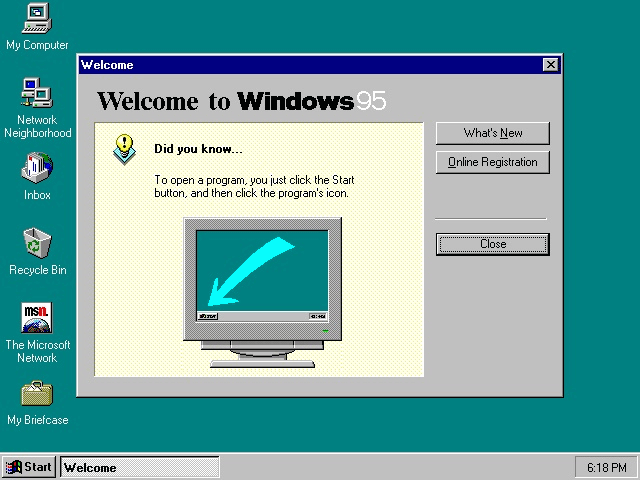
你呢?关于 Windows 95,你印象最深的是什么?它又是如何改变了你的电脑世界?

Frequently Asked Questions

What storage media were used to install Windows 95?
The installation required a set of 13 special 1.44 MB 3.5" floppy disks that had to be inserted sequentially.
How much RAM was sufficient to run Windows 95?
Windows 95 could operate with only 4 MB of RAM, though adding more could provide an extra 2 MB of performance.
How much hard‑drive space did Windows 95 need for installation?
The operating system required approximately 50 MB of free space on the hard drive for a complete installation.
React to this article:
Written by
Abe Olandres

Abe Olandres

Editor-in-chief

Abe is the founder and Editor-in-Chief of YugaTech with over 20 years of experience in the technology industry. He is one of the pioneers of blogging in the country and is considered by many as the Father of Tech Blogging in the Philippines.

View all posts by Abe Olandres →

30 Comments

HO
hotruss · 11 years ago

CD installer came with the Weezer “Buddy Holly” music video. It was a crowd-pleaser whenever you would like to watch something.

Also came with Edie Brickell “Good Times”.

Reply
TR
trebor · 11 years ago

naalala ko to nung 1st year ko sa school,ask kme ng prof namen anu aw ang xpected na ma22han nmin sa computer subject,,sbi ko corell draw and autocad,hehe without knowing na 486 lang pla gmit nmin,,ayun ms word lang pala tinuro,naalala ko pa boot muna sa floppy ang windows 95,masaya nko nun hbang nkaharap sa mga white colored monitor and cpu,,tinitipa ko pa ang mga keys ng keyboard kc napakasoft compared sa typewriter,,inosente pako sa pc nun not until now i owned a computer shop with atleast 6 amd apu’s running stock windows 7 atlest 1mbps broadband speed here in pampanga…

Reply
FO
foobarph · 11 years ago

Tapos ang first programming experience ay yung gagawa ka ng BAT files. Astig!

Reply
PA
pandesal · 11 years ago

there was no lx-300 at that time…. it was the fx(s) and the OKI microline and the star(s) printers…. thanks

Reply
IM
imagi · 11 years ago

@Pandesal. The Epson LX-300 came out in 1994.

https://archive.org/details/printermanual-epson-lx-300-service-manual

FI
FiatLux · 11 years ago

I used to use Windows 98 when I was a very young kid.

And I’ve used to run Windows 3.1 on DOSBOX.
And the memories of floppy diskettes that I’ve remembered shouldn’t die….

Reply
RU
Ruben · 11 years ago

The first GUI used is not windows 95 it’s Windows 3.11 for workgroup. It’s based on a shell called Program Manager pretty much like the File Explorer of present day windows and no Start button yet. But it’s is GUI and mouse enabled already. Then windows 95 comes and start menu and desktop was born. But there is a trick to hide the start button of windows 95 and show only the Program Manager just like the old 3.11

Reply
1C
1cho · 11 years ago

I could recall the days when I used to play SimCity, Chips Challenge, Skifree, Monopoly, Lost Vikings and especially the 3D Maze screen saver.

Reply
1C
1cho · 11 years ago

Pati pala Red Alert! How could I forget? Hahaha

AB
Abe Olandres Editor-in-chief · 11 years ago

Yes, I remember playing Red Alert, Warcraft 1 and Diablo.

IM
imagi · 11 years ago

I remember Atomic Bomberman~ the game that started LAN games.

AN
Andre · 11 years ago

Earlier versions of MS-DOS already had a disk defragmenter, licensed from some other company. Also VGA monitors became a (virtual) necessity with the earlier Windows 3.1. By the time Windows 95 rolled out, many users were on Super VGA already, 256-color and even 15-bit, 16-bit or truecolor (24- or 32-bit).

My first reaction to Win95 was meh, though ‘meh’ didn’t exist at the time yet :P I preferred to stay with DOS and running bare metal stuff especially games.

Reply
IM
imagi · 11 years ago

Darn, I remember doing a long report in college using Wordpad. Hindi pa naka-install ang office in my computer. In those years, ang uso na word processor ay Wordstar. It was a big switch using the mouse. Also, unforgettable ang Epson Dot Matrix Printer (LX-300) when it first came out those years. It took me 2 hours to print a 50+ pages report back then.

Reply
DI
Digest · 11 years ago

I miss the sound of that printer printing endlessly back and forth.

'E
’em · 11 years ago

tama Wordstar!

Leave a Reply

Loading next article...