
With Google Chrome and Firefox nearly getting to version 100, early testing has begun for possible issues on parsing three-digit User-Agent strings.

이 테스트는 브라우저 버전을 식별하여 비즈니스 로직을 수행하는 웹사이트에서 발생할 수 있는 파손 가능성을 방지하기 위해 도입되었습니다. 이 현상은 브라우저 버전이 두 자릿수에 도달하고 User-Agent 파싱 라이브러리에서 많은 문제가 발생했을 때 발견되었습니다.
대부분의 웹사이트에 대한 간단한 팁은 웹 앱에 Java Script 테스트 스위트가 있는 경우, 버전 번호가 100인 브라우저 프로필을 추가하여 문제가 발생하는지 테스트하면 업데이트가 진행될 때 문제 발생 가능성을 판단할 수 있다는 점입니다.
According to developers from Google, starting from Chrome 96, until Chrome 99, a feature flag will be available to force the User-Agent string to utilize the major version number 100, regardless of the actual version number. Better yet, you may check out Is Chrome 100 yet? to verify if your browser is sending the major version 100 in the User-Agent string.
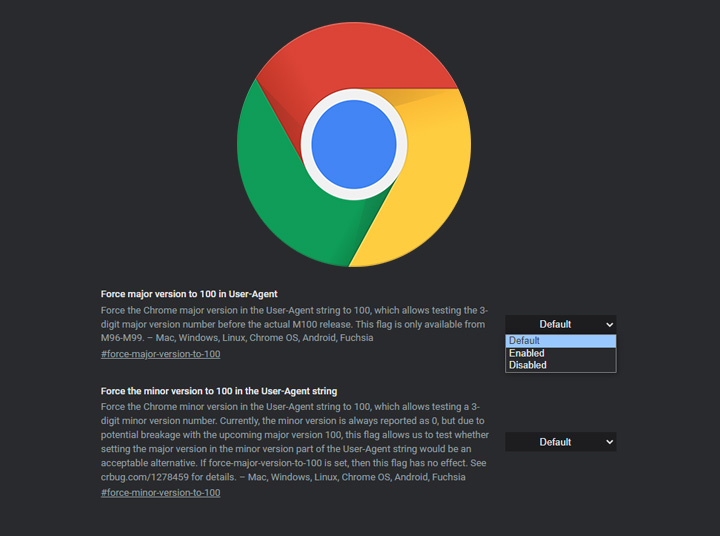
플래그를 Chrome에서 켜고 실험하려면 주소 표시줄에 chrome://flags 를 입력하고 #force-major-version-to-100 플래그를 활성화하십시오.
반면에 Firefox의 경우, Firefox Nightly 설정 메뉴를 열고 "Firefox 100"을 검색한 뒤 "Firefox 100 User-Agent String" 옵션을 선택하여 활성화하십시오.


0 Comments
Leave a Reply