yugatech x infinix

Windows 8.1 update to be rolled out on October 17

Listen to article

Just a few months after its Preview version was released, Microsoft is now set to roll out the Windows 8.1 update to devices currently running on Windows 8 starting at 12:00am on October 18th in New Zealand or 8:00pm on October 17th local time.

The update, as we pointed out on one of our previous post, will bring a handful of new features that are missing on the current version of Windows OS, including customizations to further improve the overall user experience.
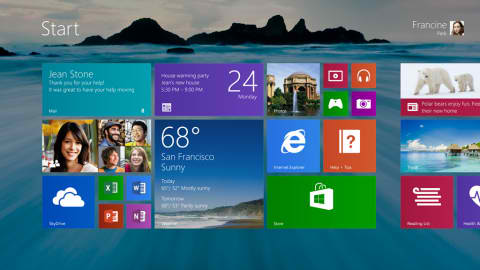
windows 8.1

Among the more notable improvements on Windows 8.1 include the return of the Start button on Desktop Mode and the ability to display up to 4 apps at once for better multitasking experience. Below is a short video demo that showcases some of the enhancements that this new build brings to the OS.

https://www.youtube.com/watch?v=VQb5caeSo00

{source}

React to this article:
Written by
Ronnie Bulaong

This article was written by Ronnie Bulaong, a special features contributor and correspondent for YugaTech. Follow him on Twitter @turonbulaong.

View all posts by Ronnie Bulaong →

43 Comments

DO
donzzy · 13 years ago

I just wish MS did not ditch the Aero features on the Themes section. Anyhow, I’m still grateful for the speedy boot-up and shutdown time, Windows apps, etc.

Reply
JA
james p. · 13 years ago

windows 8 is great, just want it more to be favorable offline… i mean people cant always depend online… i also hope that users can have something more also to show even offline…

most apps, needs to be connected online.
office, needs to be connected for better templates.

as a student i need something all packed up, and apps even the o.s. to only need frequent connection…
for me, being online is a distraction…

Reply
GR
greg · 13 years ago

Great news!

Reply
SI
silent b0bjay · 13 years ago

zomg! san na si brader abuzalzal. puff and pass.

Reply
MR
Mr. Curious · 13 years ago

I’m waiting for abuzalzal’s comment about this. hahahaha

Reply
ED
edwaine · 13 years ago

panahon pa ng old school nung gumamit si abuzalzal ng PC. Medjo matanda na cguro yan hehehe.

EM
emem · 13 years ago

abuzalzal’s can play hd games and true professional with his car aircon business lines are getting old hehehe

NA
Name: t · 13 years ago

Windows 8 is nice and fast. It’s just that you need to get used to the new layout and new locations of options and menus to appreciate it.

Reply
ED
edwaine · 13 years ago

Its good to know that they (almost admitted on their wrong doings in the release of Windows 8 eg. the removal of the start button) did something right with the OS. The return of the start button will bring back the consumers trust in this platform.

Reply
TH
thecorrescode · 13 years ago

As you mentioned it is just a start button, and not a menu…

CA
Carl Gustav M4 · 13 years ago

The removal of the start button isn’t really the mistake here: it’s the removal of start menu that caused a big the mistake for Windows 8. The start button won’t bring back customer’s trust that much because it’s merely a button guiding the user to the start screen. The start menu that we used to use will never make a return because Microsoft believes that moving forward to a touch-oriented UI is the best decision for them.

And please let me tell you that the success of Windows 8.1 largely depends on the computer manufacturers and how will they leverage Windows 8.1’s features into their products.

I love Windows 8 and I hope that start menu will never return. I’m fine with the return of the start button though.

CA
Carl Gustav M4 · 13 years ago

correction to my last comment:
*a big mistake

CH
chubibo · 13 years ago

the learning curve for windows 8 is almost flat once you get over the loss of the start menu. the start button in 8.1 just brings you to the metro interface. no big deal. and i have not used it at all. i still use the windows key on my keyboard (i have 8.1 installed on a desktop that has no touch interface, thus the mouse and keyboard). still, am happy with the small adjustments miscrosoft made, providing a more customizable user experience. it is quick and easy to use.

ED
edwaine · 13 years ago

Well the this, if you are still getting a hang over on the start menu, then you can use any 3rd party application to bring it back. But the thing is, it’s not all about start button or menu, its about the new features it gave us. also the good thing here is, its cloud centered. You can manage almost all your mail on the mail. You can now access facebook and twitter using the people app, and etc…

ED
edwaine · 13 years ago

I mean you can manage almost all your emails on the mail app.

(To correct my early post. hehe)

WH
wha · 13 years ago

being a newbie to Win8, i am excited for this one. .

Reply
TH
thecorrescode · 13 years ago

Is Microsoft still relevant?

Reply
BE
bern · 13 years ago

saan ka naman gagawa o mag de-develop ng Android applications? sa mac?

TH
thecorrescode · 13 years ago

well, mac is better than windows… and there is also an OS called Ubuntu…

PH
PhSMASH · 13 years ago

you can create android apps using linux, take note that android is linux too

"M
“more-on” · 13 years ago

Haha, fuck you Henry Yap. I knew you all the time, you fucking Ubuntard. People like you who hate Microsoft without a concrete reason is always bound to make such non-sense, epic troll-level comment like yours. Go home and leave us alone!

Leave a Reply

Loading next article...