

HUAWEI MatePad 12 X (2026) Review



Google’s Arts and Culture app, in partnership with United Kingdom’s National Gallery and Japan’s Museum of Art, adds a new feature that transforms your photos into the style of the world’s famous artists.

Powered by Google AI, the Art Transfer applies a unique algorithm that adapts the characteristics of the chosen artist’s paintings and recreates the chosen images right in your mobile device. Among the featured artists on the Art Transfer are Frida Kahlo, Vincent Van Gogh, Edvard Munch, and Leonardo Da Vinci.
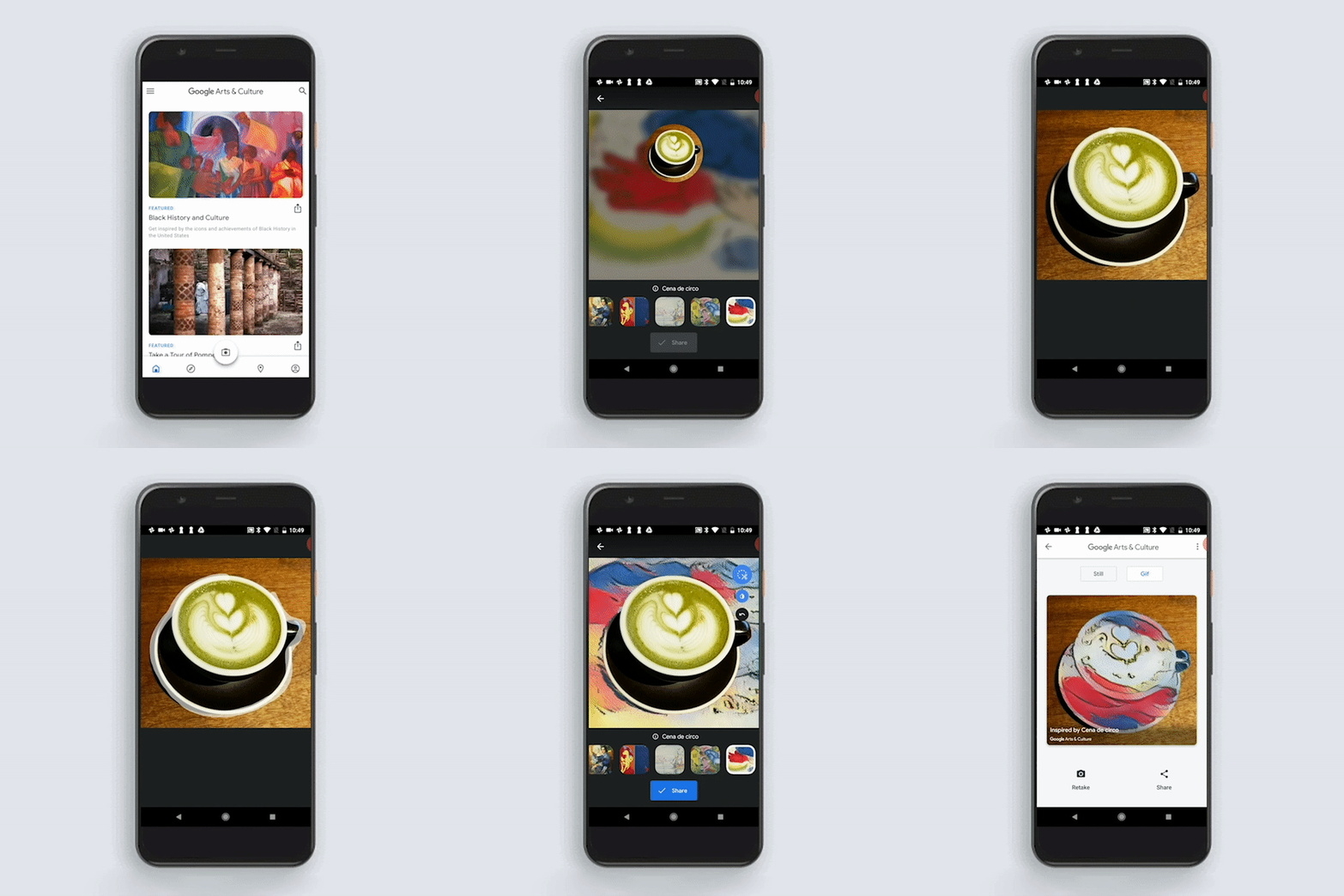
How to use the Art Transfer?
Step 1: Download the Google Arts and Culture app on iOS and Android.
Step 2: Open the camera menu located at the bottom bar of the app then select “Art Transfer.”
Step 3: Upload your photos. You can customize it by using the scissors icon to select specific parts of the image that you want to transform.
Step 4: Choose the art style to adapt to your image from the catalog of artists.
Step 5: Wait for it to load and read the fun facts about the artwork. You can share and download it either as a photo or a GIF.










Apple, Asus, Cherry Mobile, Huawei, LG, Nokia, Oppo, Samsung, Sony, Vivo, Xiaomi, Lenovo, Infinix Mobile, Pocophone, Honor, iPhone, OnePlus, Tecno, Realme, HTC, Gionee, Kata, IQ00, Redmi, Razer, CloudFone, Motorola, Panasonic, TCL, Wiko
Best Android smartphones between PHP 20,000 - 25,000
Smartphones under PHP 10,000 in the Philippines
Smartphones under PHP 12K Philippines
Best smartphones for kids under PHP 7,000
Smartphones under PHP 15,000 in the Philippines
Best Android smartphones between PHP 15,000 - 20,000
Smartphones under PHP 20,000 in the Philippines
Most affordable 5G phones in the Philippines under PHP 20K
5G smartphones in the Philippines under PHP 16K


